SQL Data Source problems deleting items

We have 7 users
Datasource is an SQL server
There are only two users with delete rights
Myself and the director who is also the admin
If I delete an entry it often reappears
I take my laptop offsite and also use it in offline mode
I was wondering if the cache mode could affect this and somehow resync the deleted entry
All Comments (8)
hello,
it does happen, please have everyone press CTRL-F5 to invalidate the local cache.
Please let us know how that turns out
Maurice
Hello,
What version of RDM are you using?
Could you please check on this other thread on our forum to see if it helps https://forum.devolutions.net/topic26891-cannot-delete-folders-in-rdm-.aspx.
Best regards,
Érica Poirier
We've been able to reproduce the issue and are working on a fix.
Best regards,
Stéfane Lavergne
The issue has been resolved and will be in the next minor release, due out soon.
I will let you know when it's available.
Best regards,
Stéfane Lavergne
I am now on 12.0.5.0
We have a group / folder entry under the data source.
I delete it, it comes back.
This is still not fixed
I had all users press CTRL F5 but tbh I don't see why I should have to as surely it should detect the delete and their cache update itself?
Hi,
Could you verify the usage logs and tell us what happen to the folder, if it has been resurected or if it has been edited, Thank you.
See the attachement for usage log location.
Best regards,
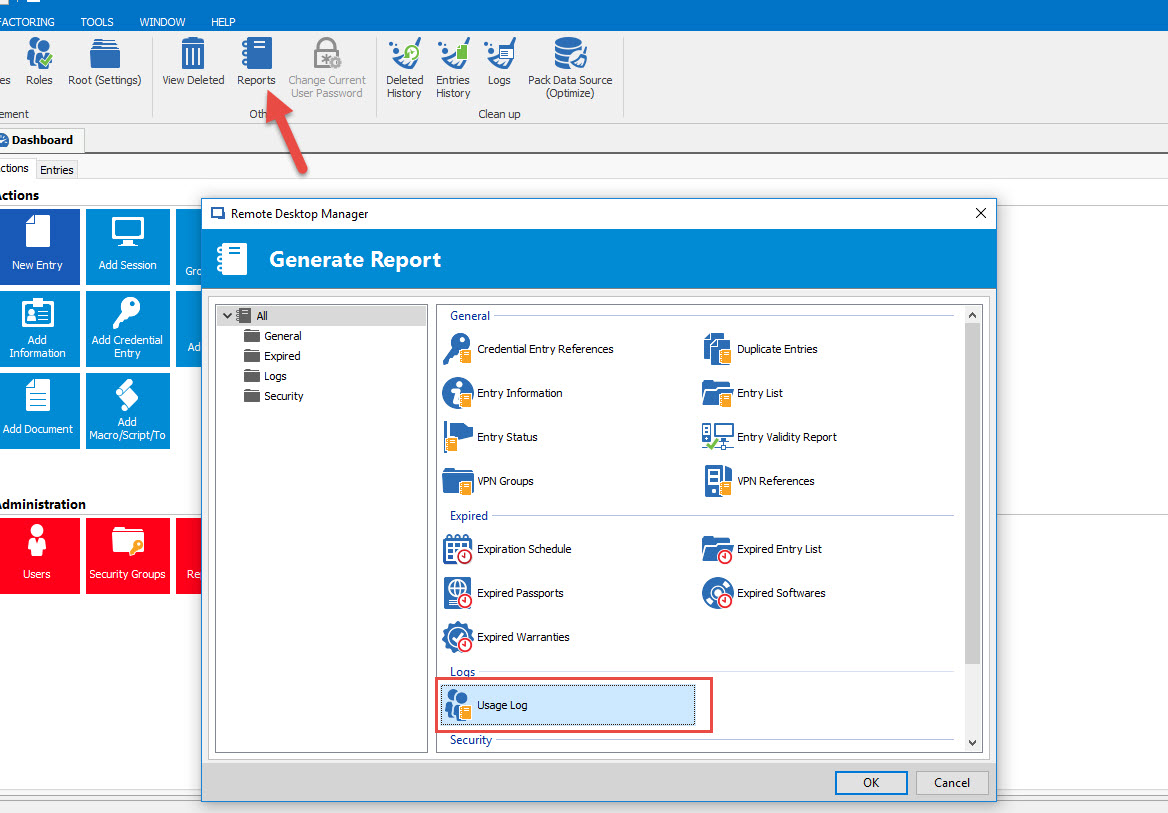
Alexandre Roy
Usage log.jpg
I will have to wait to see if it reappears as I already edited it by renaming and moving it then deleted it again as previously moving items has allowed me to successfully delete them.
I will check when I am back in the office tomorrow.
Could you please execute the following SQL statement and post the result?select (select [color=fuchsia]max[/color][color=gray]([/color][color=blue]Version[/color][color=gray])[/color] [color=blue]from[/color] dbo[color=gray].[/color]Connections[color=gray])[/color] [color=blue]as[/color] Connection[color=gray],[/color][color=blue] [/color][color=gray]([/color][color=blue]select[/color] [color=fuchsia]max[/color][color=gray]([/color][color=blue]Version[/color][color=gray])[/color] [color=blue]from[/color] dbo[color=gray].[/color]ConnectionHistory[color=gray])[/color] [color=blue]as[/color] History
Stéfane Lavergne