Changing Group/Folder property bug

New bug with 8.1.....kind of tough to explain.
So...I group my sessions starting with the company name (with a company property), then create subgroups for each physical site within the company. Each physical has a RDP sessions, VMware connections, webpage links, etc.
Most of these physical locations were imported from a CSV file with the basic information. However, none of these imported sessions were populated with the correct IP addresses, server name, etc. So, when i need to work on a physical location for the first time, I need to populate the appropriate information. By default, these non-configured groups use the folder icon to designate the location has not been populated. After I complete populating the physical location information, I change the icon to the "Site" property.
Now, after upgrading, whenever I change from the folder icon to the site icon, the site disappears. At first, I thought it was deleted. However, I discovered that the site was moved/transplanted outside of the nested structure I setup, to another folder, with the same top-level company name (just with a folder icon, instead of the Company icon) at the bottom of the sessions list.
I move the transplanted site group back to the correct company group without issue. The "rogue" company name also disappears.
Hopefully this makes sense.
All Comments (5)
Hi,
I think that I will need some print screen. It's not a simple to understand.
David Hervieux
Hello, I think I have the same problem.
Only with imported entries, the group/folder information for subgroups is wrong (in particular, the name entry contains the parent group) but it's displayed right.
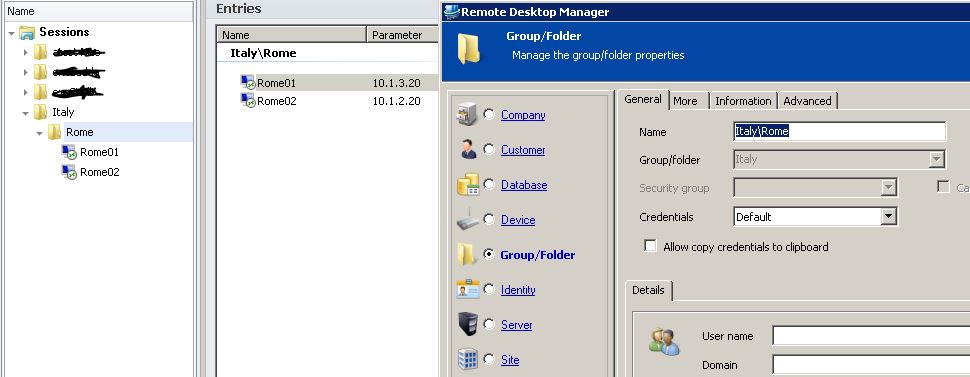
For example, a sub-folder namedItaly\Rome is imported right and is visually OK. But looking inside its property, you can see in the General tab that the name entry is Italy\Rome and the Group/folder entry is Italy. Whenever you press the OK button (even without touching anything) the folder changes visually to Italy[/b]Italy\Rome and its property reflects it.
New entries don't have this problem.
Hi,
Do you think that you could send me the import file? You can edit it to remove the sensitive information.
David Hervieux
I've sent an example .RDM file by PM.
The attached screenshot should better explain the problem.
Cheers,
Nico
test.jpg
Solved - confirmed on the latest beta.
Thanks a lot,
Domenico