Errors everywhere since upgrading to version 12

I am getting the following emails every 30 minutes
I've run the SQL commands as listed here, but no luck: https://helpserver.devolutions.net/configure_sqlpermissions.htm
Note that everything was working fine without any issues until upgrading the Database to Version 12.
Any ideas anyone?
Error:
SqlException - The DELETE permission was denied on the object 'UserRole', database 'RDMS', schema 'dbo'. at System.Data.SqlClient.SqlConnection.OnError(SqlException exception, Boolean breakConnection, Action`1 wrapCloseInAction) at System.Data.SqlClient.TdsParser.ThrowExceptionAndWarning(TdsParserStateObject stateObj, Boolean callerHasConnectionLock, Boolean asyncClose) at System.Data.SqlClient.TdsParser.TryRun(RunBehavior runBehavior, SqlCommand cmdHandler, SqlDataReader dataStream, BulkCopySimpleResultSet bulkCopyHandler, TdsParserStateObject stateObj, Boolean& dataReady) at System.Data.SqlClient.SqlCommand.FinishExecuteReader(SqlDataReader ds, RunBehavior runBehavior, String resetOptionsString) at System.Data.SqlClient.SqlCommand.RunExecuteReaderTds(CommandBehavior cmdBehavior, RunBehavior runBehavior, Boolean returnStream, Boolean async, Int32 timeout, Task& task, Boolean asyncWrite, SqlDataReader ds, Boolean describeParameterEncryptionRequest) at System.Data.SqlClient.SqlCommand.RunExecuteReader(CommandBehavior cmdBehavior, RunBehavior runBehavior, Boolean returnStream, String method, TaskCompletionSource`1 completion, Int32 timeout, Task& task, Boolean asyncWrite) at System.Data.SqlClient.SqlCommand.InternalExecuteNonQuery(TaskCompletionSource`1 completion, String methodName, Boolean sendToPipe, Int32 timeout, Boolean asyncWrite) at System.Data.SqlClient.SqlCommand.ExecuteNonQuery() at Devolutions.Server.DatabaseManager.ExecuteNonQuery(String sql, IDbTransaction dbTransaction, IDbDataParameter[] parameters, CommandType commandType) in c:\Dev\devolutions\Websites\Server\Common\Managers\DatabaseManager.cs:line 255 at Devolutions.Server.RoleManager.SetUserRoles(Guid userId, Guid[] customRoles, Guid[] domainRoles) in c:\Dev\devolutions\Websites\Server\Common\Managers\RoleManager.cs:line 672 --- SessionManagement
*********************************
Error:
OperationCanceledException - The operation was canceled. at System.Threading.CancellationToken.ThrowOperationCanceledException() at System.Web.Http.Owin.HttpMessageHandlerAdapter.d__20.MoveNext() --- End of stack trace from previous location where exception was thrown --- at System.Runtime.CompilerServices.TaskAwaiter.ThrowForNonSuccess(Task task) at System.Runtime.CompilerServices.TaskAwaiter.HandleNonSuccessAndDebuggerNotification(Task task) at System.Web.Http.Owin.HttpMessageHandlerAdapter.d__0.MoveNext() --- End of stack trace from previous location where exception was thrown --- at System.Runtime.CompilerServices.TaskAwaiter.ThrowForNonSuccess(Task task) at System.Runtime.CompilerServices.TaskAwaiter.HandleNonSuccessAndDebuggerNotification(Task task) at Microsoft.Owin.Host.SystemWeb.IntegratedPipeline.IntegratedPipelineContextStage.d__5.MoveNext() --- End of stack trace from previous location where exception was thrown --- at System.Runtime.CompilerServices.TaskAwaiter.ThrowForNonSuccess(Task task) at System.Runtime.CompilerServices.TaskAwaiter.HandleNonSuccessAndDebuggerNotification(Task task) at Microsoft.Owin.Host.SystemWeb.IntegratedPipeline.IntegratedPipelineContext.d__2.MoveNext() --- End of stack trace from previous location where exception was thrown --- at Microsoft.Owin.Host.SystemWeb.IntegratedPipeline.StageAsyncResult.End(IAsyncResult ar) at System.Web.HttpApplication.AsyncEventExecutionStep.System.Web.HttpApplication.IExecutionStep.Execute() at System.Web.HttpApplication.ExecuteStep(IExecutionStep step, Boolean& completedSynchronously) --- Default
Source:
mscorlib
All Comments (29)
Hello,
When the error occured exactly?
What version of Devolutions Server are you using?
Best regards,
Jeff Dagenais
Hi Jean,
Thanks for the quick response.
I have been getting emails EVERY 10-20 minutes for the last 24 hours since upgrading.
Version is 4.0.0.0
When I went to check version I noticed 4.0.1.0 is now available, so I upgraded the server to that version.
3 minutes later I got this error:
Error:
SqlException - The DELETE permission was denied on the object 'UserRole', database 'RDMS', schema 'dbo'. at System.Data.SqlClient.SqlConnection.OnError(SqlException exception, Boolean breakConnection, Action`1 wrapCloseInAction) at System.Data.SqlClient.TdsParser.ThrowExceptionAndWarning(TdsParserStateObject stateObj, Boolean callerHasConnectionLock, Boolean asyncClose) at System.Data.SqlClient.TdsParser.TryRun(RunBehavior runBehavior, SqlCommand cmdHandler, SqlDataReader dataStream, BulkCopySimpleResultSet bulkCopyHandler, TdsParserStateObject stateObj, Boolean& dataReady) at System.Data.SqlClient.SqlCommand.FinishExecuteReader(SqlDataReader ds, RunBehavior runBehavior, String resetOptionsString) at System.Data.SqlClient.SqlCommand.RunExecuteReaderTds(CommandBehavior cmdBehavior, RunBehavior runBehavior, Boolean returnStream, Boolean async, Int32 timeout, Task& task, Boolean asyncWrite, SqlDataReader ds, Boolean describeParameterEncryptionRequest) at System.Data.SqlClient.SqlCommand.RunExecuteReader(CommandBehavior cmdBehavior, RunBehavior runBehavior, Boolean returnStream, String method, TaskCompletionSource`1 completion, Int32 timeout, Task& task, Boolean asyncWrite) at System.Data.SqlClient.SqlCommand.InternalExecuteNonQuery(TaskCompletionSource`1 completion, String methodName, Boolean sendToPipe, Int32 timeout, Boolean asyncWrite) at System.Data.SqlClient.SqlCommand.ExecuteNonQuery() at Devolutions.Server.DatabaseManager.ExecuteNonQuery(String sql, IDbTransaction dbTransaction, IDbDataParameter[] parameters, CommandType commandType) in c:\Dev\devolutions\Websites\Server\Common\Managers\DatabaseManager.cs:line 255 at Devolutions.Server.RoleManager.SetUserRoles(Guid userId, Guid[] customRoles, Guid[] domainRoles) in c:\Dev\devolutions\Websites\Server\Common\Managers\RoleManager.cs:line 674 --- SessionManagement
Source:
.Net SqlClient Data Provider
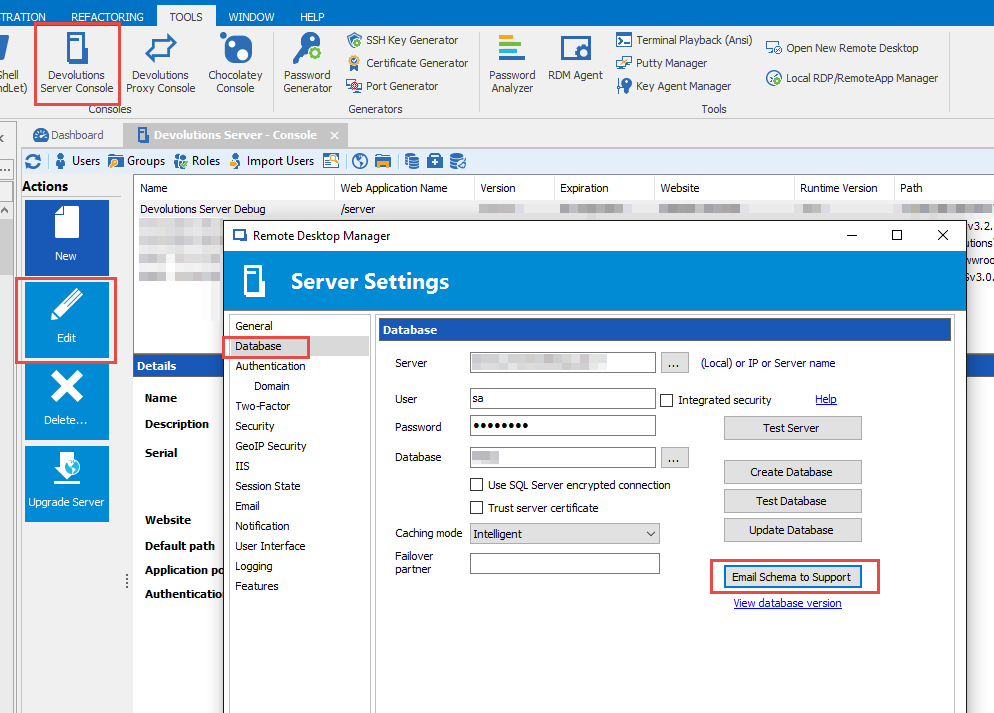
First let's make sure your database schema is correct. Could you please send me your DB schema via
On the DVLS machine, in RDM, running as Administrator go to:
Tools -> Devolutions Server Console -> select the server in the list -> Edit -> Database -> Email Schema to Support
Please add "Attn: Stefane" to the message body.
Stéfane Lavergne
2016-11-30_7-57-51.png
Thanks Stefane I have done this.
Thanks James,
Got the schema dump email and all looks good and that end. So what I'm thinking is the SQL username/password being used doesn't have proper rights to the database.
As per the error: The DELETE permission was denied on the object 'UserRole', database 'RDMS', schema 'dbo'.
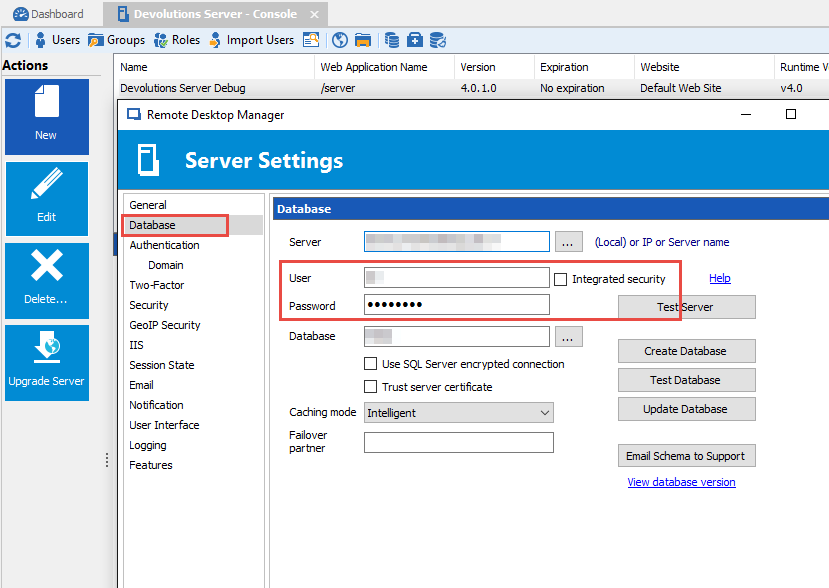
To verify the SQL user; on the DVLS machine, in RDM, running as Administrator go to:
Tools -> Devolutions Server Console -> select the server in the list -> Edit -> Database -> user/password
Make sure that user has full read/write/delete permissions on all tables in the RDM database. You can test with 'sa' if you want.
Best regards,
Stéfane Lavergne
2016-12-01_8-07-16.png
Hi Stefane,
We are using integrated security and permissions haven't changed, all we did was upgrade to Version 12.
I went through this link: https://helpserver.devolutions.net/index.html?configure_sqlpermissions.htm and verified that all permissions are as per the document / requirements.
Upgrading DLVS must have altered permissions somewhere as part of the upgrade process?
Stuart
Good catch, v12 has some new tables therefore we need more grants. We will update the documentation and send you the grants you will need to execute for your user.
Best regards,
Stéfane Lavergne
Perfect - thought it would be something similar.
If you can send to me asap that would be good as I'm getting 3-4 emails every hour and it's driving me nuts :)
I was hoping to test the script prior to send it to you but since you are about to go nuts... I will send it via private message, since it's not fully tested I don't want it out in the wild for now.
Best regards,
Stéfane Lavergne
Thanks Stefane, I've run those commands in and will let you know how I go :)
Stuart
Those DELETE errors appear to have stopped now, which is good news.
I am still getting these ones though:
The following error was received by a user at 2/12/2016 2:56:46 PM
Error:
HttpException - Cannot redirect after HTTP headers have been sent. at System.Web.HttpResponse.Redirect(String url, Boolean endResponse, Boolean permanent) at System.Web.Security.FormsAuthenticationModule.OnLeave(Object source, EventArgs eventArgs) at System.Web.HttpApplication.SyncEventExecutionStep.System.Web.HttpApplication.IExecutionStep.Execute() at System.Web.HttpApplication.ExecuteStep(IExecutionStep step, Boolean& completedSynchronously) --- Default
Source:
System.Web
And I'm not getting this when (as an administrator) I try to edit a connection:
Anything in the application logs?
Stéfane Lavergne
Only this one:

Any news on this - I am being flooded with these emails:
I am still getting these ones though:
The following error was received by a user at 2/12/2016 2:56:46 PM
Error:
HttpException - Cannot redirect after HTTP headers have been sent. at System.Web.HttpResponse.Redirect(String url, Boolean endResponse, Boolean permanent) at System.Web.Security.FormsAuthenticationModule.OnLeave(Object source, EventArgs eventArgs) at System.Web.HttpApplication.SyncEventExecutionStep.System.Web.HttpApplication.IExecutionStep.Execute() at System.Web.HttpApplication.ExecuteStep(IExecutionStep step, Boolean& completedSynchronously) --- Default
Source:
System.Web
I was able to find and fix the issue of the error in the application logs, fix will be in the next release.
I've yet to find anything on the HTTP headers error. I will keep you posted. Sorry for the inconvenience.
Regards,
Stéfane Lavergne
Thanks Stefane.
I received approximately 20-25 emails with the HTTP headers error per day and at the moment I only have four users using the system as a test.
We purchased site licenses last week and I need to deploy to 140 users before Christmas but I can't do that until this is fixed because I'll get 100's of email errors per day if everyone starts using it.
Ouch not fun. Can you forward me the entire error message email? slavergne-at-devolutions-dot-net.
Best regards,
Stéfane Lavergne
That is the entire email message.
I have just forwarded you one that came through.
Got it thanks The stack trace is odd. It tells me what went wrong but not how it got there... this one won't be easy...
Stéfane Lavergne
Only started happening in V12 - wasn't an issue before - so it will be something that's new :)
Could you have a look at the IIS logs on the Devolutions Sever?
%SystemDrive%\inetpub\logs\LogFiles
You can send me the entire log files or if you want scan them for any non-200 codes (especially 500 codes).
Also, could you have a look in the Event Viewer on the Devolutions Server for any IIS events?
Anything you find could help us find the issue.
Regards,
Stéfane Lavergne
Are you running v12.0.3.0 (beta)? If not could you please upgrade. We are not able to reproduce the issue with this version.
Stéfane Lavergne
Hi Stefane,
I have emailed you the IIS logs.
I've looked for BETA here: https://forum.devolutions.net/topic26829-remote-desktop-manager--beta.aspx?Page=2 but cannot find it. Can you please send me a link for download and I will try this version?
Hello,
You can download RDM 12.0.3.0 at the bottom of the following link
https://remotedesktopmanager.com/Home/Download
Best regards,
Jeff Dagenais
Hi again,
We only have 5 people using the software at the moment as we are in a testing phase. All five upgraded to 12.0.3.0 but the emails have continued to come in?
We are still working on a fix, made good progress today. I should be able to get you a private build of the server to test in a few minutes. Do you think you could give it a try?
Stéfane Lavergne
Sure, no problems - you have my email address.