Opening a Windows Remote Desktop session within Remote Desktop Manager, via Command Line Arguments.
Opening a Windows Remote Desktop session within Remote Desktop Manager, via Command Line Arguments.

About Command Line Arguments...
This page states the following...
https://help.remotedesktopmanager.com/index.html?installation_commandlinearguments.htm#_ga=1.236054210.2143865047.1479736072
Example #1 - Open a template and connect to a host
RemoteDesktopManager.exe /DataSource:178c2fda-dab4-4f41-98df-6e3205c0a011 /Template:a666b21b-1479-4eee-b482-0a3d561d2411 /Host:Windjammer-PC1
--------------------
/Datasource:{datasource id}
Specify the data source ID (available in the Advanced Tab of the session).
[/table]--------------------
/Template:{template ID}
/Host:{host name}
/UserName:{username}
/Domain:{domain}
/Password:{password}
Open the template ID with the specified host name and an optional username/password.
The template ID is the Session ID of the template (available in the Advanced Tab of the template).
[/table]--------------------
So when I use this (with my own datasource, template/session ID, and host name of course)...
RemoteDesktopManager.exe /DataSource:178c2fda-dab4-4f41-98df-6e3205c0a011 /Template:a666b21b-1479-4eee-b482-0a3d561d2411 /Host:Windjammer-PC1
...why is it so that the only thing that happens is that the Remote Desktop Manager window gets opened, but nothing else? I would assume that since datasource, template/session ID, and host name are all provided, Remote Desktop Manager would just open the corresponding hostname in Remote Desktop Manager?
But it doesn't. Anyone any idea on why?
All Comments (11)
Hello,
I checked the code and there is an issue with opening shared templates and using the /datasource parameter. This will be fixed in RDM 12. Can you confirm you were using shared templates?
Regards,
Hubert Mireault
Shared templates you say... I'm not sure I understand correctly...
FWIW: I'm running version 11.7.6.0 (64bit), and the database is a local SQLite database, on the same machine.
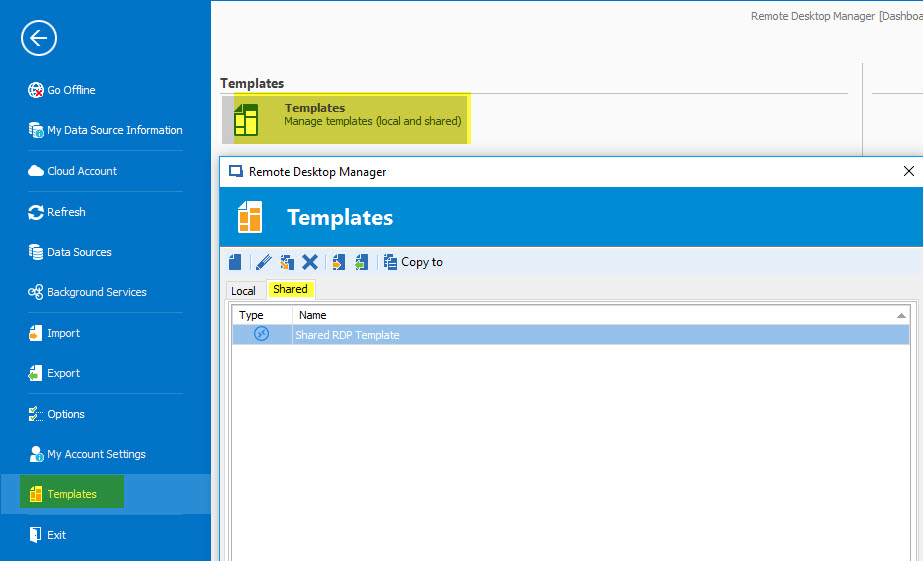
There are two types of templates you can create in RDM: local, which are saved on your machine, and shared, which are saved in the datasource. If you go in File > Templates and press the "Manage templates" button, you will get a window to manage your templates, and you can see the local and shared ones:
With the local template, it should have already been working, but if you took the ID from a template in the "shared" category, this is where it failed.
Regards,
Hubert Mireault
2016-11-28 9-31-45 AM.jpg
Okay. I see. But... What if I check that location, and find no templates whatsoever? Not under the 'Local' tab, and not under the 'Shared' tab?
Would that mean I have been using RDM "incorrectly"?
Hello,
If your Template location is empty, it's because they don't have any template created at this time. You can create one by following this help.
https://help.remotedesktopmanager.com/file_templates.htm.
Also for your information local templates are saved on the local computer and are not available to other users and shared templates are saved in the database and can be used by all users.
I hope this help will help you,
Best Regards,
David Grandolfo
I now see how I can create templates. But I fail to see what this has to do with my initial question.
What does having or not having a template have to do with not being able to RDP to a machine via command line?
As my colleague answer at the top, your problem isn't linked to the Template. They have a problem with RDM, the problem will be released in V12 (in less than 24 hours) But temporary you can use Template to do what you would like. Do you need help to create a template as you would like or you will expect version 12 ?
Best Regards,
David Grandolfo
That first answer gave me the impression that the problem that will be fixed in V12 was related to the template-thing.
I understand now. I'll wait for V12.
Thanks :)
Thanks. Already had V12. Now updated to V12.0.1.0. And now it works.
Partially :)
After giving the CLI command, the RDM window comes to the front, and a session gets opened. So that works. However... It opens a 'Quick connect' to the host and gives me a login prompt.
I want it to refer to the host with the same name that is already in the database list, so it will retrieve the login credentials from the 'Credential Repository'.
(FWIW: manually selecting/clicking the host in the RDM list opens up a session and logs in with credentials from the 'Credential Repository' just fine.)
What am I missing?
Thx.
Hello,
I think what you're looking for is the'session' command line argument:
/Session:{session ID}
The session ID is unique and it will allow you to start an already-existing entry in RDM from the command line, which from what I understand is what you're looking for. This is example #2 in the help topic https://help.remotedesktopmanager.com/index.html?installation_commandlinearguments.htm
Example #2 - Open a session
RemoteDesktopManager.exe /DataSource:178c2fda-dab4-4f41-98df-6e3205c0a011 /Session:474bcbcf-d507-435b-8c0a-a9e868781910
We do not currently support opening a pre-existing session based on its name with the command line, but you can achieve something like that with our powershell snapin/module.
Regards,
Hubert Mireault
So what I want, in a standard setup only works with the session-ID included. And with a host name included instead of the session-ID you get a 'Quick Connect'. Got it.
Thanks.