Start VPN Connection With Data Source?

Is there a way to launch a VPN Connection when RDM looks for the data source? I have it prompt me to work offline and that works fine. But was curious if it could launch a VPN Connection when it can't connect to the data source. I didn't see anything that would allow that.
All Comments (16)
Hi,
This is not supported but it's a good idea. I will see what I can do for the next major release.
David Hervieux
I would like to second this request.
I created an account to suggest it, and was delighted to see that someone else had the same request.
I work from home frequently in the evenings, and RDM starts up automatically.
Since it can't find the data source it delays start up.
Offline mode helps, but that means switching configurations every time I go back and forth to work.
This is planned for the version 9.5. This is the next version after the 9.1 release but it will require .NET 4.0
David Hervieux
Thanks for replying. I look forward to it.
Please, make sure you are providing the IP Address instead of host name.
Data Source=190.190.200.100;Initial Catalog=myDataBase;User ID=myUsername;Password=myPassword;
When you use a VPN connection to access a SQL Server from a different network, and that SQL Server requires Windows Authentication, you present your 'hall pass', but the remote SQL Server contacts its' own network DC, and that DC does not know or trust your 'hall pass' since it had nothing to do with your initial login and verification.
Here are some relative posts:
http://stackoverflow.com/questions/2970673/connecting-to-sql-server-2005-on-another-domain-through-vpn-connection
http://www.sqlservercentral.com/Forums/Topic533415-1291-1.aspx#bm533510
Hope that helps!
edited by dhervieux on 8/16/2014
MarionParlors, thank you for the information.
But the issue is that when I start RDM, and I'm not on my work network, I have to manually start my VPN in order for RDM to connect. I would like a setting similar to "When not in xxxxx domain (or IP =/= 10.12.xx.xx)" then start VPN #1"
RDM over VPN works fine, even though I use the SQL instance name instead of it's address.
Thanks
bump!
i too think its a gr8 idea,
would like to see something like in session-options:
Kind Regards
Markus
======================
It's on our todo list.
David Hervieux
I'm on version 10.0.4 now.
Is it here yet?
Not yet.
David Hervieux
Hello David,
please, can you let us know if is there something new in this topic? It would be really appreciated to have a possibility to automatically dial VPN before connecting to SQL data store.
Thank you for reply.
Greetings, Jarda
This is planned for RDM 14 with a link to a VPN entry file in an external file.
Regards
David Hervieux
That is perfect. Thank you for the response.
Jarda
Hi
I know this is a VERY old post but is there documentation on how to configure this. I'd like to set it up so that when I am working from home it knows to load the vpn.
However, I have no idea what RDM file it requires me to point to it? 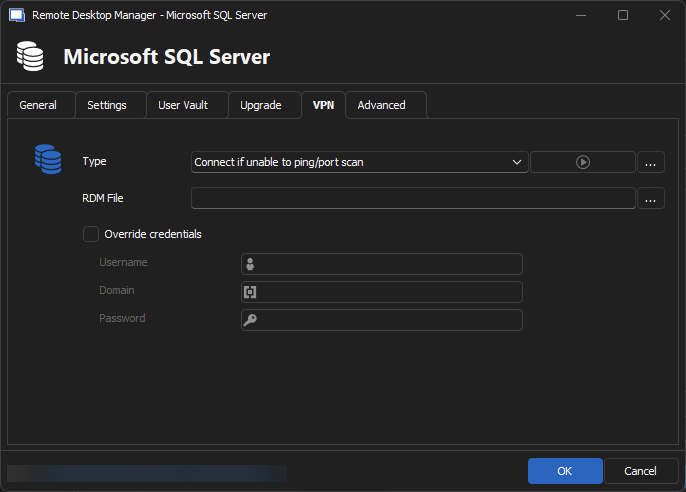
Thanks
Iain
Thanks
Iain
Version 2026.1.14.0 64-bit
Data Source SQL
246ed8c7-77f3-4ed0-ad9a-98e693cb5647.png
Hello iaing80,
We are always here to support you, regardless of how old your post is.
To use this field, you need to provide a .rdm file of one of your VPN entries. You can create your VPN entry in RDM and export it as a .rdm file to use in this field.
I will test this over the weekend and share my results on Monday.
Best regards,
Patrick Ouimet
Hi Patrick,
Thanks I did manage to get it working sort of. Ran into another issue with OTP which I have opened a new thread for.
However, I did work out that exporting the VPN session as a .rdm file and then pointing to it in the VPN section was what was needed.
Thanks
Iain
Thanks
Iain
Version 2026.1.14.0 64-bit
Data Source SQL