Windows key shortcuts on local machine

When connecting to Windows 2012 Servers, the Windows-key shortcuts are not working, they are redirected to the local machine. I'm using 8.0.27, but I just upgraded from 8.0.12 and it did the same thing.
All Comments (10)
Hi
By default, in the local resources tab, the keyboard is set at "local computer only", did you adjust it?
regards
Maurice
D'oh!
For anybody else wondering where this is on newer versions, it's in the "Actions" ribbon and is called "Windows Key on the Remote Computer".
Looks like my comment above only works for the current session. When you close and open Remote Desktop Manager again that option is reset. Where exactly can I change this setting so that it persists? I've looked for a "local resources tab", but can't find it.
the commands on the action ribbon are only for the current tab, you can use it as an override, and its visibility is dependent on the capabilities of the RDP protocol on the remote host.
For each and every session though, you should use the setting in Local resources, Keyboard.
Maurice
Thanks for the clarification Maurice. My problem is that I can't find the "Local resources" section. Where is it? Is it in one of the File|Home|Actions|Edit|View|Administration|Refactoring|Tools|Window|Help menus? I've also looked in File -> Options and can't find it there either. Maybe I'm just blind.... Also, I'm using version 9.2.5.0 if that helps.
P.S. These forums have a bad user experience where if I'm on a thread already (like this one) and then use the OpenID button to sign in, it takes me to the forums homepage instead of back to the thread I was on. Not sure if you guys can fix that or not.
edited by deadlydog on 5/8/2014
Its in the entries themselves, you can modify each entry manually, or use the batch edit mode.
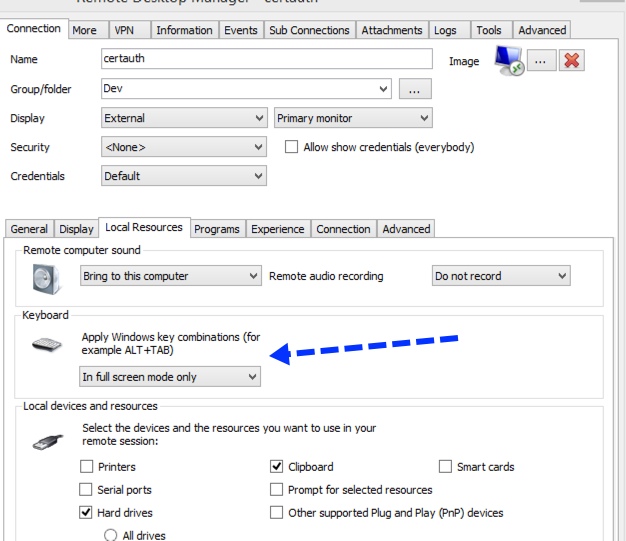
Maurice
2014-05-08_20-00-40.jpg
Thanks Maurice, I found that screen by right-clicking one of my entries in the Navigation pane and choosing Properties. This works, but I can't find the corresponding batch edit property to modify. I tried right-clicking a higher level node in the tree -> Batch edit -> Edit Session (Local machine specific settings) -> Settings tab -> Override keyboard, but that didn't work. Where is the corresponding setting for batch editing? Sorry to be such a pain, I'm new to the software, but hopefully other users will find this useful tool
Hi,
Select all the entries that you want to perform a Batch Edit in your Navigation Pane and click on Edit -> Batch Edit -> Edit Sessions (Session Type Settings) -> Local resources tab.
Regards,
Jeff Dagenais
Awesome, thanks so much Jean-François. It was the Edit Sessions (Session Type Settings) part that I was missing. :)