Do not collapse tree view

Dear Support,
I love working in the tree view since you then see all entries under a specific group, but is it possible to deactivate the option that collapse the tree when you open an entry? I prefer to keep it closed because after opening a few entries the whole tree is collapsed?
in image 001 you see that most groups are closed and when you then select a group in tree view it shows in the overview pane all systems organized. but when you open a session from the overview it will collapse in the tree view to this entry as well as shown in 002. I prefer to keep the tree as in 001 but just open the session?
Don't know if it is possible but for me it would certainly be great!
Thanks,
Nico...
edited by nicolinden on 3/2/2013
001.jpg
002.jpg
All Comments (6)
Hi,
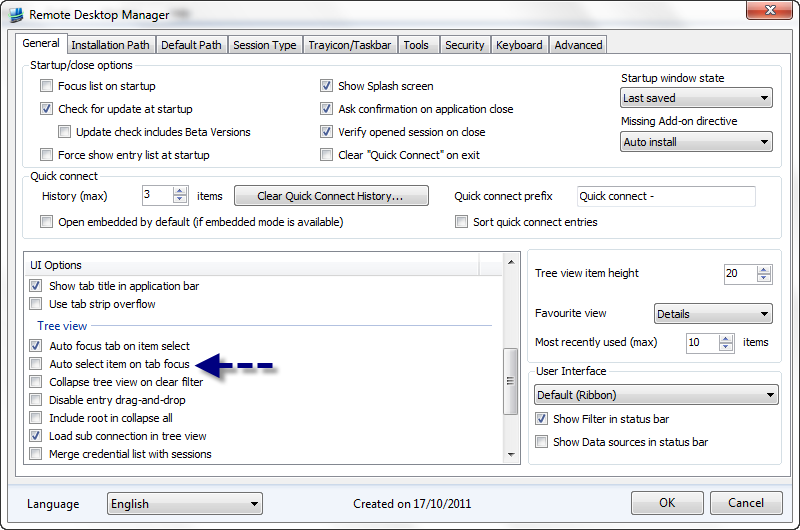
I see what you mean and we have a setting that will do what you want
David Hervieux
AutoFocus.png
Dear David,
that sounds great... however... I cannot see this option :-) Am I missing something?
Kind Regards,
Nico
001[2].jpg
Dear David,
Any update on this? I just do not have the options you showed and I'm using the latest version? (See also attachment previous post)
Kind regards,
Nico
What version do you use exactly? The version 8.1 is released but the auto update will be activated next week.
David Hervieux
Hi David,
sorry I didn't notice that there was a new version. But this was indeed what I was looking for, the application only gets better and better. Great work of you guys!!!
Small question, is there a keyboard shortcut to activate the dashboard without clicking with the mouse on it?
Kind Regards,
Nico
Hi,
No problem I know that sometime check for update could be confusing but we always wait 1 week before activating. We want a small delay before everybody upgrade.
Regards
David Hervieux