RDM Enterprise 3.6.1.1 cannot connect to RDP sessions with Silverlight
RDM Enterprise 3.6.1.1 cannot connect to RDP sessions with Silverlight

Greetings all!
I've come across a curious issue with RDM 3.6.1.1 that I've been able to replicate with multiple servers. If I attempt to RDP to a server that has an active Silverlight-based application open, RDM will enter this endless cycle of connecting, quickly disconnecting, then quickly attempting to reconnect again. It will continue this loop until I close the tab for that session.
If I attempt to connect to that same RDP session using Microsoft Remote Desktop, everything works out fine.
I have been able to replicate this behavior on two different Silverlight applications: the Skype for Business Control Panel, and the System Center Orchestrator Web portal.
As always, thank you for your continued support of RDM on the Mac--you folks rock!
All Comments (9)
Hi,
Could you provide us with your application log. You can find it under Help -> View Application Log.
Could you also send us the log of one of the RDP session on which you reproduce the issue. Here are the instructions: http://helpmac.remotedesktopmanager.com/howto_rdplogs.htm
You can send both of those to myself via private message.
Best regards,
Xavier Fortin
The logs are on their way!
Hi,
Could you tell me what's the exact Windows version of the server on which you can reproduce this issue?
Best regards,
Xavier Fortin
Windows Server 2012 R2 (6.3.9600) and Windows Server 2016 (10.0.14393).
The RDP session log I sent you was connecting to the 2012 R2 server.
Thanks!
Hi,
Could you export the faulty connection and send it to me via private message. You can do so by right clicking the connection and then Export -> Export Selection (.rdm)...
Letting the Credentials checkbox unchecked will make it so your credentials aren't exported. Since it is an XML file, you can also open it and remove any other sensitive information.
Send it to me via private message.
Best regards,
Xavier Fortin
Hi,
We've been able to reproduce the issue. We'll keep you inform of any advancements we make.
Best regards,
Xavier Fortin
Sounds good. I've sent you the exported connection. I'll stand by and await further updates.
thank you!
Hi,
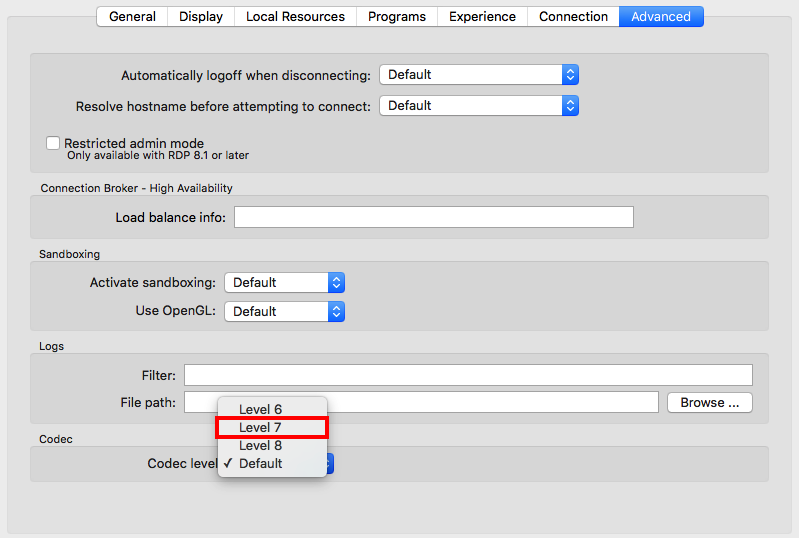
We don't know exactly when we'll get a fix for this. But there is something you could try in the mean time. Switching the Codec Level of your connection to Level 7 might fix the issue for you:
Best regards,
Xavier Fortin
CodecLevel.png
I can confirm that this workaround does work for every machine I've tested it on so far. Thank you!