Upgrade to 3.6.1.1 issue

Hi,
Just upgraded to 3.6.1.1 after being prompted. Since the upgrade I can now no longer RDP to any servers.
Datasource is SQL server.
I have tested the SQL server connection and SQL Database connection successfully and can view all my folders and servers but cannot RDP to any.
I get the OS X rainbow wheel for a few seconds and thats it.
Is there any logging that can be turned on to find out what is causing the issue?
Thanks
All Comments (14)
Hi Steve,
You can send us your application log under: Help -> View Application Log. You can also enable the log on an RDP sessions and send it to us. Here are the instructions: http://helpmac.remotedesktopmanager.com/howto_rdplogs.htm.
You can send both of those to me directly via private message.
Best regards,
Xavier Fortin
Thanks, I have sent you a PM.
Seems The issue is around the RDP client
[28/10/2016 8:13:56 AM]ERROR Timeout waiting for connection from external process
[28/10/2016 8:13:56 AM]ERROR SILENT System.Exception: Failed to initialise RDP client
Hi Steve,
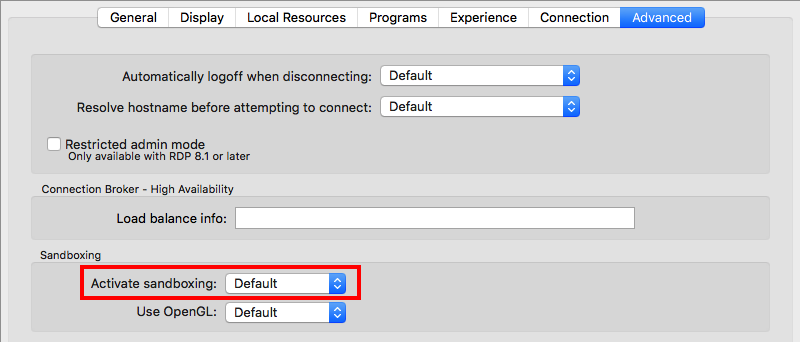
Could you try turning the sandboxing off on your RDP session:
Just set the Activate sandboxing to false.
Tell me if you can connect, and if not, send me your log again.
Best regards,
Xavier Fortin
Sandboxing.png
same issue, but different events logged
[28/10/2016 8:35:20 AM]ERROR SILENT System.Exception: Could not create an native instance of the type 'NativeBindings.MRDPViewController': the native class hasn't been loaded.
It is possible to ignore this condition by setting MonoMac.ObjCRuntime.Class.ThrowOnInitFailure to false.
at MonoMac.Foundation.NSObject.InitializeObject (System.Boolean alloced) [0x00051] in <04da21ca516d4206a560036fa1e92246>:0
at MonoMac.Foundation.NSObject..ctor (MonoMac.Foundation.NSObjectFlag x) [0x0000e] in <04da21ca516d4206a560036fa1e92246>:0
at NativeBindings.MRDPViewController..ctor () [0x00000] in <d823f18998ed4c97b8bc8ca6559c9a4f>:0
at A.cae41ce9feb6d98815dc8fe8497aee672..ctor (Devolutions.RemoteDesktopManager.Business.Connection c776a41b8682456bb5342249892ced939) [0x00000] in <54552a9e17504a5ea6562eb11d10ad2a>:0
at A.cebef5cc3d7f30ca7586a0733f7bb2047.cf075d2faaa6fc61cc42b2d0409895932 (Devolutions.RemoteDesktopManager.Business.Connection c776a41b8682456bb5342249892ced939) [0x00044] in <54552a9e17504a5ea6562eb11d10ad2a>:0
at A.c045391544a44e5dff3a8eaae33a6e4f8..ctor (A.c54a723778c89e8adcf75ada8d0dbb3e7 c1eb077fd69e9bed67d7d220fbc9e3c1f) [0x00354] in <f082a53c68cf4dc79b4eb8023a02b864>:0
at Devolutions.RemoteDesktopManager.Business.Connectors.EmbeddedRemoteDesktopConnector.NewFrame (A.c54a723778c89e8adcf75ada8d0dbb3e7 connectionResult, Devolutions.RemoteDesktopManager.RDPVersion rdpVersion) [0x00063] in <f082a53c68cf4dc79b4eb8023a02b864>:0
at Devolutions.RemoteDesktopManager.Business.Connectors.EmbeddedRemoteDesktopConnector.CreateFrame (A.c54a723778c89e8adcf75ada8d0dbb3e7 connectionResult) [0x00056] in <f082a53c68cf4dc79b4eb8023a02b864>:0
Forgot to mention, I'm running OS X Yosemite 10.10.5
Hi Steve,
We had another user who had a similar issue.
I've built him a custom version that solved his issue.
Would you mind to give it a try?
Here's the link: https://www.dropbox.com/s/dmxjzwzklpwr5ga/Remote%20Desktop%20Manager.app.zip?dl=0
Best regards,
Benoît Sansregret
Hi,
Sorry I have ben away, seems the Dropbox link is no longer working.
Hi Steve,
I'm not sure this is the version Benoit wanted to make you try, but could you try this one:
https://www.dropbox.com/s/b9n02mc2a1drbk8/Remote%20Desktop%20Manager.app.zip?dl=0
Tell me if it works.
Best regards,
Xavier Fortin
Hi,
RDP connections now work, but accessing my datasource (MS SQL server) now doesn't work, although the "test connection" and "test server" work successfully.
Hi Steve,
Do you get any error message? Can you check your Application Log and see if something relevant is in it? You can find it under Help -> View Application Log. You can send it to me if you want me to have a look at it.
Best regards,
Xavier Fortin
Hi,
This is the application log error:
[3/11/2016 1:08:10 PM]ERROR System.Data.SqlClient.SqlException (0x80131904): Invalid column name 'RepositoryID'.
at System.Data.SqlClient.SqlConnection.ErrorHandler (System.Object sender, Mono.Data.Tds.Protocol.TdsInternalErrorMessageEventArgs e) [0x00066] in <9a741ae2620a404d9751c215875ae1f7>:0
at Mono.Data.Tds.Protocol.Tds.OnTdsErrorMessage (Mono.Data.Tds.Protocol.TdsInternalErrorMessageEventArgs e) [0x0000b] in <cf220965207b4a43a38cd5792cae1736>:0
at Mono.Data.Tds.Protocol.Tds.ProcessMessage (Mono.Data.Tds.Protocol.TdsPacketSubType subType) [0x00102] in <cf220965207b4a43a38cd5792cae1736>:0
at Mono.Data.Tds.Protocol.Tds.ProcessSubPacket () [0x0012a] in <cf220965207b4a43a38cd5792cae1736>:0
at Mono.Data.Tds.Protocol.Tds.NextResult () [0x0004a] in <cf220965207b4a43a38cd5792cae1736>:0
at System.Data.SqlClient.SqlDataReader.NextResult () [0x00047] in <9a741ae2620a404d9751c215875ae1f7>:0
at System.Data.SqlClient.SqlDataReader..ctor (System.Data.SqlClient.SqlCommand command) [0x00019] in <9a741ae2620a404d9751c215875ae1f7>:0
at (wrapper remoting-invoke-with-check) System.Data.SqlClient.SqlDataReader:.ctor (System.Data.SqlClient.SqlCommand)
at System.Data.SqlClient.SqlCommand.ExecuteReader (System.Data.CommandBehavior behavior) [0x00042] in <9a741ae2620a404d9751c215875ae1f7>:0
****************************** SqlError ******************************
Message:Invalid column name 'RepositoryID'.
Hi Steve,
I'm sorry. It appears the version I've sent you does not contains the fix of the version 3.6.1.1. Tell me if this one works:
https://www.dropbox.com/s/f64pygrzfwpitfn/Devolutions.RemoteDesktopManager.Mac.3.6.1.1478175555.dmg?dl=0
Best regards.
Xavier Fortin
This has resolved all issues.
I can view all my connections and RDP is now working.
Thanks for all your help.
Glad to hear it!
Best regards,
Xavier Fortin