Adjust RDP connection bar

The connection bar on the top of the screen is always in the way.
I know that you move left and right and that it can be unpinned.
But when I place it to the right and come with my mouse to the upper left corner, it becomes visible and stays to long visible.
Is it possible to make it smaller or to make it only appear when the mouse comes in the neighborhood of the bar ?
All Comments (6)
Hello,
Are you using your session in undocked or external mode?
Could you post a print screen of the bar that you want to make disappeared.
Best regards,
Jeff Dagenais
Ik use undocked. I want to have the biggest screen possible without the (host) taskbar.
The screen is taken from the top of my screen.
I want to make the bar with DESENG1 smaller or it should only popup when I hover my mouse on left upper side of the screen, not the whole upper screen side.
2016-10-12_15-30-15.bmp
Hello,
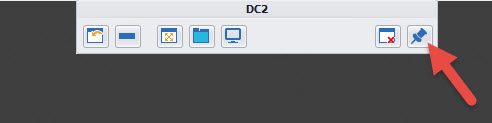
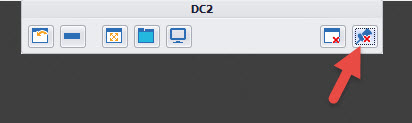
If you click on the pin icon completely at your right, you will see a little red "x" on it and after a few seconds, the bar will disappear.
Best regards,
Jeff Dagenais
2016-10-12_10-02-57.jpg
2016-10-12_10-01-07.jpg
Yes, I know that. You can see that in my screenshot.
But I place the connection bar on the right side, and when I hover my mouse to the upper left corner, connection bar pops up.
It also sometimes stays visible, even when it is unpinned.
I made a little movie of it.
2016-10-12_16-18-52.mp4
Hello,
Thank you for your explanation.
Let me check with our engineering department if something can be done. I would need to get back to you on this.
Best regards,
Jeff Dagenais
Hello,
The tool bar will now only pop up when you hover your mouse on the region where it once was, as you requested. This change will be available in RDM 12.
Regards,
Hubert Mireault