Tree list sorting

Hey guys,
i know it sounds like OCD but we have a list and we have added en new entry. but is is not sorting on alphabet. driving me nuts looking at it.
see the attached screenshot
according to the online help this should be done automatically, http://help.remotedesktopmanager.com/#_ga=1.105761863.578047735.1476175784
this maybe a quick fix, if you know what setting/button to make/push
let me know ok?!
rdm.GIF
All Comments (17)
Hello,
What version of RDM are you running?
Best regards,
Jeff Dagenais
rdm Enterprise 11.7.3.0
Hello,
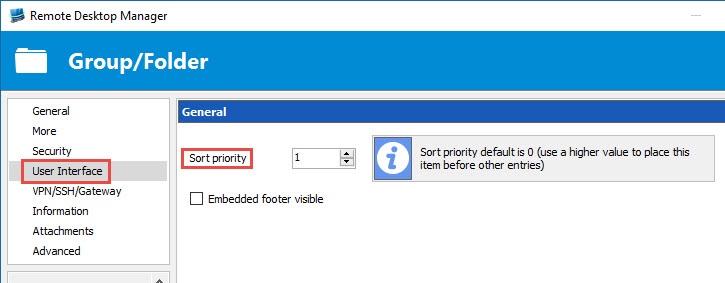
Is there a Sort Priority configured on your folder?
Best regards,
Jeff Dagenais
2016-10-11_11-16-53.jpg
nope, should there be?
Hello,
If you set a sort priority, this will change the position of your folders.
Could you post a print screen of your folders with the complete name so that we can try to reproduce in our environment.
Best regards,
Jeff Dagenais
hello
so I tried the suggested setting. only thing that changes is the location of the root folder. but not the sorting
see the screensots, rdm-before where i have NOT made a change, then rdm-after where i changed the priority, and rdm-after-no-sort where you can seee the whole folder structure where there is a folder starting with letter P and is not sorted
rdm-after-no-sort.GIF
rdm-after.GIF
rdm-before.GIF
Hello,
Could you try to do a CTRL + Refresh to refresh your local cache.
If this is not working, try to change the offline engine in File -> Options -> Advanced to SQLite or MCDF and do a CTRL + Refresh to refresh the local cache again.
Best regards,
Jeff Dagenais
Hello Jean-François
sorry but i cannot get it to work. Made the change to MCDF, but I cannot find the ctrl-refresh option
Hello John,
Here a help topic that should help you perform a CTRL + Refresh.
http://help.remotedesktopmanager.com/troubleshooting_caching.htm
Best regards,
Jeff Dagenais
hello Jean-François
feeling like a real noob here, I had to search for the refresh button. ctrl-f5 i had already tried.
Now that I have refreshed, still no sorting
strange...
Hello,
Does everybody encountered the same issue?
How did you create your folders? Are you creating them manually and then add your sessions inside or you create a remote session and type the folder name in the Group/folder manually to create the folder at the same time as the remote session?
Best regards,
Jeff Dagenais
Hey
yep everybody uses the centrale databse and thus has the same sorting problem
yes, I 1st create a folder manually, then create the neccesary connections
Hello,
Could you export me your sessions (without the credentials) in a .rdm and send me your file via Private Message so that I can reproduce your issue in our environment.
Best regards,
Jeff Dagenais
Hi Jean-francois
I have sent you a PM
Hello,
I have received your .rdm file (thank you).
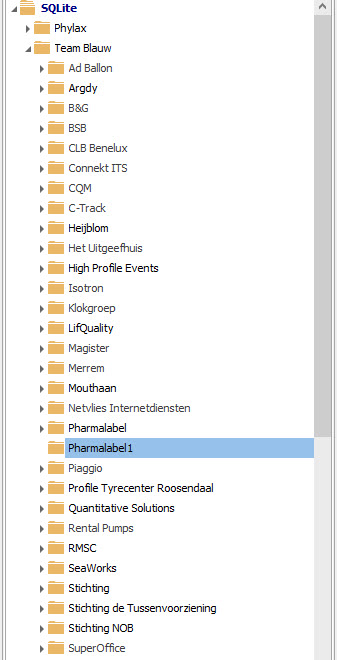
I have imported your sessions in a SQLite data source. The Pharmalabel folder was the first one because of the Sort Priority that was set to 1.
I changed the Sort Priority to 0 and now the folder is in the middle like supposed.
All other folders are sorted properly.
I have created a folder named Pharmalabel1. The folder was created at the proper place.
Could you try the same thing in your environment. Does it create the folder at the bottom or in the middle?
Best regards,
Jeff Dagenais
2016-10-24_09-55-58.jpg
hello,
just flabbergasted. when I created the export Pharmalabel was NOT sorted. I checked the entry and found the sort prio setting on Pharmalabel and removed it. did the control refresh thing. but nothing.
When i create Pharmalabel1 it DOES sort!
So I move all entries in Pharmalabel to Pharmalabel1. strangely enough the Original Pharmalabel disappered immediately, leaving only pharmalabel1. Still with me??
Renamed Pharmalabel1, to just Pharmalabel and took another coffee.
I think we'll never knwo what it was. but i'll leave it as it is now
TNX!!! alot for the assitance. How do we close this post?
Hello,
Thank you for your reply, glad that is now working.
There's no closed button, but we will considered this topic closed.
Best regards,
Jeff Dagenais