LogMeIn Portal Login User Specific Settings
0 vote

The Portal Login for LogMeIn connections must have user specific settings, otherwise all shared connections use the same LogMeIn account for authentication.
All Comments (14)
Hi,
Could you try to link it to a credential entry and apply user specific settings for this entry?
Regards
David Hervieux
There isn't a way to specify the Portal Login info while editing user specific settings, only the host login.
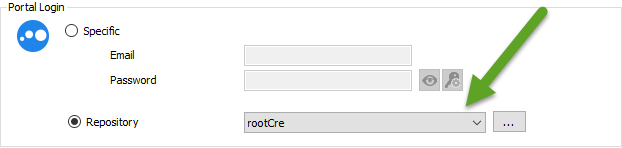
Indeed you can't directly set a user specific settings. The solution is to link your portal to a Credential entry and Apply the user specific setting to this entry:
Regards
David Hervieux
LogMeIn.png
I was hopeful that would work but it doesn't autofill the portal login.
Just tested it and setting the Portal Login to the Repository doesn't seem to work at all, regardless of user settings and the type of credential.
Hello,
We have tested using the latest version of RDM and we are unable to reproduce the issue. What version of RDM are you using? Are you linking a simple "username/password" credential or something like 1Password or Keepass?
Regards,
Hubert Mireault
RDM 11.7.3.0 with SQL Server
Simple username/password credential
LogMeIn Portal Login is set to use a credential
LogMeIn connection opens and brings you to the login page for LogMeIn and nothing else happens
Hello,
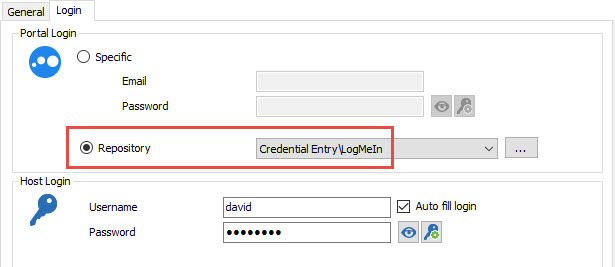
Your LogMeIn section should look like the following
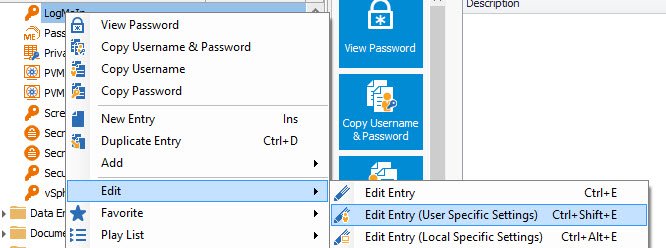
On the credential entry that you are using in the Portal Login, do a right click and select Edit -> User Specific Settings
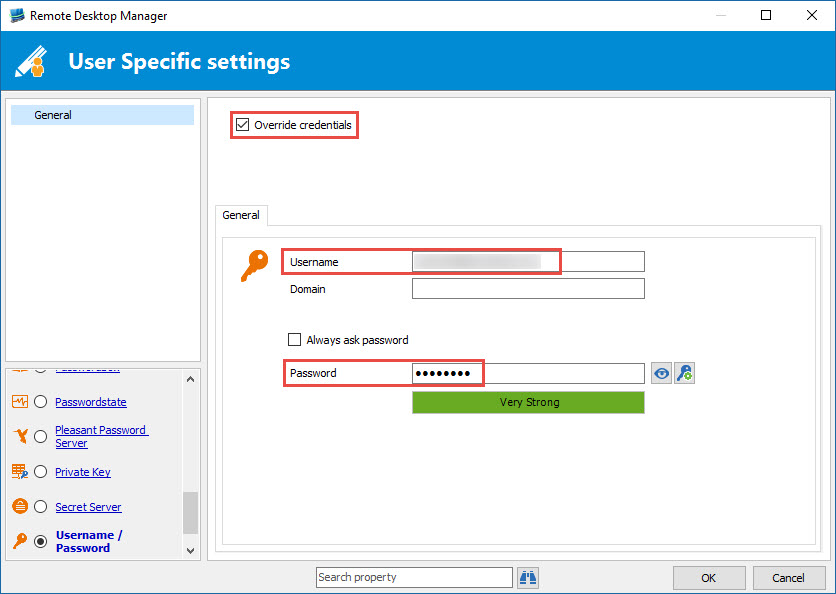
Then, override the credential with the one that you wanted to use
Is this what you configuration looks like?
Best regards,
Jeff Dagenais
2016-10-05_20-06-45.jpg
2016-10-05_20-06-18.jpg
2016-10-05_20-05-38.jpg
Yup. That's exactly how I have everything set
Hello,
After several tests, I am not able to reproduce your issue.
Could you post a small video of your settings and the issue please.
Best regards,
Jeff Dagenais
Sorry that's me.. Didn't know I wasn't logged in.
Hello Michael,
Thanks to this information we were able to reproduce the issue and fix it. This will be available in the next beta version of RDM. This should come out soon.
Regards,
Hubert Mireault
Now that RDM has reached v12 and this works properly, how can I change all of my LogMeIn entries to use a repository credential instead of a specified E-Mail and Password?
Hello,
You can use a custom powershell batch action. You can access it by selecting the logmein entries you want to modify, right click > edit > batch edit > batch action, then select the "Custom powershell" batch action and enter the following:$connection.LogMeIn.DashboardCredentialConnectionId = "<GUID>"$RDM.Save();
<GUID> is the session ID of your credential. If you go in the credential's properties and check the advanced tab, it should be there.
Regards,
Hubert Mireault