RDP Restricted Admin Mode Embedded Not Working?
I have been trying to use the RDP restricted admin mode with an embedded window, but it doesn't seem to work. The only way I can get it to work is to do an external display. Support for this was supposedly added in a recent release, but I am unable to get it working. Am I missing something?
Snap1.png
All Comments (16)
Hello,
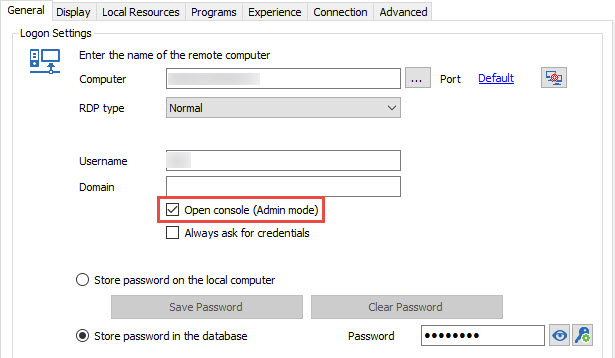
Does the Open Console (Admin mode) option is checked in the properties of your RDP session?
Best regards,
Jeff Dagenais
2016-09-28_13-56-52.jpg
I just tried it with that checked and unfortunately it didn't make any difference. Is there anything else I can try?
Hello,
Have you tried this option in Advanced?
Best regards,
Marc Beauséjour
Hello,
One more thing, are you on Windows 10?
Best regards,
Marc Beauséjour
Yes, I have been setting the "Restricted Admin Mode" option, and I even tested by forcing restricted admin mode using group policy.
Yes, I sure am on Windows 10! :)
Hello,
We will set up our environment to test this feature and come back to you as soon as possible.
Best regards,
Marc Beauséjour
Thank you very much! I look forward to hearing back from you.
Hello,
Sorry for the late reply.
According to this TechNet article from Microsoft; http://social.technet.microsoft.com/wiki/contents/articles/32905.how-to-enable-restricted-admin-mode-for-remote-desktop.aspx
The registry key and our option in Advanced seem to establish the connection without any issues. Is that the case for you?
Best regards,
Marc Beauséjour
That is not the case for me. I have set that registry key on the destination server, and I am forcing admin mode through group policy and through the admin option within your program to be sure. When I do that I am unable to connect to the server in question, but if I use regular remote desktop that is built-in there are no problems.
Thanks,
Jared
Hello,
Do you get an error message with RDM or the connection simply cuts off?
Are you connecting to a Windows Server 2012 R2?
Best regards,
Marc Beauséjour
Yeah, I am connecting to a Windows Server 2012 R2, and I get the same error that is in the picture I posted in the first question. Something like "The connection cannot be completed because authentication needs to be enabled.....". Now, just to clarify this only happens in embedded mode. If I use the built-in MS RDP it works fine, and if I use RDM and choose external display then it works. It only doesn't work when using embedded mode for some reason.
Hello,
If you check the NLA option in the Connection tab, does it change anything?
Best regards,
Marc Beauséjour
That did it! I am not sure whether it was an update to the software at some point, or what it was but it is now working!!!
Thanks so much, and sorry it took me so long to get back to this!
Thanks,
Jared Burr
Hello!
Thank you so much for your feedback!
We'll add a note in our documentation for future reference.
Best regards,
Marc Beauséjour

Hello,
I want to activate restricted admin mode for all server RDP connections. I couldn't find this option in the settings about it. I don't want to do this for individual server connections. Could you please provide information about this?
Hello,
If you select all your entries at once and right-click, you should have the option to select Edit > Batch Edit > Edit Entries (Session Type Settings).
Once there go to the Advanced tab, check "Override", then check "Restricted admin mode".
Click "OK"
This will change the settings of each of your entries at once.
Best Regards,