'Logoff' command is typing 'ashutdown /l'

I have Remote Desktop manager Enterprise Edition -- every-time I hit 'Logoff', it opens 'run' successfully but types 'ashutdown /l' instead of 'shutdown /l'
Is this a bug that is already known?
All Comments (13)
Hello,
Your issue is related to this post;
https://forum.devolutions.net/topic24876-right-click-server-gt-logoff-fails-with-ashutdown-l.aspx
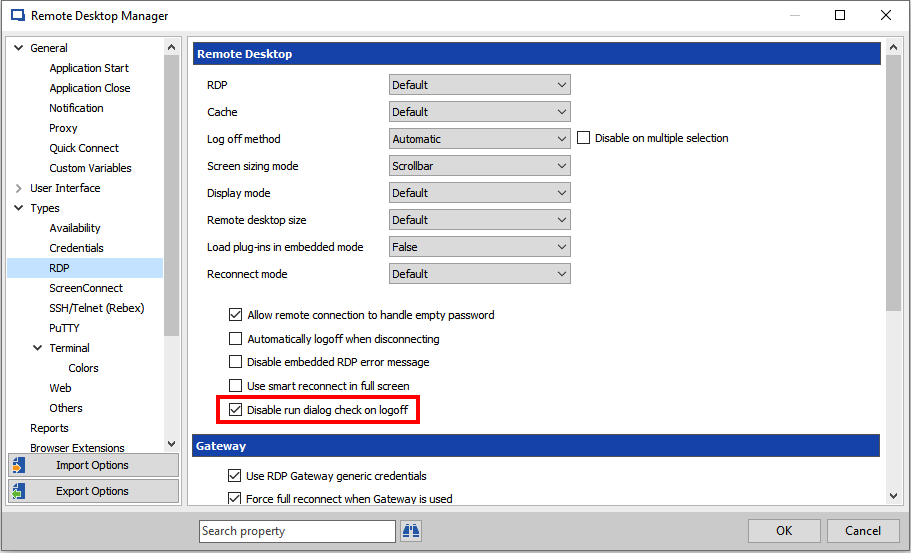
Could you please check this option in FIle -> Types -> RDP? The option is Disable run dialog check;
If there is anything else we can help you with, please let us know.
Best regards,
Mark Beausejour
Perfect... it works.
Also, I updated my version.
Best customer service support ever in the world.
I am SO glad I was recommended this piece of software.
You guys are amazing.
Is there any other outlet for getting support, instead of creating a forum thread?
Thanks!
ALSO, important question -- do you have any future support for Windows Server CORE 'Logoff' command?
I have a few Windows Server CORE machines and I would really like to use the 'Logoff' feature with that.
If I use the feature with Windows Server CORE, it simply types 'rshutdown /l' in the command prompt.
Hello Billy,
That’s good news! Thank you so much for your feedback!
We have our support line; 1 844 463.0419 (Level 1 support only)
We also have our support mailbox support@devolutions.net and our chat service on our website.
For your feature request, let me check this out for you!
If there is anything else we can help you with, please let us know.
Best regards,
Mark Beausejour
Hello again,
It has been assigned to one of our developers.
If there is anything else we can help you with, please let us know.
Best regards,
Mark Beausejour
Thank you!
Hi Billy,
I'm no expert of Windows Server Core but, am I safe to assume that (since it is a command based UI) sending the command "shutdown /l" (without sending Win + R first since we do not need to open the Run executable first) should initiate the logoff procedure? If so, it should be fairly easy to implement.
I might need to add some kind of option or a Server Core role in the connection settings to indicate which shutdown method to use. Would you be comfortable with this?
Best regards,
Xavier Fortin
Yes, so as long as the command prompt is visible, sending 'shutdown /l' should log off.
I do believe that would be the best approach.
In the connection settings, have a setting that allows users to select which approach to use the shutdown command.
Hi Billy,
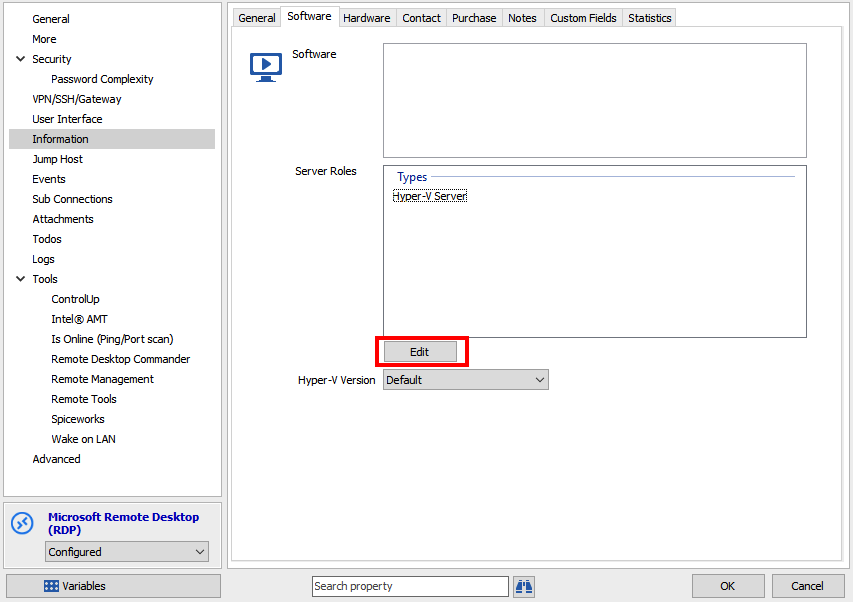
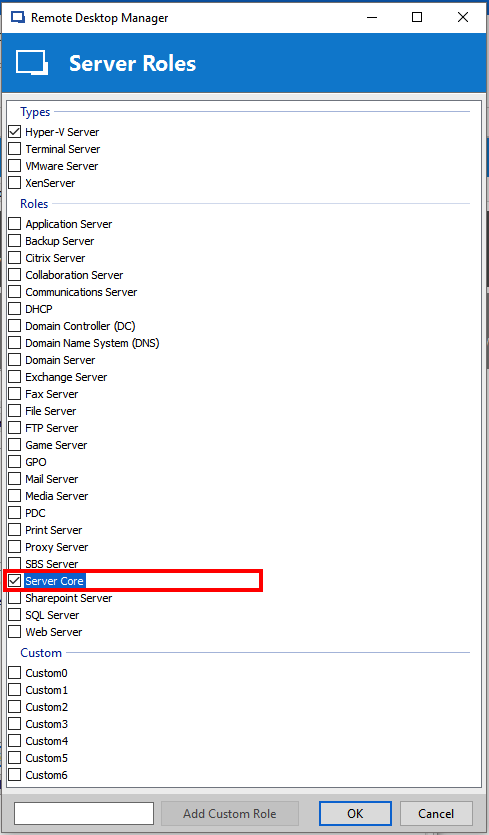
It has been done and will be available in RDM 12. To change the log off method for Server Core you'll have to add the Server Core role in your connection properties under Information -> Software -> Server Roles:
If you have an issue with the the log off sending "cshutdown /l", just disable the run dialog check in the option:
Best regards,
Xavier Fortin
DisableRunDialogCheckOnLogoff.PNG
ServerCore.PNG
ServerRoles.PNG
Wow, that is amazing.
This is definitely the best piece of software I've ever sought to purchase.
The support is beyond perfect.
I appreciate your response to this ticket, the development of this feature, etc.
I truly wish ALL companies were like this.
I recommended Kaspersky to enable their KSN for Endpoint, and they took my advice but never told me it was done.
Anyhow, amazing -- I even got documentation for the new feature. I'm amazed.
Anyhow, what else does server roles do? Is it an entire new feature or has it always been there?
It's fairly recent. It was a request from a user and we wanted to simplify the UI (we already had some checkboxes for some of those items).
Most of the Server Roles are purely informative, but some like Hyper-V, and now Server Core, are used to either modify the behaviour of the connection or enable specific features (like the View -> Console Management -> Hyper-V Console to display Hyper-V virtual machines).
Best regards,
Xavier Fortin
Another good feature for Server Core (for me at least) would be to start 'sconfig' -- which is a configuration window to do things like updating the system, restarting, shutting down, etc.
Is that possible already?
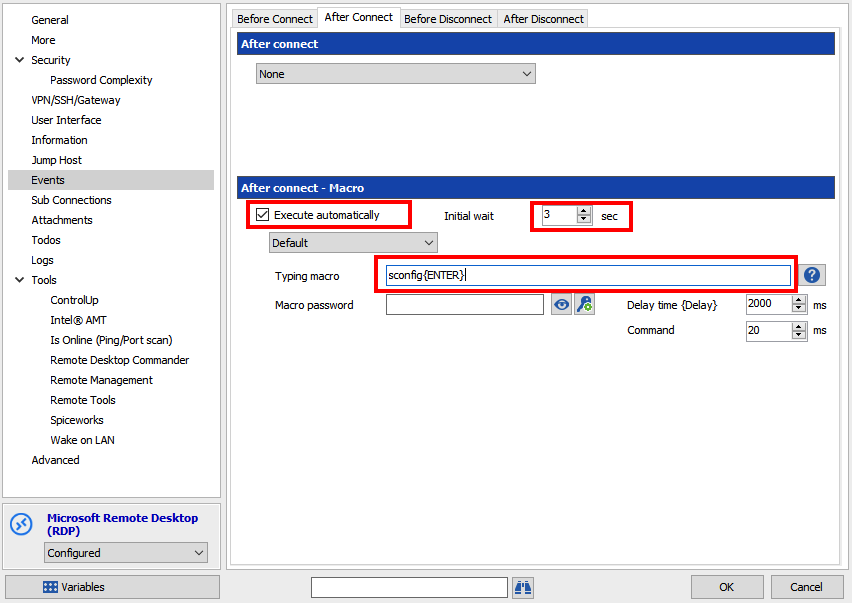
Well, as long as it's sending key to write and send a command, you can use the After Connect event to send a macro which will simulate keyboard keys:
You just need to enter your command in the Typing macro field and check the Execute automatically. It should send the macro after you connect. You can adjust the Initial wait delay if you need more/less time after the connection before sending the macro.
Best regards,
Xavier Fortin
AfterConnectEvent.PNG