SSH Fails

I am using RDM 3.6.0.0 on Mac OSX 10.11.6 - when i use terminal to ssh to a device it works fine - however some devices will not accept an ssh session from RDM i get the following error:
'Error: Unable to establish the connection. Please make sure your connection settings are valid.'
I've tried changing from the Putty plugin to SSH Shell (Native) and get the same results. Have also cleared the host our of .ssh/known_hosts. Is there a way to get a log of what is failing? I also checked /var/log/system.log but did not see anything that seemed relevant.
Thanks - Rodney
All Comments (8)
Hi Rodney,
In RDM Mac the Putty and SSH Shell connection both use the same component, they are just there to ensure compatibility with RDM Windows. It is therefor normal that both give you the same error.
Could you tried connecting through the Mac terminal using the following command:
ssh [-afgknqstvxACNTX1246 ] [-b bind_address ] [-c cipher_spec ] [-e escape_char ] [-i identity_file ] [-l login_name ] [-m mac_spec ] [-o option ] [-p port ] [-F configfile ] [-L port host hostport ] [-R port host hostport ] [-D port ] hostname | user@hostname [command ]
Alternatively, you can open a Putty connection and open it in external mode. It will open a terminal window and pass said command.
Best regards,
Xavier Fortin
Using MAC Terminal I can successfully ssh to the host 'ssh Admin@10.1.1.2'
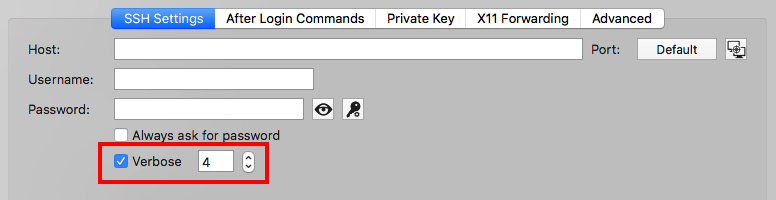
You can try checking the Verbose option in the SSH Shell settings tab and setting it to 4:
It should display additional log information in the terminal window. You can copy it and send it to me via private message.
Best regards,
Xavier Fortin
SSHVerbose.png
Hi Rodney,
We've looked at the verbose log you've sent us and we're still puzzled on this issue. Can you tell me what's the ssh server you're trying to connect to? What's the OS of the remote host? You can provide us with any other information you might find relevant.
Best regards,
Xavier Fortin
It is a Session Boarder Controller - it uses CentOS as the base OS - but is a locked down version by the manufacturer. What is odd is that i can ssh to it via MAC Terminal as well as Royal TS. I am trying to move to use RDM for everything and this seems to be the only devices that I can not connect to via RDM. Is it possible that I have an old figerrprint cached somewhere in RDM that needs to be removed?
I don't think it's a problem with a cached fingerprint. We'll investigate further to find the issue.
I'll inform you of our progress.
Best regards,
Xavier Fortin
One last thing.
The address in the log you've sent me differ from aforementioned one. Could you make sure the right address is in the host field of the connection? Could you try connecting to the address in the log with the Mac terminal?
Best regards,
Xavier Fortin
My apologies - I was using 10.1.1.2 as an example - the ip in the log i sent over is the correct one.