Custom VPN parameters

Good day,
I'm struggling with L2TP VPN connections using a pre-shared key. We are using a small 2000 entries in the enterprise edition with our whole support team.
We want a centralized solution for connecting to customer networks. Using PPTP and a central .pbk file, everything is working fine.
Since I’m unable to add a pre-shared key within the .pbk, I am going for the work around with a PowerShell script using “Add-VpnConnection”.
Now on to the bug report ;-)
If I add an entry and define a Custom VPN to it, the tab “settings” gives me 4 parameters.
The parameters $VPN_USERNAME$, $VPN_DOMAIN$ and $VPN_HOST$ work fine.
If I use the parameter $VPN_PASSWORD$, it gives me the value of the $VPN_USERNAME$ .
I’ve checked Security\Allow password in variable
I’ve also tried Data Source Settings\Password Policy\Allow password in macro (from another post)
Could you look into this for me please?
Also, any other hints regarding L2TP and preshared key usage is welcome ;-)
Thanks!
Sander
All Comments (22)
Hello,
What version of RDM are you using?
What type of data source are you using?
Best regards,
Mark Beausejour
Hi Marc,
I'm using 11.7.2.0 with a Microsoft SQL Database.
Sander
Hi Marc,
Just tested it with 11.7.2.0 with a local data source (XML), but still the same error.
Also tried to run it in 64 bit mode.
Sander
Had an old 11.6.1.0 version; tested it with SQL, same error
Hi,
I've found the bug and this is fixed internally. I could send you an hot fix if you want.
Regards
David Hervieux
Hi David, yes please!
Hi,
I've posted the patch here. It's too big for an email
David Hervieux
RemoteDesktopManager.Core.zip
Hi David,
Sorry for getting back to you after so long.
The modifications work fine now!
Do you include them in the next release?
Thanks!
Sander
Hi David,
One other question. It looks like the parameters aren't sent when the closing arguments kick in.
Could you check that for me?
Sander
I discovered that when you let RDM disconnect the VPN connection after ending the session, the parameters are sent correctly.
Only when using the "Close VPN" button, the paramters are not used.
"Open VPN" works fine.
Sander
Hello,
I've tried reproducing the issue on RDM 11.7.2.0 but the closing argument is sent properly. Do you send any special characters or anything of the sort? What do your closing arguments look like so we can test with something similar?
Regards,
Hubert Mireault
Hi Hubert,
This is my closing argument:
\192.168.1.1\Shares\Script.ps1 $VPN_HOST$ disconnect
This is what I entered within the VPN type Custom:
Host: example.domain.com
Executable: C:\Windows\System32\WindowsPowerShell\v1.0\powershell.exe
Opening argument: \192.168.1.1\Shares\Script.ps1 $VPN_HOST$ $VPN_USERNAME$ $VPN_DOMAIN$ $VPN_PASSWORD$
Closing argument: \192.168.1.1\Shares\Script.ps1 $VPN_HOST$ disconnect
Wait interval: 2 sec
Run in 64 bit: enabled
Run in background: disabled
Username: testuser
Domain: testdomain
Password: testpassword
I'm using 11.7.2.0 also, but with the modified files by David in this topic.
Sander
I attached to this post a tool we made that serves to spit back out the commands that have been passed to it. Could you, instead of pointing to powershell, point it to that executable and check the resulting commands? The result should look like this when I send your exact arguments, with $VPN_HOST$ resolving to "host":
Regards,
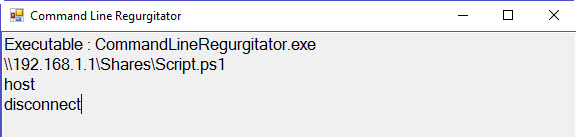
Hubert Mireault
2016-09-26 1-16-08 PM.jpg
CommandLineRegurgitator.zip
Hi Hubert,
Herewith the results.
I've also attached the 3WT-L2TP.ps1 file; this is just a file to echo out the results.
Thanks!
Sander
*Using button "Open VPN" and button "Open Session":
Executable : CommandLineRegurgitator.exe
C:\Users\sander\Downloads\CommandLineRegurgitator\3WT-L2TP.ps1
example.domain.com
testuser
testdomain
testuser
Shared
*Using button "Close VPN":
Executable : CommandLineRegurgitator.exe
C:\Users\sander\Downloads\CommandLineRegurgitator\3WT-L2TP.ps1
$VPN_HOST$
disconnect
*Using button "Open Session" and confirm VPN disconnect after session close:
Executable : CommandLineRegurgitator.exe
C:\Users\sander\Downloads\CommandLineRegurgitator\3WT-L2TP.ps1
example.domain.com
disconnect
3WT-L2TP.ps1
Thank you, I found the issue and this will be fixed in the next version of RDM. :)
Regards,
Hubert Mireault
Great! Nice to hear!
Any idea when the new version will be available?
Thanks!
Hi,
This is included in the beta release 11.7.3
http://remotedesktopmanager.com/Home/ThankYou?f=RDMsetupBeta
Regards
David Hervieux
Hi David,
Sorry for having to get back to this old topic.
Currently, I'm using version 11.9.0.0 and 11.7.3.0, both to the same SQL database.
In the session I've created earlier in this topic, the paramaters $VPN_PASSWORD$ is working fine.
If I duplicate this session and modify the vpn password entry, evertying still works fine.
If I create a new connection (both from template or from new session), the $VPN_PASSWORD$ parameter is not send to the executable.
I've used your application CommandLineRegurgitator.exe to diagnose, see the results in the images.
Can you help me with this?
Thanks!
Sander
New session - Not working.JPG
New session - Not working - result.jpg
Duplicate - working.JPG
Duplicate - working - result.jpg
Hello,
Did you make sure to check the "allow password in variable" checkbox (in your entry, in the security tab)? That might be what is causing the issue since it isn't checked by default.
Regards,
Hubert Mireault
Shame on me..... instantly did the trick...
Thanks!
Hi,
How do you manage the allow password check box in the example where you configure the VPN on the folder with inheritance on each connection?
Looks like I would have to enable it on each connection one at a time....
Thanks,
Hello,
Unfortunately there is no way to inherit that setting, it needs to be set on a per-connection basis.
You can do a batch action to set it for all of your selected entries though. You can access the batch action menu by selecting the desired entries, then right click > edit > batch edit > batch action, then select the custom powershell batch action and enter the following:$connection.AllowPasswordVariable = $true;$RDM.Save();
Regards,
Hubert Mireault