File Manager session does not adhere date format settings

Hi,
I noticed when using the File Manager session type in details view mode, all the date columns contain date/time in US format (system default), instead of the format set for my user (ISO format). In Windows Explorer the date/time is displayed correctly (as set in Windows Region Formats).
Could you please take the user seetings into account for File Manager sessions?
Thanks a lot
Holger
-------------------
Remote Desktop Manager Enterprise Edition 12.6.6.0 64 Bit - Data Source: SQL Server
Running on Windows Server 2012R2 VMs with Remote Desktop Services feature, serving as common work environment for 30 Windows Server administrators
All Comments (3)
Hi,
I will verify with the third party we use why it does not use the system date.
Regards
David Hervieux
Hello,
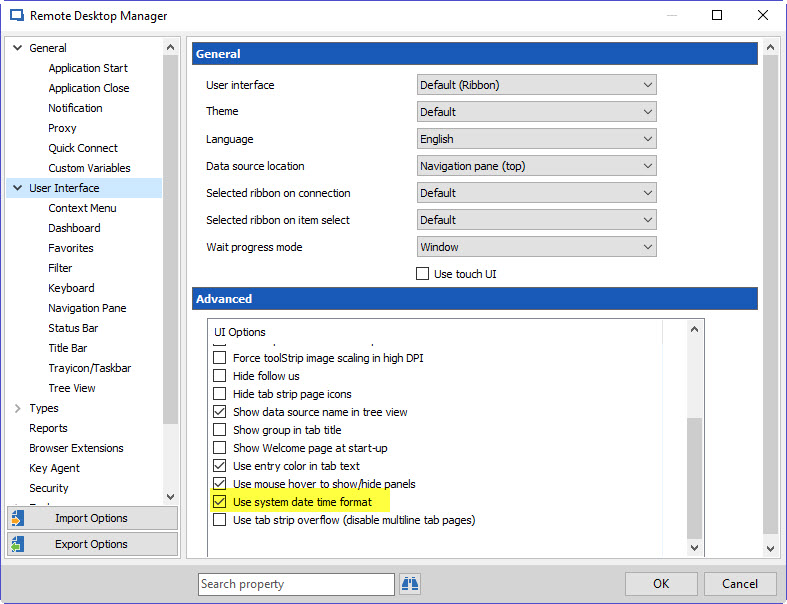
Currently, the third party uses the date/time format for the language set inside RDM. We will add an option to force the usage of the date/time format from the system rather than from RDM's language settings. You will be able to find the option in File > Options > User interface > Advanced:
This will be available for RDM 12.
Regards,
Hubert Mireault
2016-09-14 2-41-07 PM.jpg
Thank you, it's working for me in RDM 12 :)
-------------------
Remote Desktop Manager Enterprise Edition 12.6.6.0 64 Bit - Data Source: SQL Server
Running on Windows Server 2012R2 VMs with Remote Desktop Services feature, serving as common work environment for 30 Windows Server administrators