After upgrade to 11.7 RDM, not able to restore RDM from Systray
After upgrade to 11.7 RDM, not able to restore RDM from Systray

Hi Dev,
after the upgrade from RDM 11.6.2.0 to 11.7.0 on my Windows 7 Pro, i'm not longer able to restore the RDM from the Windows Systray.
Trying - rightclick in the icon and -> Restore doesn't works like others..
Also using the ProcessExplorer from MS Sysinternal and using "Restore and/or Bring to Front" doesn't works.
Unfortunately i can not downgrade to 11.6 as it's not available on the Dev site.
Please fix this issue asap.
many thanks
Bob (Jens)
All Comments (23)
Hi,
Sorry about that. I reverted the version from our web site. We will investigate what happened. Could you confirm that it was working in this release?
http://cdn.devolutions.net/download/Setup.RemoteDesktopManager.11.6.7.0.exe
Best regards,
Jeff Dagenais
Hello,
Could you tell us what datasource you were using and if there were any prompt for username/password set up for your datasource?
Is the application able to be restored using the task bar and only the tray menu fails to restore it?
We are trying to reproduce this issue on our end but without success. If you can give us any additional information, it would be very helpful. Trying out beta version 11.6.7.0 (the version linked in the previous post by Jean-François) to see if the issue is there could help us pinpoint the issue.
Regards,
Hubert Mireault
Hi all,
many thanks about your response,
- can you provide me the http://cdn.devolutions.net/download/Setup.RemoteDesktopManager.11.6.7.0.zip instead of the exe?
- i the default datasoure embedded in RDM and i will not prompt for any user and password..
Bob
David Hervieux
Hi David,
many thanks about your response. i have good and bad news..
The bad one, the 11.6.7.0 shows the same behaviour as the 11.7.0.0 .. the good news.. if i unpack and start the RMD from scratch in a new directory it works as expected . means i can restore from Systray.
fazit, it seems this behaviour only happens when i overwrite an existing RDM version with the new 11.7 files.
PS: even i run Win 7 PRO 64bit is use the RemoteDesktopManager.exe and not the RemoteDesktopManager64.exe
i hope that helps
rgs Bob(Jens)
When the issue is present (the files are overridden), could you try out two things:
1. Delete the file RemoteDesktopManager.ext then test to see if the issue is gone.
2. Rename the file RemoteDesktopManager.cfg to something different then test to see if the issue is gone.
This will make it so the RDM uses the default settings. We want to see if it is a configuration issue.
Regards,
Hubert Mireault
Many thanks Hubert,
i renamed both and RMD works as expected. I renamed back both and the problem is related to the RemoteDesktopManager.cfg ..
Bob(Jens)
Thanks to Jens' help we have found the problematic configuration.
When the option "When not minimized" is selected, this issue happens.
We will work on a fix, but as a workaround you can select "Always visible".
Regards,
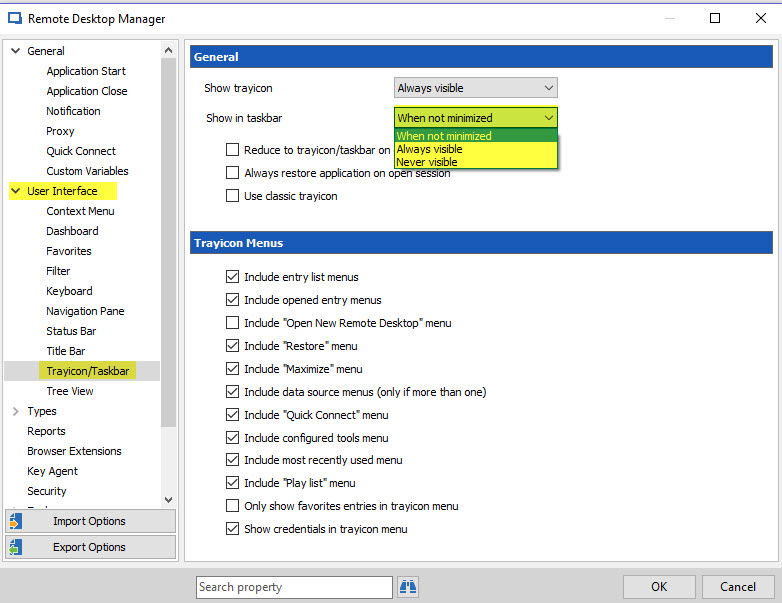
Hubert Mireault
2016-09-02 09-46-09.jpg
The workaround works,
many thanks for your great support as always.
cheers
Bob(Jens)
How do you get there?!?
No that didn't restore the dashboard to the desktop!
Going back to the previous version didn't fix the problem. It must be something in the setting.
@John ferguson
Could you elaborate on what is your issue exactly please.
What version of RDM are you running?
Best regards,
Jeff Dagenais
11.7.1.0
you start the program and everything is fine
you minimize the program to the tray on the right
when you expand the program by clicking on the tray the program is moved to the bar at the bottom of the screen but the dashboard will not return to the desktop so you can access the dashboard
to get back to the dashboard, you have to close the program
@John,
Could you post a print screen of the main screen with the dashboard missing?
Regards
David Hervieux
all you have is the icon on the tray nothing is displayed on the desktop
Screenshot 2016-09-03 16.33.42.png
I deleted the new program. Went back to the old program. The problem still occurred. I also deleted every devolutions folder I could find. I think it is something in the setup but I don't see what.
It seems that once the program is minimized to the systray, the program dashboard can't be seen unless you click "Always restore application on open session and set "Show in taskbar" to "Always visible"
then it works like it did before 11.7 except the icon stays on the taskbar when you minimize it.
Thank you for the details.
Regards
David Hervieux
Hello,
Could you try out RDM 11.7.3.0 and see if you can still reproduce the issue?
Regards,
Hubert Mireault
I have the same issue with RDM 11.7.6.0.
It seems to be connected to the "Show trayIcon" and "Show in task bar" options.
When I chose to show in task bar "When not minimized" and try to restore the dashboard from the tray icon, the GUI is not drawn properly. I see the program coming back to the task bar and the shadow of the window is rendered on the desktop, but the dashboard window is not visible.
When changing the show in the task bar optionto "always visible" it works fine.
I updated from RDM 11.5.2.0 that didn't have the issue. After the update I deleted my installation and re-installed it. Still when changing "Show in task bar" I got the same issue, so I assume this is not connected to the update.
2016-11-03_092558.png
Hello,
If it is possible for you, could you try the latest beta version (11.9.1.0) and see if the issue is present?
Regards,
Hubert Mireault
I can confirm that the issue is fixed in RDM Beta 11.9.1.0.
Thanks for the help and the quick reply :)