Macro/Script/Tools with host and credentials

I've been reading the manual http://help.remotedesktopmanager.com/macroscripttools_commandline.htm regarding tools that can be launched for a session entry.
So I've been thinking it would come in handy to have an option to launch PuTTY for any kind of session entry and figured an entry in the Macro/Script/Tool section would be the way to go.
I've created a command line M/S/T entry which launches PuTTY and defined the necessary parameters and values ($HOST$, $USERNAME$, $PASSWORD$) and referenced them in the command line call.
However, when I select a session dashboard and execute the PuTTY Tool, PuTTY gets launched but the variables are not resolved.
So maybe I'm getting the whole concept wrong, but how do I use the session specific variables to launch a tool?
-------------------
Remote Desktop Manager Enterprise Edition 12.6.6.0 64 Bit - Data Source: SQL Server
Running on Windows Server 2012R2 VMs with Remote Desktop Services feature, serving as common work environment for 30 Windows Server administrators
All Comments (5)
Hello,
Is it all the variables that they are not resolved or only the $PASSWORD$?
For the $PASSWORD$ variable, you need to check the Allow password in variable option in the Security section of your session. If your are using an advanced data source like SQL Server or DVLS as example, in the Data Source Settings under Password Policy, please check allow password in macro.
Best regards,
Jeff Dagenais
Hi,
I am aware of the fact that $PASSWORD$ resolution needs to be enabled - and it is.
However, none of the variables are resolved at all. Maybe I'm getting the concept all wrong. Please see the attached screenshots.
When actually calling the tool for a session entry (Right click>Macros/Scripts/Tools>PuTTY) I receive a command line parameters dialog with the variable names as shown on the second screenshot.
-------------------
Remote Desktop Manager Enterprise Edition 12.6.6.0 64 Bit - Data Source: SQL Server
Running on Windows Server 2012R2 VMs with Remote Desktop Services feature, serving as common work environment for 30 Windows Server administrators
commandlineparameters.JPG
ToolCall.JPG
Hello,
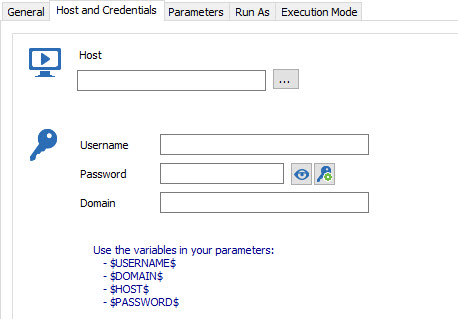
The variables retrieve the information from another field in RDM and return the appropriate information. As example, $USERNAME$ return the username found in the configured credentials.
In your case, I think you want to create a command line to launch Putty with specific parameters.
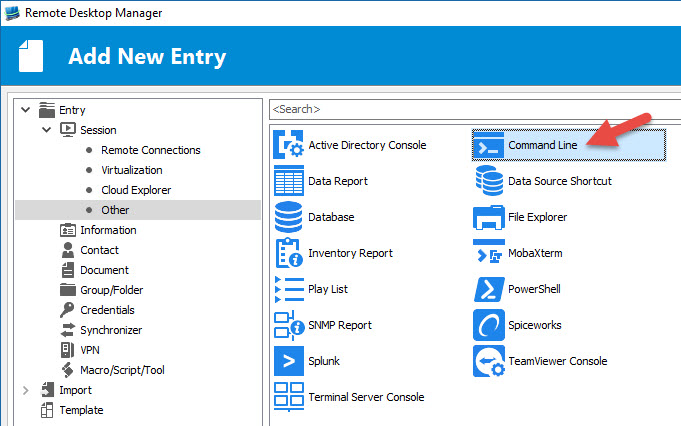
I would like you to try a Command Line session instead of a Command Line Macro/Script/Tool.
With this type of session, it would be possible to use the variables in the Run field like you want because the variables will be resolved with the information from the Host and Credentials tab.
Best regards,
Jeff Dagenais
2016-09-07_10-15-22.jpg
2016-09-07_10-13-26.jpg
Hi,
sure, I know that variables do work with Session types. But that was not what I intended to do. As I said, maybe I'm getting the Macro/Script/Tools concept all wrong. But how can I call a Macro/Script/Tool in relation to a selected session?
I mean, whenever I click on a RDM integrated tool, like "Computer Management", or "Ping", this tool is started with the Hostname of the currently selected session. I thought I can add my "Command Line" Tools "PuTTY" in order to be able to launch PuTTY with the hostname and credentials of whatever session entry I've currently selected?
-------------------
Remote Desktop Manager Enterprise Edition 12.6.6.0 64 Bit - Data Source: SQL Server
Running on Windows Server 2012R2 VMs with Remote Desktop Services feature, serving as common work environment for 30 Windows Server administrators
Hello,
You are right, if you want to execute a command line on a session, you need to create a Macro/Script/Tool.
http://help.remotedesktopmanager.com/macroscripttools_overview.htm
In your case, you want to open an application with specific parameters, this is why I was suggesting the other session type.
On what type of session are you running this Macro/Script/Tool? Could you post a print screen of that session please.
If you remove the variables and put the proper information, is it working like expected?
Best regards,
Jeff Dagenais