Https via RDP Jump

Hi all,
We are using JetNexus for the load-balancing on various environments.
I'm currently building a new RDM-Server which then should have all the JN connections in it.
The problem is that some of the websites can only be reached via a Jump-Server.
My question is if RDM Jump is capable of establishing the connection via a specific Jump-Server.
What I would like to have, is to double-click the HTTPS entry, which then logs in on a Jump-Server in the background with a local user account, which then opens up the HTTP/S website so you can authenticate yourself to the website, without using the Jump-Box all the time, but configure it once.
Happy about any advise.
Thanks,
Dom
All Comments (4)
Dominik,
I'm not sure I understand the last part of your question:
Regardless we should be able to configure it the way you need/want.
Have you looked at the Jump documentation? http://helpjump.remotedesktopmanager.com/
Your configuration would look something like this:- On the client machine configure an RDP session to the jump machine. - On the jump machine - install RDM - start RDM & start RDM Agent (set as always start) - note, no need to configure any data sources on this machine, it will be driven by the client RDM - back on the client machine configure your https session - configure the to open via Jump (see attached image)
Now if you double-click on the https session RDM will first open the RDP Jump Host session then wait a few seconds to establish a connection to the RDM Agent . Once established it will pass the https session over to the jump host machine and execute the https session there (RDM will start if not yet running). Logs and such will be reported back to your client RDM session.
Let me know if it works for you, if you need more guidance or problems arise.
Please note you can tweak the jump RDM to remove most/all useless to keep the screen real estate to a maximum.
Best regards,
Stéfane Lavergne
2016-08-24_11-47-59.png
Hi Stefane,
thanks for the fast feedback.
I can't see my terminal server listed on the "Jump" config, which you showed on your screenshot. Just if I un tick the "Filter Jump host only" box.
Without that setting it would do the RDP connection to the terminal server and then open the HTTPS session in the RDM of the terminal server...
What I was after with that other statement: I would like to have the HTTPS Session in my client RDM, but doing a background connect to the RDM Agent box with stored credentials. So you basically just double click the HTTPS Session and it will do the other connection stuff in the background. You would then end-up just seeing the HTTPS without seeing what happens in the background.
Cheers,
Dom
Dom,
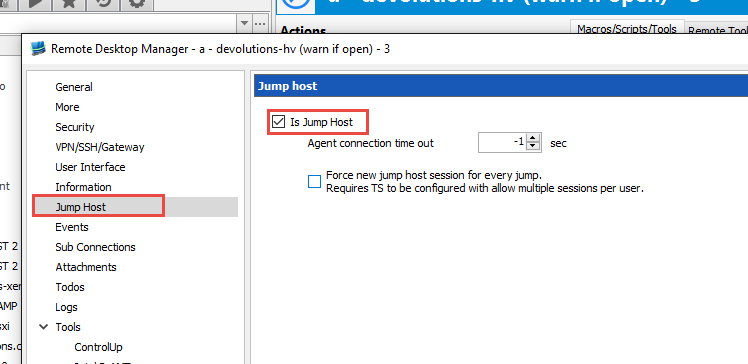
Sorry forgot to specify to set the Jump host flag. Edit the RDP session, Jump Host -> Is Jump Host (checked)
Once correctly configured you will only need to double-click the HTTPS session on the client and the rest will be taken care of by RDM (with RDM-Agent & the remote RDM running on the Jump Host). It won't be completely seamless but you can configure it to almost seamless (you can hide most of the docked windows).
Hang-on, I just ran a test and found a bug in the latest versions of RDM's Jump Configuration. The developer assigned to this was already working on a fix. For now Jump is somewhat broken, you can configure any jumps (it doesn't save).
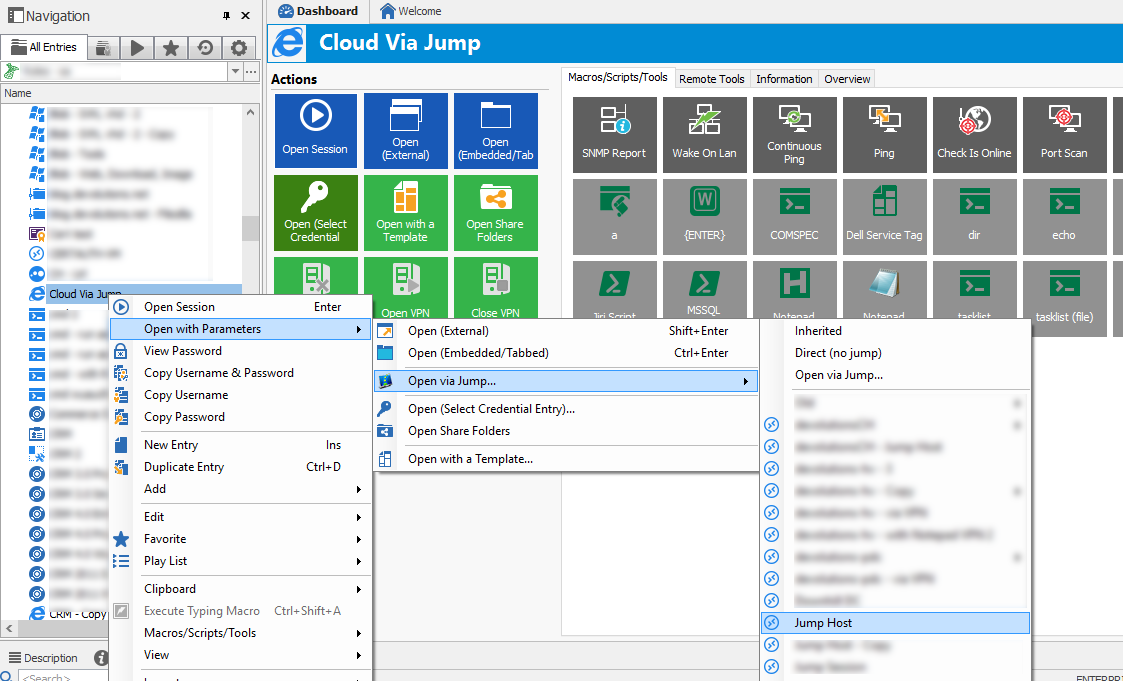
But, for testing purposes you can get around it, on the https session right-click -> Open with Parameters -> Open via Jump... -> select your jump host session.
Best regards,
Stéfane Lavergne
2016-08-25_8-53-19.png
2016-08-25_8-16-41.png
Hi Dominik,
The latest version has the required fixes. All should work as expected from now on.
http://remotedesktopmanager.com/Home/Download
Best regards,
Stéfane Lavergne