Keyboard unusable in RDM after Win10 anniversary update

After update to the Windows Anniversary build, RDM running in a Parallels virtual machine "loses" the state of the shift key on a US English keyboard. This happens on the production version RDM, which I believe was 11.6.1 and the latest beta (11.6.6).
I tried numerous attempts to fix this issue:
=> I removed and re-added the US QWERTY profile to Windows
=> Removed and reinstalled the hypervisor's virtualization drivers (Parallels Tools)
=> Tested a variety of other applications in the Windows VM, none of which have this problem.
A screenshot is attached. As you can see, if I start a newly opened session and enter a series of dollar signs, all is well until I stop, released the shift key and then attempt to enter more dollar signs. There after, until reboot of the Windows VM in which RDM is running, all shifted characters are unavailable.
Having just one use of the shift key per Windows boot makes RDM unusable (sigh).
2016-08-16_11-42-09.png
All Comments (13)
Could you try RDM 32 or 64 to see if it makes a difference? I saw many problem with the RDP ActiveX in 32 bits
Regards
David Hervieux
There's no difference between RemoteDesktopManager64.exe and RemoteDesktopManager.exe with respect to the use-shift-key-once-per-boot issue on my machine.
Could you try to disable all the shortcuts in File->Options | UI->Keyboard?
Regads
David Hervieux
No luck with this either.
But it brings up one of my continuing frustrations with RDM: the UI makes no sense. An example: several releases ago "delete entry" moved from a context menu of its own to being buried inside of "edit entry" context selection (shades of the "start" button to shutdown Windows). Sure, you can set it back with some random setting splashed somewhere in the options, but that only makes it worse.
RDM is full of strange UIs buried here and there. This dialog which, in nearly two years of use I've never had to use, is a great example. You can reset the default but you must click through each shortcut type and drop down multiple entries in a scrollable (but not resizable!) pane.
Good thing I never saw or used these dialogs when I was evaluating the product. I'd have run screaming back to MSFT's RDP client.
2016-08-16_13-47-55.png
FWIW, the keyboard in RDM Windows running in a Windows 7 VM under Parallels works just fine. I think that narrows the issue to the specific release (1607) of Windows 10.
Is there any response to this issue? It's extremely frustrating to not be able to, for example, input open parentheses, just the character '9'.
Hello,
I have done several testing for this issue and I would like you to try something.
If you do a CTRL+SHIFT+4, what is the result? Is it $?
Could you also edit one of your RDP session and click on the Local Resources tab. What is the settings in the keyboard section?
As I can see, if On the local computer is selected, SHIFT+4 = $. If On the remote computer is selected, CTRL+SHIFT+4 = $
Best regards,
Jeff Dagenais
Yes, changing keyboard to local produces the correct case -- but it's not the behavior I want nor is it the way it "used to be". I'd like the Windows key CTRL-TAB and the like sent to the remote session andbe able to access "un-CTRL'ed" keys on the US English number digit keys.
In short, something changed -- and I don't want to have to re-train my muscle memory.
Changing the local for the Windows key pretty much makes RDM useless. And the Mac version is worse -- hitting the Windows key (if it's enabled in the session settings) sends it to both the local and remote session.
RDM has become a mess for users like me who use the keyboard. I wish you guys would fix this quickly.
Months have gone by -- and no real solution. Let me ask you guys: have you ever tried to manage/maintain Windows Server 2012 _without_ use of the Windows key?
if I select "on local computer" I can't use a Windows key remotely. In the Mac version, the Windows key is mapped to the Mac cmd key and when pressed, sends both a local Mac cmd key press _and_ a remote Windows key press.
Catch-22. Something happened to RDM keyboard handling and it's driving me crazy.
What can I do about this?
Hello,
I have read the entire thread again and as per your first topic, you are running Windows 10 in Parallels on your Mac.
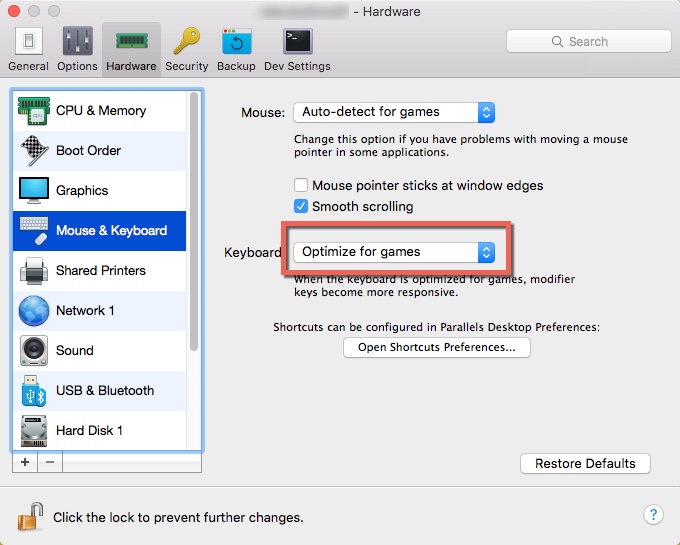
I would like you to try something. Could you shutdown your Windows 10 VM and click on the Configure button of the VM in Parallels. In the Hardware section, select Mouse and Keyboard. Then, in the Keyboard dropdown, select Optimise for games.
After, restart your VM and let me know if the ALT + TAB and/or the Shift key are working again in RDM with the option set to On the remote computer in the Local Resources tab.
Best regards,
Jeff Dagenais
2016-09-20_14-37-12.jpg
Whoa! Seems _much_ better. Uppercase works; Windows key works. Let me run for a day or two like this and see if anything else is affected.
Thanks! I was going crazy.
Just an update: I've been working all day in at least five different sessions and had no problems using "on remote computer." What a relief. THANK YOU!
For the record, this is using Parallels 12 with Windows 10 1607. Who'd have thought a keyboard setting would make everything go haywire. I don't know how, if or when the VM setting changed away from "optimize for games." I was throwing bricks in the wrong place -- I assumed it was RDM under Win 10 1607 -- because after the VM was upgraded to the anniversary date, things went south. Anyway, I really appreciate the help.
Now, if only RDM Mac didn't send the Windows key to both the local and remote sessions...