Private Vault credentials not listet in Quick Connect RDP Template
Private Vault credentials not listet in Quick Connect RDP Template
So, I've got 4 credentials defined in my Private Vault section of RDM.
I created a shared template (RDP) for use with QuickConnect. For credentials, I've set the template to "Private Vault search".
The idea is, that any user who wants to open a RDP session using QuickConnect will be prompted with a list of his/her individual credentials from his/her Private Vault.
When I'm in the "All Items" section of RDM and when clicking on QuickConnect, the a dialog windows "Credential List" with a tab "Credentials" pops up. The list, however, is empty.
When I'm in the "Private Vault" section of RDM and when clicking on QuickConnect, the a dialog windows "Credential List" with a tab "Private Vault" pops up and all my credentials are listed.
I did some more testing. When I'm in the "All Items" section of RDM and when clicking on an existing RDP session entry, right click, "Open (Select credential entry)", the a dialog windows "Credential List" with a tab "Credentials" and "Private Vault" pops up. The "Private Vault" shows all entries.
I also created a new session using the QuickConnect RDP template in the "All Items" section. The same behavior as using QuickConnect in the "All Items" section, no credentials displayed from the private vault and no "Private Vault" tab visible in the search box.
-------------------
Remote Desktop Manager Enterprise Edition 12.6.6.0 64 Bit - Data Source: SQL Server
Running on Windows Server 2012R2 VMs with Remote Desktop Services feature, serving as common work environment for 30 Windows Server administrators
All Comments (6)
Hello,
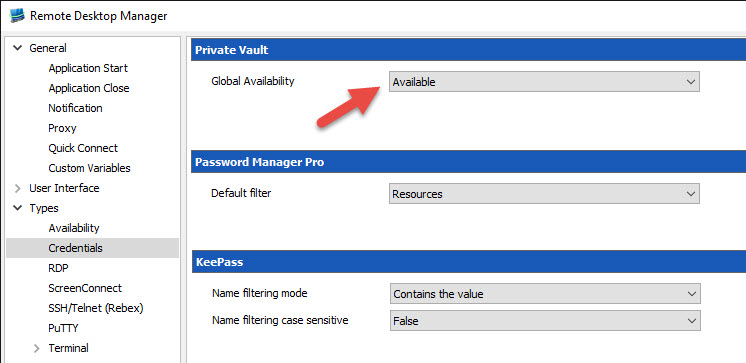
Could you go in File -> Options -> Types -> Credentials and select Available in the Global Availability section.
I think this may resolve your issue.
Best regards,
Jeff Dagenais
2016-08-11_15-48-40.jpg
Hi Jean-François,
indeed, that did the trick. The Private Vault credentials are available now in the All Items section. I wonder if it was me, who configured that to "Unavailable" in some early RDM configuration days...
Cheers
Holger
-------------------
Remote Desktop Manager Enterprise Edition 12.6.6.0 64 Bit - Data Source: SQL Server
Running on Windows Server 2012R2 VMs with Remote Desktop Services feature, serving as common work environment for 30 Windows Server administrators

Hi,
I have a similar issue that is not resolved by this solution. We have several templates we use for QuickConnect sessions, but they all use the same Remote Desktop Gateway server. That server uses our domain credentials, which have to be changed every quarter. Right now, we have to individually edit every template to change the password for the gateway credentials (custom credentials). We would love it if we could select our domain credentials that are already stored in our private vaults. That way, we only have to change it in once place instead of each and every template.
Is there any way to do this?
Thanks!
Mike
Hi Mike,
I will ask Hubert to check if we support the private vault search for the gateway. I think it's not supported but I need to double check.
Regards
David Hervieux
Hello,
Private vault search is currently not supported for the gateway, but I have made some changes internally and it will be available in the next build of the RDM 12 Beta. Thank you for your feedback.
Regards,
Hubert Mireault
Hubert, thank you! You guys are awesome!
Mike