Ver 10.1.8 asks for License each time it is started

Dear Sirs, I've a registered 10.1.8 version but since a couple of months ago, the software asks for the License each time it is started. I choose "Enter Serial" and the form is already populated with my data. I click OK and it works. How can I avoid the "Enter Serial" window from appearing each time I start the software? Thanks.
All Comments (9)
Hello,
The license key is save in a file name RemoteDesktopManager.cfg. By default, this file is located in %localappdata%\Devolutions\RemoteDesktopManager.
Do you have access to write in that folder?
If you edit your RemoteDesktopManager.cfg file, do you see your license? The license should be present at the RegistrationSerial line.
Best regards,
Jeff Dagenais
Hi Jean, thanks for your kind reply.
Furthermore: I'm a local Administrator and I've tryed both starting the software normally and "Run as Administrator". No change in either case.
Portion of the CFG file:
<RegistrationEmail>strivoli@libero.it</RegistrationEmail>
<RegistrationName>Stefano Rivoli</RegistrationName>
<RegistrationSerial>fake1-fake2-fake3-fake4-fake5</RegistrationSerial>
Let me know if you have further suggestions. Thanks.
Hello,
Could you try to close RDM, edit your RemoteDesktopManager.cfg file, add manually your license in the RegistrationSerial, save the .cfg file and reopen RDM.
Does it ask you to enter your license?
Best regards,
Jeff Dagenais
Hi, I've closed RDM, opened the CFG file, overwritten the serial number with the one I've get when I bought RDM (the 2 strings are identical: the one on the CFG file and the one I've got when I bought RDM), I've saved the CFG file.
No change... :(
RDM still asks for the S#. Please note my subscription ended on February 2015.
Does RDM check online if the license is valid? Please note I had to create a new account when I opened this thread on the Forum because my previous account was unknown. Might there be any correlation between the issue and the unknown account?
Hello,
Oh, I did know that your license was expired.
If your license is expired since February 2015, the latest official release that you can use is RDM 10.0.4.0
Could you install this version and see if the license message is still present.
You can download this version here - http://remotedesktopmanager.com/Home/PreviousVersion
Best regards,
Jeff Dagenais
Well... the latest "downloadable" version is 10.0.4.0 which I installed on the new system (I have an old system which must be changed with a new system - both old and new suffer the same issue). The issue happens even with the 10.0.4.0. Since the old system was at 10.1.8.0 (I updated it a few days before the maintenance was over) I searched for the 10.1.8.0 setup till I found it on your web site.
So... the old system is at 10.1.8.0 and has the S# issue. The new system started with 10.0.4.0 (1 week ago) and had the S# issue then it was upgraded to 10.1.8.0 (2 days ago) and still has the S# issue.
Perhaps the system detects more installs and asks for the serial each time?
Hello,
Could you send us an email at support@devolutions.net with a print screen of the message that you receive + your license key so that I can validate it in our system.
Thank you
Best regards,
Jeff Dagenais
OK. I did. Thanks.
@everyone
The issue is now resolved. The license key is working fine with RDM 10.0.4.0.
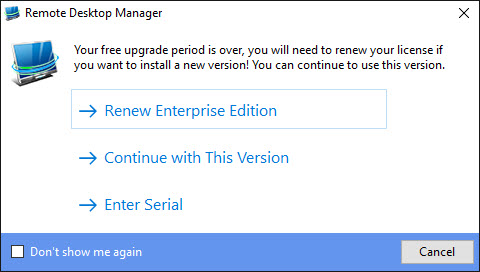
The message that was displayed was the following
The message inform you that your license is expired, however, you can continue to use this version.
At this point, check the Don't show me again option at the button and press the Continue with this version button.
Best regards,
Jeff Dagenais
2016-08-05_12-19-25.jpg