smart sizing causing fuzzy display

I upgraded from 11.6.2 to 11.6.5 and the smart sizing option seems to be causing a small problem.
I have it on on by default and when I make a new connection the display is a little blurry (these are embedded connections). If I uncheck smart sizing from the tab on the open connection, the size of the rdp window doesn't seem to change but everything is sharp. It seems like the window adjusts itself on the right hand side ever so slightly but it's hard to tell if the size even changed by a pixel or two. This wasn't an issue in 11.6.2 to the best of my knowledge. I'm on windows 7 and I see the same thing connecting to windows 7/2008 r2/2012 r2 and windows 10 machines.
On an unrelated topic once I'm posting, I have that reconnect issue when I have to switch from default to full in order for it to pass my credentials. Will that be fixed or am I stuck with full reconnect now?
All Comments (20)
Hi,
Could you post few print screen of your Smart Sizing issue? You can try as a workaround to set the RDP to RDP8.
For the reconnect we don't have a solution. It seems to be a problem with the ActiveX
Regards
David Hervieux
Tried RDP 8.0/8.1 but didn't help. I've attached a few screen shots but you might find it hard to see the difference as it's quite subtle. It's almost like the width of the rdp window is maybe off by a pixel or two and it causes a problem.
I tried on a couple other machines with 11.5.4 and 11.6.2 and I didn't see the problem. When I toggle smart sizing for a connection I have open I don't see the screen try and readjust it's dimensions like I do in 11.5.4 and in 11.6.2 it doesn't seem to "resize" as much as in 11.6.5. Kinda of hard to explain, maybe a webex to show the problem might be needed
smart_sizing_on3.png
smart_sizing_off3.png
smart_sizing_off2.png
smart_sizing_on2.png
smart_sizing_off1.png
smart_sizing_on1.png
Do you use a specific resolution?
David Hervieux
Remote desktop size is set to default
if it helps, the problem is caused by a slight shift in the pixels on the side. Attached are a couple of screen grabs of the right hand side. With smart sizing off there is what appears to be maybe a 1 pixel black line.
When I turn on smart sizing, the black line is maybe 2 or pixels wide now.
On the left hand side of the screen with ss of it looks like there's a slight black line. With I turn SS on, the black line seems to disappear because the image gets shifted. (I did not provide images of this)
The shift is subtle, I know, but I still can notice the difference as some stuff on the screen will appear a bit out of focus/blurry to me.
edge_ss_off.png
edge_ss_on.png
Hi,
I've found a edge case. I'm working on it and I think that tomorrow I will be able to post potential fix to try.
Thank you
Regards
David Hervieux
@foxtrot
I've released a new beta today with a fix for that. I was able to reproduce it on two machines and fix the problem on both.
Regards
David Hervieux
Great!
Thank you for you feedback.
David Hervieux
Hi,
Sorry for bumping a thread that is over 8months old, but we are currently trialing RDM and have notice this 'fuzziness' as well when connecting to servers via RDP within RDM.
We used to use Remote Desktop Connection Manager, and this scaled and displayed remote desktop connection session really well, and always provided a clear and crisp session regardless of the working area. However with RDM, if we make use of the Smart Sizing option, this seems to introduce a fuzziness that the previous poster on this threat (foxtrot) also reported.
We are using RDM 12.0.8.0 and have tested using different versions of RDP client within RDM and it doesn't seem to make a difference. The only way we can make the connections crisp and clear is by having scrollbars on the RDP sessions which isn't ideal.
Happy to post screenshots of the issue if that helps.
Thanks
Rich
@Rich Saunders
Could you post a print screen of your issue so that we can see what is not working.
Best regards,
Jeff Dagenais
Hi Jeff,
Of course, I'll attach two screenshots of the same server logon, one when using RDM and another when using Remote Desktop Connection manager.
You will hopefully notice the slight fuzziness on the screenshot from RDM. It might be best to view both screenshots full screen so they are reduced in size/scale when viewing.
Thanks
Rich
RDM.bmp
RDConnectionManager.bmp
Hello,
What is the display setting of the RDP session in RDM? Could you post a print screen of that tab please.
Best regards,
Jeff Dagenais
Hi Jeff,
Of course, please see the attached screenshots of the display settings used within RDM for our RDP session to servers. I've also included to further screenshots that show both the Interface options screen and the RDP Type options screen, to show how this is set on our RDM client at the moment.
Finally I've attached a screenshot of the RDM System Diags screen, in case there is any info here you need.
Thanks and look forward to your reply.
Rich
RDM System Diags.bmp
RDM RDP Type Settings.bmp
RDM Option Settings.bmp
RDM Display Settings.bmp
Hello,
Could you try to change your display settings for the following to see if there's some changes regarding the text on the remote session.
Remote desktop size = Default
Screen Sizing mode = Smart reconnect
Best regards,
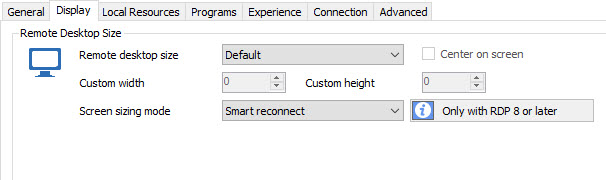
Jeff Dagenais
2017-03-14_10-09-36.jpg
Hi,
Sorry for the delay in responding to this.
I have made the change as requested and this now gives a much clearer and crisp display, however there are now scroll bars at the bottom and side of the RDP session. This will make using the RDP session very difficult however - is there anyway to keep the crispness of the display without having the scrollbars?
I have attached a screenshot to show how it looks with the settings you have advised.
Thanks
Rich
Screen Reconnect Set.png
Hello,
Could you try the following:
Best regards,
Jeff Dagenais
Hi Jeff,
Thanks for the suggested options.
I have tried this and seeing the same results as last time - the remote desktop session is now perfectly crisp and readable, but is showing scrollbars that are needed to move around and use the remote desktop session fully.
Ideally we want to keep this crispness but lose the scrollbars?
Thanks and appreciate your time and help with this.
Rich
Hello,
What is the resolution of the remote server? Could you post a print screen please.
Best regards,
Jeff Dagenais
Hi Jeff,
Just to update, I've had a it more of a play with the settings in RDM and think I have managed to suss it! It looks like we had amended (read: fiddled) with the RDP settings in the options menu of RDM which I guess sets the defaults for the application as a whole (File -> Options -> Types -> RDP)
By going through all these settings and making sure everything was set to default (including the Remote Desktop Size option), when logging onto RDP sessions now they are scaling and displaying fine :)
For the RDP session itself, having left the display, remote desktop size as default and set the Screen sizing mode to Smart Sizing, now when the RDP session is running, it looks perfectly crisp and detailed when viewing within the embedded workspace, and will auto re-size if we make RDM in general a different size.
Think it was just us mis-understanding the impact these settings have but happy this is working now.
Thanks again for all your time and help on this.
Rich
Hello Rich,
Glad that is now working!
Thank you for your feedback, it's very appreciated.
Best regards,
Jeff Dagenais