RDM & Password Manager Pro

Hi,
we use RDM together with Password Manager Pro, we get the following error on a regular base with no pattern on why it happens. The error happens when I open a new remote desktop session.
This user no longer exists in My Account settings!
If I then go to the PMP credential an reselect my username and hit OK. The next remote desktop sessions I open the normal workflow for PMP works.(Popup windows and credential selection)
Could you please look into this as this error is very annoying.
Thanks
All Comments (20)
Hello,
What version of RDM are you using? Also, do you use RDM on multiple workstations?
Regards,
Hubert Mireault
Hello,
I use the latest 11.6.2.0 version. With my user I only use it on my local workstation with SQL datasource, it is planned to use it on multiple in the future. But we share the database for other usernames on multiple computers.
Does this issue occur when the token / username / machine name changes in the "My account settings"? I can reproduce the issue if the token when saved in the PMP entry is different from the current token even if the username/machine name matches.
Regards,
Hubert Mireault
and I have seen this occur when the server name would'nt resolve properly. Do you use the DNS name or the ip address?
Maurice
I opened RDM today and connected to a server an the issue occurred again, I connect to the server via IP so no DNS involved. I'm on the same workstation as yesterday same IP and hostname. Hostname is also the same in the "My account settings"
It seems there is an issue with remembering the username value in the PMP credential object, after reselecting my username the error disappears.
What I noticed today is that if often happens after waking up the computer from standby while RDM was open before.
Hello,
If you close RDM, wake up the computer and open RDM, is it working as expected?
Best regards,
Jeff Dagenais
Hello,
no it behaves the same as rebooting and opening again. I get the same error.
Could it be that this behavior happens because the RDM data source is used by multiple users and so the PMP object as well, and the username is somewhere globally stored or overwritten by another user using the RDM data source? This would somehow explain the error message
Best Regards,
Maximilian Lampert
Hello,
When you create an API user in PMP, you need to provide the computer name where the API user is gonna be used.
This means that each user would need there own API user created in PMP so that they can have the appropriate token assign to their computer.
Best regards,
Jeff Dagenais
Hello,
Does the PMP credential entry has been created in the All Entries tab or in the Private Vault?
If the entry is created in the All Entries tab, I may think that everybody is modifying the entry to use their account to communicate with PMP.
I suggest to create your PMP entry in the Private Vault (http://help.remotedesktopmanager.com/view_navigation_privatevault.htm) and use the User Specific Settings feature (http://help.remotedesktopmanager.com/edit_userspecificsettings.htm) to override the credential of the session.
Best regards,
Jeff Dagenais
Hello,
it has been created in the All Entries tab. Maybe that is the issue but isn't it expected to work that way? The PMP object is created one time and at every connect the settings from the My Account settings are taken for the connection?
The problem with the private vault is that every user needs to change the settings for all server to there settings which is not feasible for us as we have around 700 servers. Or is there any way of using this function, which still is not really practical as every new worker has to configure the options accordingly.
Hello,
PMP use a token to identify the API user on the PMP server. When you create a PMP entry in the All Entries tab, every user use the same entry. When you edit the entry to use your configuration from My Account Settings, this modify the entry for all the other users. Then, another user modify the entry to use is own My Account Settings and then you are not able to connect because of that.
If you want to use PMP with RDM, the solution is to use the User Specific Settings with the Private Vault.
To simplify your infrastructure, you can set your sessions to inherited and set the User Specific Settings at the folder level. This is less manipulation for your users.
If you don't want to use the Private Vault, then you would need to save your credentials directly in RDM with the Username/Password credential entry type and use those entries in your sessions. In that case, no error message because of the token.
Best regards,
Jeff Dagenais
Hello,
Thanks for the explanation.
but this does not make sense because every user needs to create its own PMP credentials with username/token/hostname, after that I can select them in the All Entries PMP credential object. The thing is that every user has a logically a different hostname so this whole All Entries PMP does not work.
What I would like to have is the following solution for the All Entries PMP object, the object with its configuration is available for all users, and all servers can use it to refer to. But for each user the configuration is "user/local specific" that means that for every server connect the All Entries PMP object is used but with the user/local defined credentials selected.
So simply speaken, a "global" PMP object which we can use to configure all servers but with user/local defined credentials which will be used to authenticate against the PMP. So similar to the private vault function but without having to overwrite all the configurations.
The problem with the Private Vault is that we surly could overwrite all credentials with user specific but that are a ton of servers, and every user needs to do that for each of them the folder solution might be nice for smaller setups but doing it for 100+ folders is not practical as well.
Hello,
The unique token per computer that PMP needs to do the authentication is causing us some issue here.
I will verify if we can modify how the selection of the account is made for PMP. I may have an idea, however, I would need to have a discussion with our engineering department.
The developer who has made this integration is on vacation. As soon as he get back, I will have a chat with him regarding this.
I'll keep you post on the developement.
Best regards,
Jeff Dagenais
Hello,
cool looking forward to it.
Hello Maximilian,
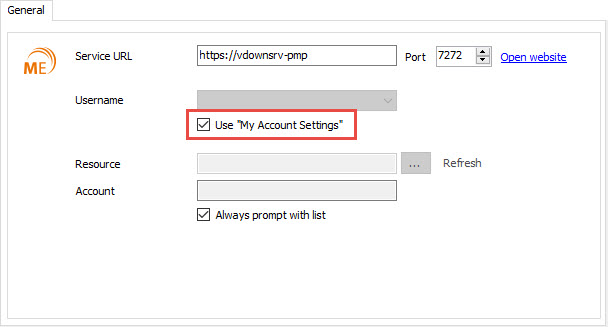
In RDM 12, a new checkbox will be added in the properties of a Password Manager Pro (PMP) entry to use the information from the My Accout Settings.
Instead of entering a profile to use in the session, you will check this box and this will use the account created in your My Account Settings.
This should resolved your issue and allow you to use PMP without the needs of the Private Vault.
Best regards,
Jeff Dagenais
Hello Jean,
that's good news. Now the question is when will RDM 12 be released?
Thanks
Best regards
Maximilian Lampert
Hello,
We hope to release a beta by the end of september.
Best regards,
Jeff Dagenais
Hello Maximilian,
RDM 12 Beta is now available and there's a new checkbox available in the Password Manager Pro credential entry that should resolve your issue.
Instead of entering your username in the credential entry, you will check the box Use My Account Settings.
This will use the account configured in File -> My Account Settings.
You can download RDM 12 beta at the bottom of this webpage - http://remotedesktopmanager.com/Home/Download
The version is 11.9.0.0
Best regards,
Jeff Dagenais
2016-10-25_15-41-47.jpg
Hello,
Sorry, I pasted the wrong download link.
Here it is - http://remotedesktopmanager.com/Home/Download
I have also updated my previous topic.
Best regards,
Jeff Dagenais