Sort priority in dashboard entries

Hello Devolutions
I'm using version 8.0.23.0 using local data source in my test setup.
First let me tell you how much I and my colleagues love this Product and how great it is to get this absolutely awesome development pace of the Product.
However, I'm concerned that you might get blinded by this development speed and fail to prioritize the correction of basic architectural flaws and UI flaws that has been there pretty much from the start in the Product.
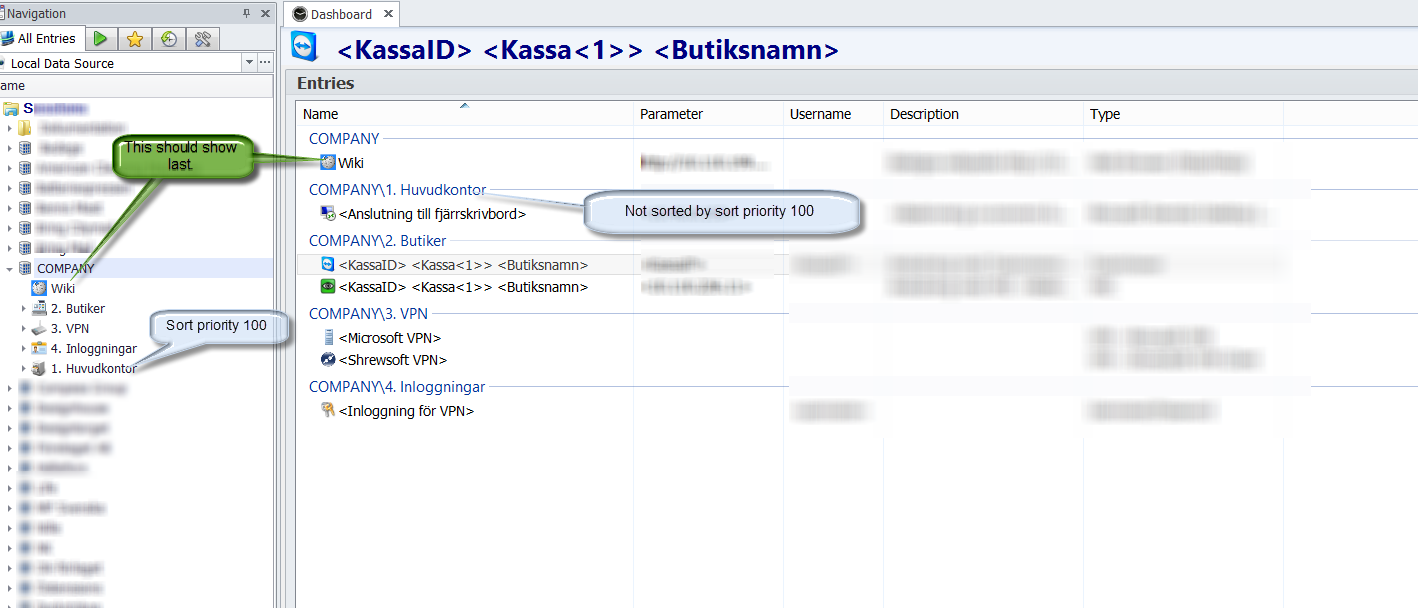
1. Sort priority in a session list is not reflected correctly in the dashboard entries. The dashboard entries seems to not care about the sort priority.
This is making it a very bad user experience, and I have to name the sessions using index numbers for the sorting to make sense. See enclosed Picture.
2. Also the help text of the Sort Priority in advanced settings says: "Change this value to a greater value to show the session before others". That is not true in this version. A greater value shows the session after others... However in older versions this was right. But the advanced setting to use/not use this setting does not change this help text.
3. The "By Design" that the Sort Priority only defines sorting within Groups or within Sessions I believe is not good enough. It is not consistent with the term sort priority. However, it can possibly be lived with....
All in all I think you need to "sort out" :) how to sort sessions in a consistent manner. The session list is after all one of the most fundamental data structures in this Product. You also need to come up with a sorting scheme that is consistent in both session list and in dashboard entries as well as other collections like exported lists etc. Drag and drop sorting or ribbon buttons for "Move Up" and "Move Down" I think should be implemented.
Please keep up your great work. :)
Yours Truly
Magnus Pettersson
IncorrectSorting.png
All Comments (3)
Hi,
I will take a look at the sorting issue you just wrote. However you have to know that sorting is not that simple. In an file base architecture, move up, move down is pretty easy to add but this is not the case here. We have a database based architecture and because of the security management, it's possible that a session is not visible.
David Hervieux
Hello
I absolutely understand that the intrinsic ways of the data structure might make it difficult to implement, otherwise I'm sure this had been corrected earlier.
I think the most important is that the sorting is the same in the Session List as in the Dashboard Entries.
I think interactive sorting could be reserved for administrators if you are concerned with security groups.
I have had great success on other projects in dbms using a sorting integer that has default value of 10000 and increased by 10000 when a new entry is created below last and set to the mean value of previous and next when inserted in the middle. When a unique mean value no longer can be created, ex(10000+10001)div 2 = 10000 the whole list is resorted from 10000, 20000, 30000 etc. But I guess this is obvious...
/Magnus Pettersson
Hi Magnus,
I have fixed the order in the list view. You were also right about the group, the order was reverted. This is now fixed and it's consistent with the rest of the application. I'm planning to add a dialog to reorder the items in a group. I think that this will simplify the ordering process.
Thank you very much for your feedback.
David Hervieux