Powershell CmdLet not recognizing enterprise license

Hello,
I'm trying to run the following code snippet:[color=00FFFF]# Register RDM Snap-inWrite-Host 'Registering RDM PowerShell Module...'set-alias installutil "$([System.Runtime.InteropServices.RuntimeEnvironment]::GetRuntimeDirectory())installutil.exe"installutil "$env:PROGRAMFILES\Devolutions\Remote Desktop Manager\RemoteDesktopManager.PowerShell.dll" Get-PSSnapin -Name *Remote.Desktop* -Registered | % { Write-Host "$_..." -NoNewline; if ((Get-PSSnapin -Name $_ -ErrorAction SilentlyContinue) -eq $null){ Write-Host "installing" -ForegroundColor Yellow; Add-PsSnapin $_ } else { Write-Host "already installed" -ForegroundColor Green }}$dataSourceList = Get-RDMDataSource[/color]
But I get the following warning:
But I have an enterprise site license that is valid until April 1st, 2017:
I'm running on Windows 10 with RDM version 11.6.1.0
All Comments (5)
Hi,
I suspect that the PowerShell does not load the configuration file. Do you use a custom destination for your configuration? Perhaps you could also verify the working folder.
Regards
David Hervieux
The configuration is in the default location:
AppData\Local\Devolutions\RemoteDesktopManager\RemoteDesktopManager.cfg
Do I need to do anything special to load the configuration file? I tried running the cmdlet from both the product installation and appdata and got the same warning.
Hmm... when I run this snippet in ISE I get the above warning, but when I run directly in powershell it works as expected? Is this something you can duplicate?
Hello Zachary,
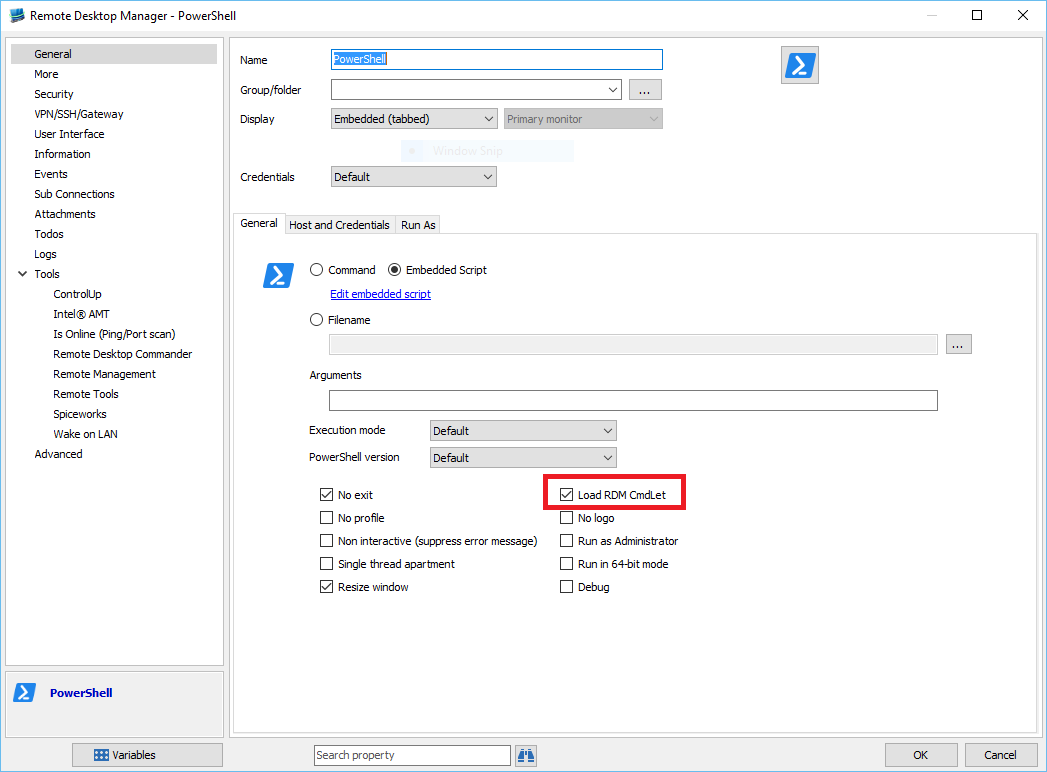
Are you using the PowerShell session in RDM? If so, you don't need to register manually the snap-in. You can check in the PowerShell session settings the option "Load RDM snap-in".
Best regards,
Olivier Désalliers
PowerShellLoadRDMCmdLet.PNG
Olivier,
I was using the standalone powershell ISE. I further narrowed it down to when I run ISE in administrator mode. So for now, it looks like I'm able to get it to work.
Thanks,