Asking for Security Provider Password at every App Start

Hi there,
I've switched to an SQL Server hosted @ AWS as my datasource. I've added a shared Secret in the "Security Provider" Dialog. My Windows Machine works fine, I've entered the shared passphrase one time and that's it. The RDM on my Mac however asks every time I start the app for the Shares Passphrase. Is this by design or is it a Bug?
Regards
Christian
Best Regards
Christian
All Comments (11)
What's your version of RDM Mac?
We save the password in the Apple Keychain which requires admin privilege. Are you using a Mac Administrator user?
Best regards,
Xavier Fortin
3.5.4.2
My User is Admin, I've to enter my Password when something has to be stored securely.
In which Object should it be stored that I can have a look into my Keychain Manager app?
Best Regards
Christian
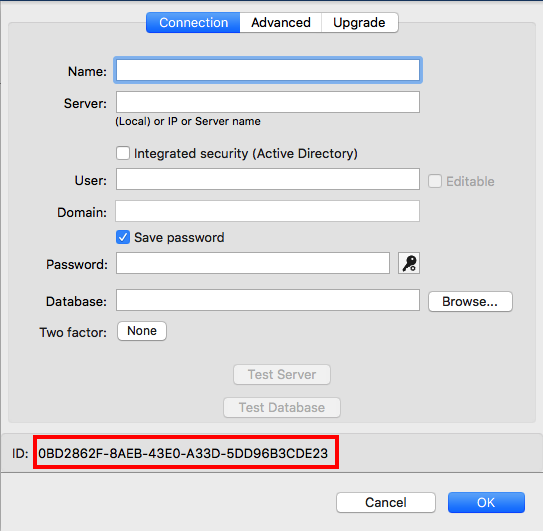
If you open the edition view of your datasource, you should see its ID at the bottom:
In Keychain Access, under the Passwords category of the login Keychains there should be an entry with the DataSource ID as its name (in small caps).
Xavier Fortin
DataSourceID.png
Yep, it's there and RDP App has Access to it.
Best Regards
Christian
And it still asks you for your password regardless? You could try deleting it and reopening your Data Source. It should ask you your password and re-save it in the Keychain (It will requires you to close RDM).
Xavier Fortin
Done. No help, sorry:
- Deleted the entry from Keychain
- Started RDM, entered Passphrase
- Looked into Keychain - entry added again
- Closed RDM
- Started RDM, asked again for Passphrase
Best Regards
Christian
Hi Christian,
There seems to be an issue with the release version of RDM, causing the problem. We'll investigate and come back to you when we find a fix.
Best regards,
Xavier Fortin
Hi Christian,
I might have found the issue. Before I go further, could I ask you something?
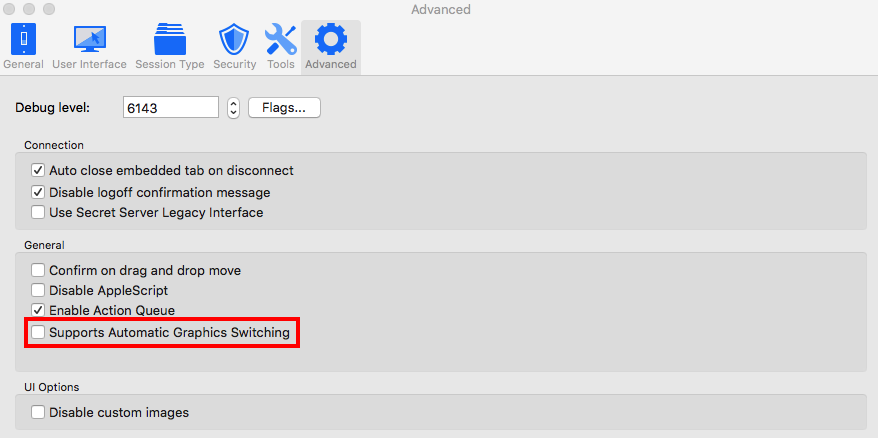
In RDM, in the preferences under the Advanced tab, is the Supports Automatic Graphics Switching option checked?
Best regards,
Xavier Fortin
SupportsAutomaticGraphicSwitching.png
Yes, that Setting is on.
Best Regards
Christian
Then it is the issue. I'm sorry for it.
This option was already questionable when we added it. Since it directly changes a value in the Info.plist file in the application bundle it causes issue with the signing of the application, which prevent RDM from accessing the Keychain.
The only fix I can offer is turning the Supports Automatic Graphic Switching off, closing RDM and download it back and overwrite the one you currently use to ensure the app is no longer tampered with.
Sorry for the inconvenience.
Best regards,
Xavier Fortin
Done. Disabled the Option "Supports Automatic Graphic Switching ", Uninstalled according to http://helpmac.remotedesktopmanager.com/index.html?installation_uninstall.htm, Downloaded 3.5.4.2 from http://mac.remotedesktopmanager.com/Home/Download, installed, configured the Data Source - and Bingo, it works. Thank you!
Best Regards
Christian