OSX Bugs

I've begun setting up RDM for our organization. After 10 minutes this is how the root of our setup looks on a PC:
https://s32.postimg.org/73o09rpv9/Screen_Shot_2016_07_12_at_2_15_04_PM.png
But... unfortunately.... this is how it looks on Mac:
https://s31.postimg.org/3tvr53onf/Screen_Shot_2016_07_12_at_2_15_42_PM.png
Is there any workaround for this kind of issue so that I don't confuse my Mac users? I need the experience to be as similar as possible.
You will note that it has copied the two folders from Credentials, and put those copies into the Sessions section. Note those copied folders are empty. But when I tried to erase them on the Mac, it took out the original folders too (which were full of stuff). So I manually re-entered the stuff, and then looked again an hour later and I had duplicate entries of everything. To summarize: It made a real mess and my experience so far is that the OSX client is not syncing to the database the same as the PC, I'm not sure we will be able to run this on PC and Mac at the same time.
PS: In general the more I play around with RDM on OSX and compare it to the PC version, the more disappointed I am. It needs work. We are getting frequent crashes, do you guys want us to report them? To who/where? If I click the "Send Report" button after a crash it appears to sends it to Apple instead of Devolutions - I suggest this is the first thing that should be fixed.
All Comments (5)
Hi,
The thing is that the Sessions and Credentials sections are in fact one and the same, they're just purposely separated depending on if the entries are connections (under Sessions) and credentials (under Credentials) (You can disable this behaviour in the options). Therefore the folder (let's say) Commonly Used Passwords is the same in both sections but since it contains only Credentials, it shows as an empty folder in the Sessions section. The Windows application seems to go one step further than the Mac by hiding folder that contains only Credentials in the Sessions section (and I will suppose vis versa). We will look it up and try to come up with a fix in the upcoming version.
As for the Send Report sending report to Apple. It is probably because it is a native crash. Alas, there is few things we can do (regarding catching this and changing behaviour) since it usually means it happens on unmanaged code. You can always send an email to support (support@devolutions.net) with a short description of what was being done and the content of the Apple crash window.
Best regards,
Xavier Fortin
Thanks for the reply Xavier, clearly the folder structure should be the same on both platforms. Please do add it to your list of things to do.
Could you specify which setting you are referring to?
Thanks again
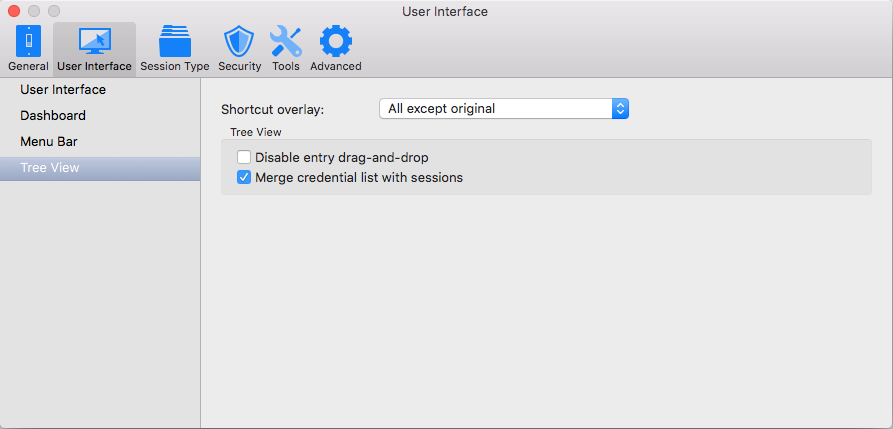
It is the option "Merge credential list with sessions" under Option >> User Interface >> Tree View. In your case, the case should currently be unchecked:
Best regards,
Xavier Fortin
MergeCredentialListWithSession.png
We love the PC version of RDM. But after spending hours in RDM on OSX I have to repeat what I said earlier: it is extremely disappointing and pretty much unusable. It crashes constantly and is nowhere near the PC version, it's almost a different product. It needs work guys.
Hi,
We need your help. We have done a lot of testing during the last week after your email and we are unable to crash the application internally. Could you give us more details about the scenario related to the crash?
Regards
David Hervieux