Keepass not opening databases automatically

Hi,
I´m testing integration between RDM and Keepass.
After install and test the plugins, i create a keepass credential setting database path manually.
I link this credential to a entry and when i open the connection, keepass starts but not opens the database and i have to open it manually.
Is this working method correct?
If yes, what´s the finality of setting the path manually?
Thanks in advance!
All Comments (31)
Hi,
I will confirm on Monday with André. I know that at the begining, the path has been added to differentiate different opened database in KeePass.
David Hervieux
Hi,
Do you mean that you have to re-select the database ?
The plugin open automaticaly the selected database and you have to provide your master password.
Once the database is opened you no longer have to provide it as long as you let it opened.
Regards,
André Sanscartier
Yes,
When I click "Open Session" that has linked the keepass credential, it opens an RDM window (Remote Desktop Manager will now try to access keepass, ...) then Keepass is launched but not opens the keepass database configured on the path of the credential configuration.
I tested keepass integration in windows and database is opened without problems.
I don´t understand what is wrong because i followed all the recomendations on the online help and the demo video.
Thanks in advance.
FYI:
RDM - 8.0.6.0
Keepass - 2.20
Plugin - 2.1.1.0
S.O - Win 7 Pro
Credential configuration - http://goo.gl/iYyvP
Hi,
Does it open other databases ?
KeePass opens all previous opened databases. If KeePass is closed with opened databases, these would be re-opened at the next launch of KeePass. If you cancel these openings (not providing passwords) it cancels the automatic process of the plugin.
Regards,
André Sanscartier
I have configured keepass to not remember the latest database opened, therefore i haven´t canceled any opening.
Simply, keepass starts but do nothing else.
Could you install the latest beta just to be sure? I know that André tried your scenario with our latest version.
David Hervieux
Could you install the latest beta just to be sure? I know that André tried your scenario with our latest version.
David Hervieux
Hi,
Like you I have configured keepass to not remember the latest database opened and I have now the same problem.
It seems that our plugin is not able to open a database if there is not at least already one database opened.
Meanwhile you could let Keepass open a database and we will investigate that issue.
Sorry for any inconvenients.
Regards,
André Sanscartier
Well,
I have tested more features in the host configured with keepass credentials and really the plugin don´t work fine (or i had it bad configured).
If i launch a ping from dashboard against the host, first of all it opens keepas!!
As I think that i have well configured the plugin and credentials, i will wait for next version to test again before integrate it with RDM.
Thanks for all
Hi,
I have made a fix and KeePass is no longer required when you ping. André did a update to the KeePass add-on. This will be released later this week.
David Hervieux
Thanks a lot for your efforts.
When this update is released, i'll test it and give you feedback.
Hi,
Finally did you try the new version of the Keepass plugin?
It needs the new version 8.1 to work correctly.
Regards,
André Sanscartier
Hi again,
I have tested the new version of plugin and RDM and it works fine.
Very good work! ;-)
I saw that new RDM versions has some changes that works different:
- The search box has been moved from Navigation bar to Status bar. Why? Was more useful in the previous version.
- Sort priority of Groups, now sorts inverted.
Where can i post this suggestions?
Anyway, thank you very much for your work.
Hi,
For the search bar, you can move it back to the navigation bar. It's a setting in File->Options
About the group sort priority, this was a bug and it was not following the session sort priority. They have now both the same behavior.
David Hervieux
Hi,
I have tested with version 9.0.0.0 and plugin keepass 2.1.2.0, but the Master key for keepass database is not request. I'll work fine only keepass is already opened.
regards
Hi,
I'll do some tests and I come back to you asap.
Regards,
André Sanscartier
Hi,
It seems that the option "Disable KeePass auto open" has been implemented at the opposite of what it says.
If you unchecked that option (the default is ok) please check it back and restart the application.
But if you didn't change that setting just let me know.
Regards
André Sanscartier
Hi,
i don't find option "Disable Keepass auto open", but i setting in options this value :
"Remenber and Automatically open last used database on startup" unchecked
"Run keepass at windows startup (current user)" checked
"Minimize to tray instead of taskbar" checked
and it works.
Now, My Question is :
keepass must always remain running ??
Thanks a lot.
Regards
Hi,
KeePass is not supposed to be let opened but it can be a way of using it. RDM is designed to let you have the choice.
The option that I refered to is in RDM not KeePass. Could you verify if it is checked or unchecked ?
This way I would be able to help you.
Regards,
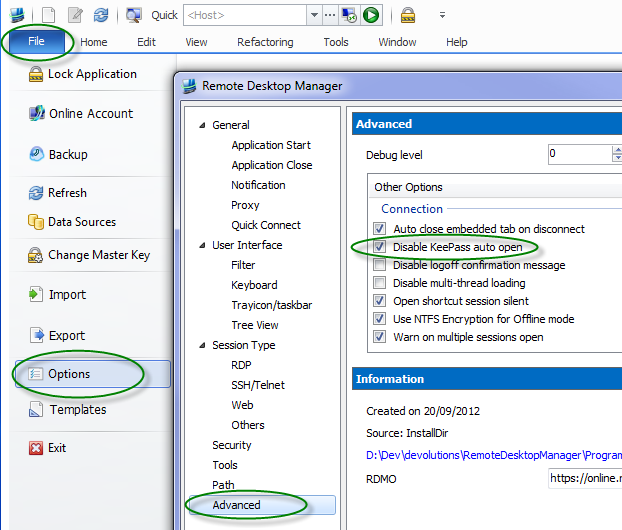
André Sanscartier
KeePassAuto.png
Hi,
Sorry I did not understand.
I tested with unchecked and no error, but the database is not open and not user is forwarder into remote desktop.
Thank a lot.
Regards
Hi,
Then checked it and restart RDM. This option has a wrong description.
It will be fixed in the next release.
Sorry for any inconvenience.
André Sanscartier
Hi,
Sorry, but if i checked i have error :
ArgumentException - Version string portion was too short or too long.
etc.etc.
Regards
But if unchecked no error but no connection to database keepass.
Ho...
Be sure that this will be investigated. That kind of error is unacceptable for us.
Regards,
André Sanscartier
Hi,
What is your configuration please ?
Windows version,
kind of datasource (Xml, Sqlite, MS-SQL, etc)
RDM 32 or 64-bits
Are you able to change other settings in options ?
Thanks,
edited by asanscartier on 10/8/2013
André Sanscartier
Hi,
ok,
Windows 7 64 Bit
RDM 9.0.0.0
RDMS 2.2.6.0
Keepass 2.23
when error appears press Don't Send and i able to change settings in File-->Options ...
Do you like to send error report by press key send ??
Regards
Hi,
I found some informations on the internet about this error ("Version string portion was too short or too long"). This error would be independent of the application and would come from .NET Framework as a list of .NET Framework versions installed on the machine. This string is limited to 256 characters.
Hoping that you know how to use Regedit you can try the following suggestion :
1.Browse to the following location in the registry:
HKEY_LOCAL_MACHINE\SOFTWARE\Microsoft\Windows\CurrentVersion\Internet Settings\5.0\User Agent\Post Platform
2.Export the Post Platform directory for backup purposes
3.Delete any unnecessary .NET CLR keys to get under the 256 character limit - for instance if there are 3 entries such as
1) .NET CLR 3.0.04506.30
2) .NET CLR 3.0.04506.648
3) .NET CLR 3.0.4506.2152
Delete the first 2 keys in this list since they are older versions of .NET 3.0
The idea is to keep newer of each version (2,3,4)
4.Reboot the machine and check the effect.
Hope this helps.
André Sanscartier
hi,
i tested, but not change...
before:
".NET CLR 2.0.50727"=""
"SLCC2"=""
".NET CLR 3.5.30729"=""
".NET CLR 3.0.30729"=""
"Media Center PC 6.0"=""
"InfoPath.3"=""
".NET4.0C"=""
After:
"SLCC2"=""
".NET CLR 3.5.30729"=""
"InfoPath.3"=""
".NET4.0C"=""
Complete the following error:
ArgumentException - Version string portion was too short or too long.
at System.Version..ctor(String version)
at Devolutions.RemoteDesktopManager.Managers.KeePassManager.EnsureKeePassIsPresent(Boolean usingDefaultDatabase, Boolean startProcess)
at Devolutions.RemoteDesktopManager.Frames.CredentialSettings.FreCredentialResolverKeePassSettings.SetControlStates()
at Devolutions.RemoteDesktopManager.Frames.CredentialSettings.FreBaseCredentialResolverSettings.set_SubMode(Int32 value)
at Devolutions.RemoteDesktopManager.Frames.CredentialSettings.FreBaseCredentialResolverSettings.LoadConnectionInControls(Connection connection, FrmConnectionCredentials parent)
at Devolutions.RemoteDesktopManager.Frames.CredentialSettings.FreCredentialResolverKeePassSettings.LoadConnectionInControls(Connection connectionToLoad, FrmConnectionCredentials parent)
at Devolutions.RemoteDesktopManager.Forms.FrmConnectionCredentials.CreateEditorFrame(CredentialResolverConnectionType connectionType, String connectionSubType, FreTypeDescriptorSelection selection)
at Devolutions.RemoteDesktopManager.Forms.FrmConnectionCredentials.LoadConnectionInControls(Connection connectionToLoad)
at Devolutions.RemoteDesktopManager.Forms.FrmConnectionCredentials.FrmConnection_Load(Object sender, EventArgs e)
at System.Windows.Forms.Form.OnLoad(EventArgs e)
at Devolutions.RemoteDesktopManager.Forms.FrmBase.OnLoad(EventArgs e)
at System.Windows.Forms.Form.OnCreateControl()
at System.Windows.Forms.Control.CreateControl(Boolean fIgnoreVisible)
at System.Windows.Forms.Control.CreateControl()
at System.Windows.Forms.Control.WmShowWindow(Message& m)
at System.Windows.Forms.Control.WndProc(Message& m)
at System.Windows.Forms.ScrollableControl.WndProc(Message& m)
at System.Windows.Forms.ContainerControl.WndProc(Message& m)
at System.Windows.Forms.Form.WmShowWindow(Message& m)
at System.Windows.Forms.Form.WndProc(Message& m)
at System.Windows.Forms.Control.ControlNativeWindow.OnMessage(Message& m)
at System.Windows.Forms.Control.ControlNativeWindow.WndProc(Message& m)
at System.Windows.Forms.NativeWindow.Callback(IntPtr hWnd, Int32 msg, IntPtr wparam, IntPtr lparam)
Thank you very much for your efforts.
Your last message with the log is a very good idea. I will do some tests with this.
André Sanscartier
Hi,
Yesterday I made some changes to try to avoid the error.
We have hot fixed the current version and you can download it. However you have to download the zip file because it is the same file version.
http://remotedesktopmanager.com/Home/ThankYou?f=RDMbin
Just replace the files and try it again.
Best regards,
edited by dhervieux on 10/9/2013
André Sanscartier
Hi,
I tried it and it works.
I checked "Ensure That KeePass is running" for convenience.
One last question, I do not work when I press the button,from the action, "Open from Credential Entry ..." and hit "Use My Personal Credentials ..."
Thanks a lot
Regars