restore on new machine

New machine install.
I logged into my cloud account to restore settings/connections.
I show I successfully connected, however, there are no action buttons to do the restore against.
What should be my next step for restoring from my backup?
All Comments (6)
Hello,
What type of data source are you using?
If you log in on your cloud account and you look in the Backup section, do you see a backup file?
Best regards,
Mark Beausejour
I see the data source in the online backup. I don't know how to properly restore this to be my data source. Right now it says I have a local database (sqlite). Shows a red check box next to it for needing password. I have not restored the original, and I have not had any prompt to restore the backup.
I was using windows authentication as additional security originally before I reformatted my drive.
Hello,
We're you using a SQLite data source before?
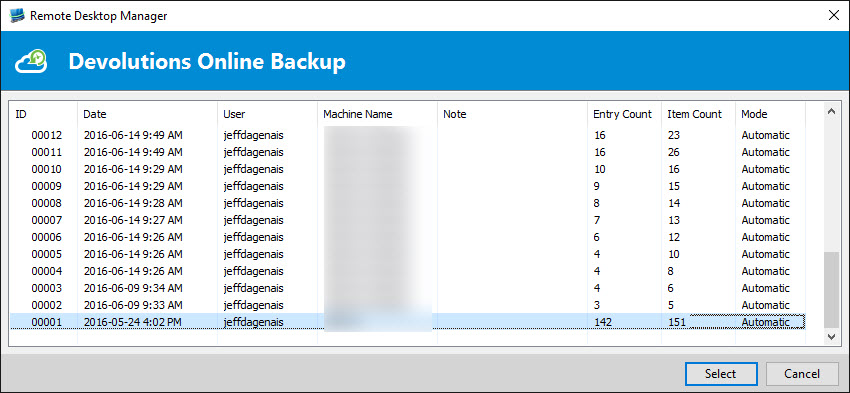
If you click on File -> Backup -> Restore, do you see a screen like the following?
If yes, select the latest backup and click on Select. After, you should see a wizard to help you with the restore of your backup.
Best regards,
Jeff Dagenais
2016-07-07_21-19-59.jpg
Hello,
If you don't have Restore in File -> Backup, click on View Subscription, select your backup file and then the Restore button should appear.
Now, you should be able to restore your data in the SQLite data source that you have if this is the type of data source that you wanted to use.
Best regards,
Jeff Dagenais
Success!
I would suggest improving the restore from cloud backup to be a little more clear, as I found it very confusing. Otherwise, super happy it did the restore of everything correctly! Thanks for your help 
Hello,
Glad that the restore worked!
FYI - We are currently working on a How-to topic that would be available in our online help to help people with the restore.
Thank you for your comments.
Best regards,
Jeff Dagenais