Make Skype for Business calls from the Contact menu
0 vote

Much like the "Mail" function that brings up the Mailto: feature in an email client, it would be great if we could say "Call" and this bring up skype or skype for business and allow us to call?
All Comments (28)
Hello,
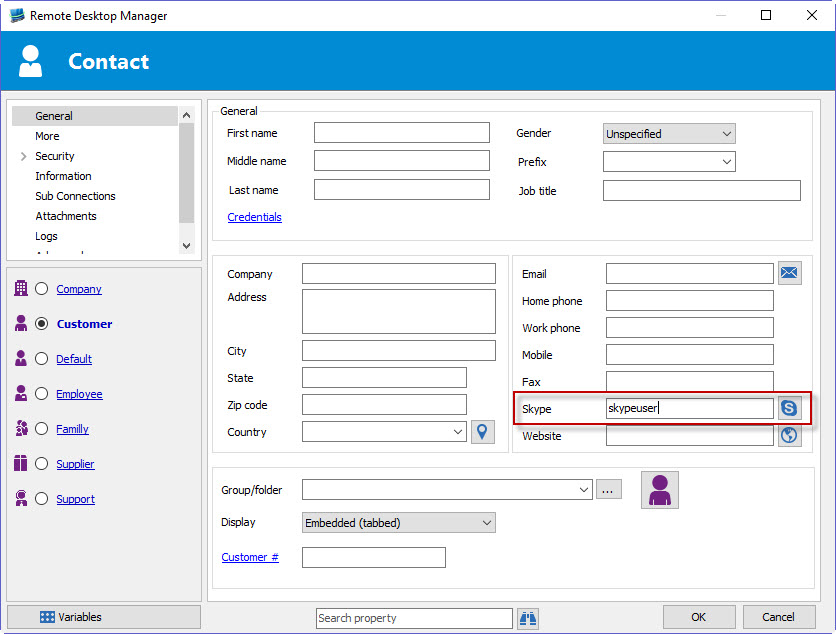
There is a button for this in the contact's information:
I found an issue with it where it will not work if you have no email entered, but this will be fixed in the next version of RDM. If you want to try it out now just enter an email in the email field as well as the skype username, then press the button. This calls skype.exe with the command /call:<skypeID>
Regards,
Hubert Mireault
2016-07-06 15-50-43.jpg
Hello
We're using Skype for Business as well. I am facing an issue with this Skype call. We can call Skype from the Skype button (like your picture), but the call won't start. The exe is newly called lync.exe.
Could this be the issue and what can we do to fix this?
Kind regards
Steffi
Hi,
We will add an option to use Skype for Business.
Regards
David Hervieux
Hello,
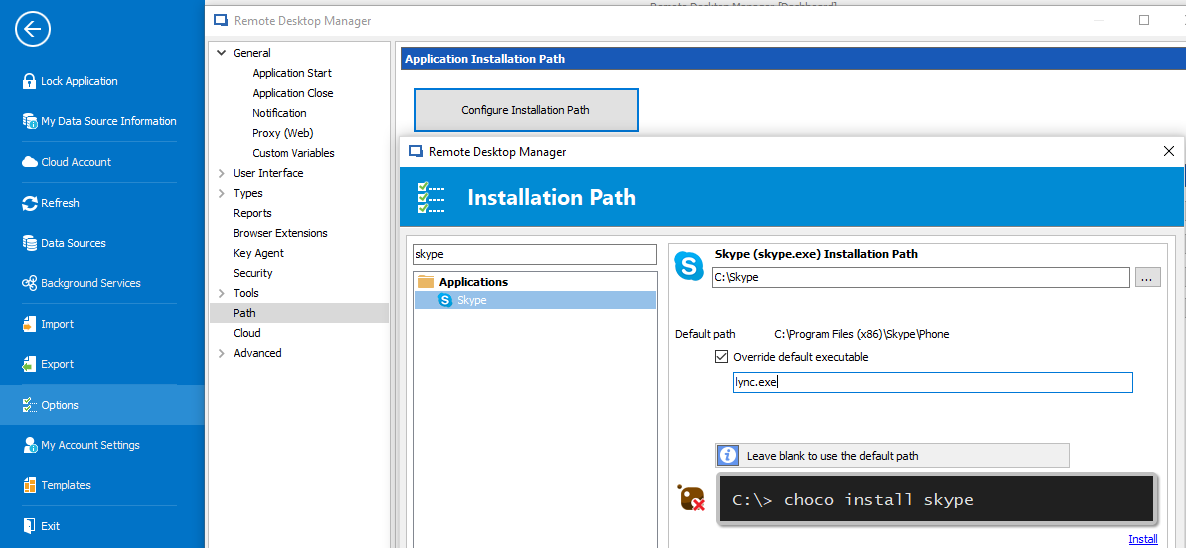
We just checked and you should already be able to open Skype for business (lync.exe). This just requires a small configuration change.
If you go in File > Options > Path and then press "configure installation path" and search for skype, you can override the executable to point to lync.exe:
Could you try that and see if it works?
Regards,
Hubert Mireault
2017-11-24_8-11-50.png
Dear Hubert
I tried this. I can start Skype via lync.exe. The problem is, that the number doesn't get filled into Skype, resp. the call doesn't start.
We have to copy the number into Skype and thats not so cool.
Kind regards
Steffi
Do you know if Lync.exe uses a different command line argument for starting with the number? What is in the code currently is "/call:<phone number>", but maybe it's different with Skype for Business now.
Regards,
Hubert Mireault
Hi Hubert,
indeed the command line parameters a little bit different. :(
For a number call the command line is: lync.exe callto:tel:+1234567
For a SIP call: lync.exe callto:sip:Min.Destens@example.org
(in both scenarios without the / )
Reference (Header is Lync 2013 but it's the same for S4B) ;)
Best Regards,
Min
Thank you Min for the reference! :)
For now we'll only include the phone call syntax since this is what we originally supported with regular Skype. If you override the executable to "lync.exe" it will automatically use "callto:tel:<number>". I think this should work to support both skype and lync.
Regards,
Hubert Mireault
You're welcome! :)
Sounds good, but at the moment the skype button is only available besides the "Skype" field - If we want to call the various numbers, additional buttons besides from Home phone, Work phone and Mobile is necessary, in best case the button is only available when the field are filled out. :cool:
What do you mean? ;)
Regards,
Min
You're right, this is a good idea :)
We'll add the "call with skype" button next to the other phone fields (home/work/mobile) if they are filled in.
Regards,
Hubert Mireault
Thank you!!
:cheers:
Best Regards,
Min
Thanks! After installing the new update it is working!
Thank you!
Awesome, Hubert! Works flawless! :cool:
Just a quick question - Any chance that RDM can handle numbers with blanks in it?
Like: +1 (844) 123 456 - if you try it with braces only +1(844)123456 the handover to lync.exe works - if there is one blank in it, lync recognizes not the correct number and a error appears.
So, is it possible to configure in RDM in the hand over to remove the blanks beetween the numbers? :cool:
Thank you!
Regards,
Min
That's a good idea, since Lync (and I'm suspecting Skype) doesn't support spaces in the command line, we'll make it so RDM trims them when calling the command.
Regards,
Hubert Mireault
Awwwesome!
Thank you so much! :worship:
Regards,
Min
Hi guys,
just to add my 1 cent:
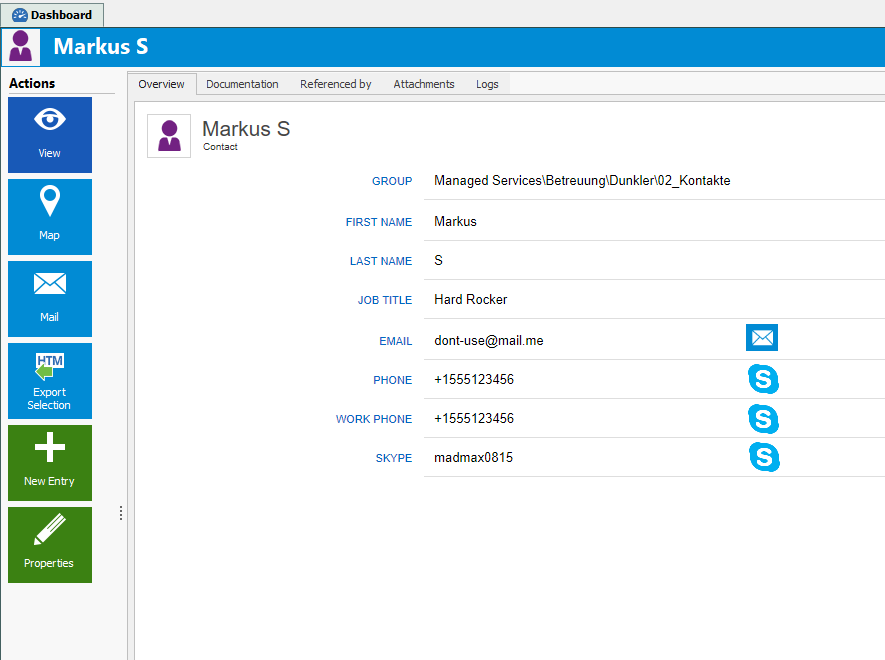
Any chance you can add the skype-butten to overview for direct dial/chat?
Example:
Kind Regards
Markus
======================
contact-ov-suggest.png
Hello Markus,
This would be very useful, it could save a few clicks. We'll add it to our todo list. :)
Regards,
Hubert Mireault
Hi,
i'm on 13.0.6.0 and now overview is not working anymore :\:
is there anything wrong with my setup or with rdm?
Kind Regards
Markus
======================
contact-ov-notworking.png
Hi Markus,
just checked it on our side - here the overview works flawless ;)
Best Regards,
Min
Hi Min,
thx,
I'll try to reproduce.
After reboot it works again ...
Very strange
Kind Regards
Markus
======================
I'm on 13.0.6.0 too and in the connection's overview the Skype icon is greyed out.
So I'm not able to make a Skype call.
However, when I go into the connection's properties - Information - Contact, there the icon is normal and I'm able to use Skype for Business call.
Is this a permissions issue ?
Hello Ron,
Could you post a print screen?
Regards
David Hervieux
Screenshot 1 is from the connection's overview, button is greyed out.
Screenshot 2 is from the connection's properties window
(customers information is blurred because of privacy)
Screenshot_2.jpg
Screenshot_1.jpg
Hi,
This is a bug. I will fix it for the next minor release.
Regards
David Hervieux
Hello guys,
I'm new here.
Is it your policy to only support skype?
I would be very pleased to use my company sip, wich works with callto: links or similar...
Thanks so much.
Onno.
user
Do you have an example on how we should call you company sip?
David Hervieux
Hi David,
The software we use is called "Bria" and is made bij Counterpath.
https://www.counterpath.com/products/
I looked into it a bit and something like this works also (run): C:\Program Files (x86)\CounterPath\Bria 4\Bria4.exe -action=call?to=018889350608
Thank you so much for looking in to this,
Onno.
user
Thank you. I will create a feature request in our system for that.
Regards
David Hervieux