Configurable Welcome Page
0 vote

Hi! I was really impressed with the Welcome page in 11.6. I think it would be great to have something similar that we can make announcements of sorts through? Maybe something that instructs people how to add a new feature or gives us an opportunity to point out what connections have been added etc etc? I know there is the System Message feature - but it is just text based. Something were we could add images or html would be really great.
John
All Comments (7)
Hi
It's a good idea. I will add this to our todo list.
Regards
David Hervieux
Hello,
This feature has been added to RDM and should be available on the next beta.
To use it go in Administration -> Data Source Settings -> General -> Check the "Use web or html welcome page" checkbox.
You can either link directly to a web page or use your own .html document.
If you use a web page you can simply type "http://www.YourWebsite.com" in the textbox.
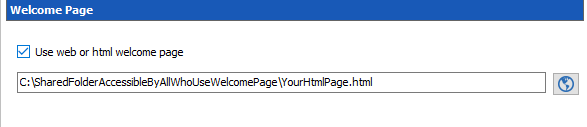
If you use the .html document, you will need to type the Path by hand to a folder all your employees share. Here is an example : C:\FolderAccessibleByAllUsersOfWelcomePage\welcomepage.html
The interface will look like this :
Regards,
Michaël Beaudin
HtmlWelcomeExample.PNG
Hello,
We’d like to integrate our RDM user manual on the Welcome page.
It would be nice if there will be a setting to always display the welcome page at startup, also by users who have already disabled the welcome page.
So that all users have the user manual available in RDM. A configuration checkbox in the datasource settings or a Group Policy would be helpful.
Also noticed when clicking on a hyperlink in a .html page, it will open the new page in an external browser instead of in the welcome page itself. It would be great if links to other webpages will open inside the welcome page tab itself (to make it possible to add a .html user manual with multiple pages).
Best regards,
Leonard
Hello,
We will add a GPO to always open the welcome page at startup, and we will add an option for how to handle the hyperlinks in the welcome page. This is currently the intended behavior, but I can see why it would be useful to navigate within the welcome page itself rather than opening externally. A ticket has been created to track these improvements.
Regards,
Hubert Mireault
Hello Hubert,
The GPO and an option to configure handling of hyperlinks in the welcome page will be great.
Thanks,
Leonard
can you tell me where thsi menu option moved to in version: 2023.2.14.0 64-bit
" Administration -> Data Source Settings -> General -> Check the "Use web or html welcome page" checkbox."
We would like to use this.
Also, is there a way to disable the checkbox allowing the user to bypass the "System Message". We need this to be displayed every time the application is launched (Hi-Trust requirement)
Hello,
You can find the option here: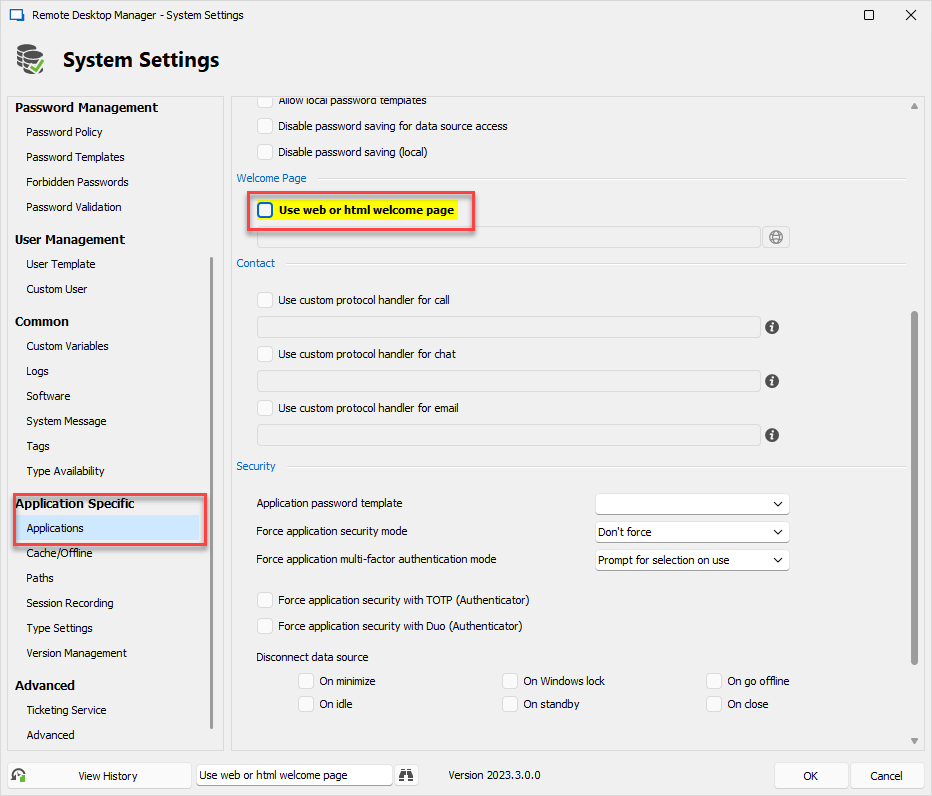
For the system message, at the moment it's not possible to force users to view it. We could add an option for this. I will open a ticket.
Regards,
Hubert Mireault
62b952b1-1af5-4ee7-9a59-9eb5d04703e1.png