Quick Question

What allows a device to have the 'automatic' connection enabled? It draws the username and password from the in device credentials and automatically logs in. It seems, however, to be grayed out for certain devices and not others. I'm wondering what enables the option?
- Matt
All Comments (5)
Hello,
What type of session have you created?
Could you post a print screen please.
Best regards,
Jeff Dagenais
This particular one was a http/https session, forced as an https.
- Matt
Example.png
Hello,
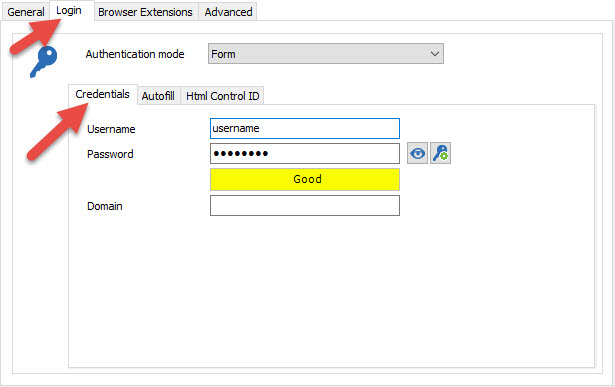
For a Web browser session like you have, you need to enter the credentials in the Credentials tab of the Login tab.
The HTML Control ID tab is not for the credentials. If you click on the Discover button, RDM will try to detect the parameters like the username and password fields on the website. This will help RDM to send the credentials properly to the webpage.
Best regards,
Jeff Dagenais
2016-06-28_16-05-21.jpg
I understand, however after entering the credentials like you said, sometimes in the html page, I was able to hit automatic and if the credentials were entered it would automatically log into the device.
- Matt
Hello,
If for some websites the credentials are not sent, you may try to send them via a typing macro.
Please have a look at this help topic - http://help.remotedesktopmanager.com/howto_typingmacro.htm
Best regards,
Jeff Dagenais