Offline mode issues - Repeating authentication prompts after "Go Offline" + non-writeable search bar
Offline mode issues - Repeating authentication prompts after "Go Offline" + non-writeable search bar

Hi,
Since the last 3 updates I've had the following 2 issues.


We use RDM Server and RDM Enterprise.
I've been struggling with this issue since the last 3 updates. I've tried changing some of the settings in my Data Source, but to no avail.
I tried recreating my Data Source. Didn't fix the issue.
I even completely uninstalled RDM, restarted, manually removed any remaining Devolutions folders in the %appdata% and Program Files folders, ran CCleaner, reinstalled and reconfigured this application, but the same issues still occur.
Could someone shed a light on this issue? Offline mode is basically broken for me.
All Comments (10)
Hello,
What version of RDM are you running?
What version of Devolutions Server are you using?
Best regards,
Jeff Dagenais
I'm running the latest RDM version 11.5.4.0
Devolutions Server is running 3.2.1.0
Hello,
Could you post a print screen (in fact, 2 print screens) of your data source configuration (File -> Data Sources). I need to see the Connection and Advanced tab.
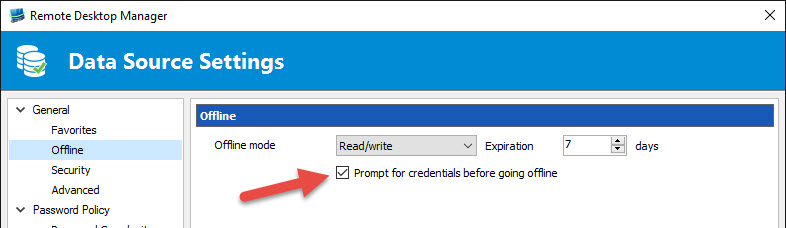
I would also like to know if the Prompt for credentials before going offline option is checked in Administration -> Data Source Setting -> General -> Offline
Best regards,
Jeff Dagenais
2016-06-27_09-51-52.jpg
Hi,
I don't have the tabbed interface like you have. Nevertheless here is my config:

Hello,
Could you go in the Administration tab and click on Data Source Setting. Under General, you will found an Offline section.
Please post a print screen of that window as well.
Best regards,
Jeff Dagenais
Hello,
This section is grayed out for me. Probably because this section is only available for Administrators, which I'm not?
Hello,
You are right, if you are not a RDM administrator, you will not have access to the data source setting.
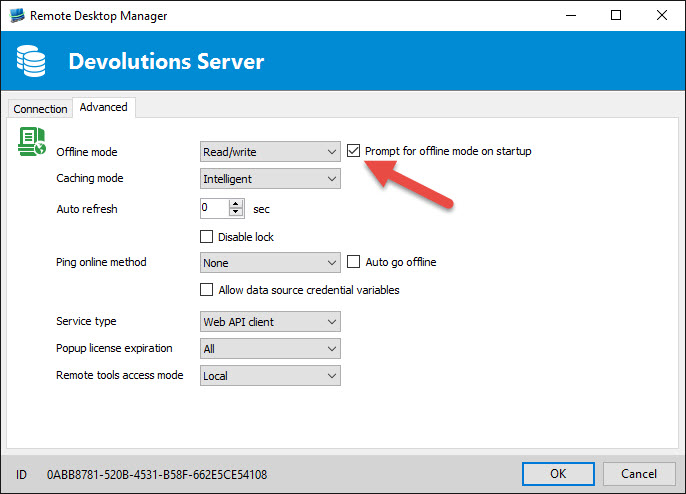
Could you try to enable the Prompt for offline mode on startup in your data source configuration.
With this option enabled, you will be prompted to go in offline mode at startup. By clicking yes, you should go in offline mode immediatly.
Let me know how this work for you.
Best regards,
Jeff Dagenais
2016-06-27_13-59-18.jpg
Hi,
I checked this box and when starting up, I get a new prompt to start in offline mode. If I confirm I want to work offline, the search bar and everything else works like it should.
Thanks for the assistance.
Still it's confusing that the logon prompt has the option to go offline as well. Perhaps that button should be deleted or have the same function as the "work offline" prompt.
Hello,
We have removed the "offline mode" button from the DVLS login prompt for now. The way to go offline will be to use the "prompt for offline mode on startup" option like Jean-François said.
This change is available in the current latest beta if you want to check it out, or you can wait for our next release.
Regards,
Hubert Mireault
Hi,
Everything is working fine now. Thanks for the assistance.
Out of curiosity, I've downloaded and installed the beta as well. I like the features added in this beta version so far.