Password Manager Pro Credentials integration error

Hello,
We are testing RDM in combination with password manager pro. The first configuration, as shown in your tut section, worked fine, I also can choose the correct target and username from it, or manuelly copy the username or password, but when I try opening the session I get on an english installation a german error "Benutzer darf nicht von diesem Host zugreifen" which means, the user isnt allowed to access from this host. I can connect to the target by manuelly entering the credentials, I can get the credentials by clicking on the Credentials PMP funktion, but I cannot access the server using open session when I choose Credential repository -> PMP -> Server/User.
Pictures as attachments.
error.jpg
credential.jpg
credential repository.jpg
All Comments (13)
Hello,
Usually, this error occurred if the computer name that you have entered in the configuration of your API user in PMP is different that the computer where RDM is installed and configure with the API user. Is this the case?
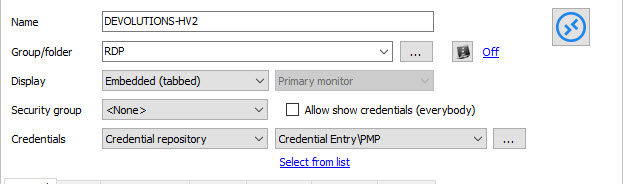
As I understand, you PMP credential entry is configure with the Always prompt with list option enable.
In the configuration of your session, if you don't select a specific entry, are you prompt with the list and able to connect by selecting the appropriate credential?
Best regards,
Jeff Dagenais
2016-06-15_08-56-05.jpg
It works with manuel choosing. It happens when it is preconfigured.
Now if I try to open then Session I get enother Error:
ArgumentOutOfRangeException - Index was out of range. Must be non-negative and less than the size of the collection.
Parameter name: index
at System.Collections.ArrayList.get_Item(Int32 index)
at System.Windows.Forms.FormCollection.get_Item(Int32 index)
at Devolutions.RemoteDesktopManager.Managers.UIManager.get_OwnerForm()
at Devolutions.RemoteDesktopManager.Business.CredentialPMProResolver.Execute(CredentialsConnection credentialConnection, Connection owner, CredentialRepositoryDestination destination)
at Devolutions.RemoteDesktopManager.Managers.CredentialTypeManager.ResolveCredentials(CredentialsConnection credentialConnection, Connection owner, CredentialRepositoryDestination destination)
at Devolutions.RemoteDesktopManager.Managers.CredentialTypeManager.GetCredentialResolved(Connection connection, String credentialConnectionID, CredentialRepositoryDestination destination)
at Devolutions.RemoteDesktopManager.Managers.CredentialTypeManager.PrepareCredentials(Connection connection, String credentialConnectionID, CredentialRepositoryDestination destination, String privateVaultSearchString)
at Devolutions.RemoteDesktopManager.Managers.ConnectionManager.Prepare(Connection connection, Boolean applyCredentials, Boolean applyAlternate, Boolean applyVPN, Boolean copy, Boolean applyOverrideCredentials)
at Devolutions.RemoteDesktopManager.Managers.ConnectionManager.OpenConnection(Connection connection, OpenConnectionParameter parameter)
at Devolutions.RemoteDesktopManager.Managers.ConnectionManager.OpenConnections(Connection[] connectionList, OpenConnectionParameter parameter)
at Devolutions.RemoteDesktopManager.Managers.ActionManager.c2d3a897d165d9e56a0d53f388986ac51(Connection[] cfabc0254f46d7d8ae5a71db9e5a0b5b5, OpenConnectionMode c602973c05c2f5870e41c508b048b13c5, IConnectionSource c5b7a41272702648f46cf77ee6b3a92cb)
at Devolutions.RemoteDesktopManager.Managers.ActionManager.OpenConnections(Connection[] currentConnections, OpenConnectionMode openConnectionMode, IConnectionSource source, Boolean checkOpenedConnection)
at Devolutions.RemoteDesktopManager.Frames.ConnectionViews.FreBaseConnectionView.OpenConnection(Connection[] currentConnections, OpenConnectionMode openConnectionMode)
at Devolutions.RemoteDesktopManager.Frames.ConnectionViews.FreConnectionTreeListView.cbad026f0443b4db7579b28d004e7ca8d(Boolean ce86b9cea9309620f2c628f54915f70f5)
at Devolutions.RemoteDesktopManager.Frames.ConnectionViews.FreConnectionTreeListView.ca390b353885c14c1b462fd0a75363620.cc01875c85cc41d29b721f72e6758884f()
at Devolutions.RemoteDesktopManager.Managers.ThreadManager.caa310ce107ed0c993f3d034df6d00336(Object c19f185fd70cefc696ba148af1c4faf54, EventArgs cf1018bb83ec7debd818319fd3cb4844e)
at System.Windows.Forms.Timer.OnTick(EventArgs e)
at System.Windows.Forms.Timer.TimerNativeWindow.WndProc(Message& m)
at System.Windows.Forms.NativeWindow.Callback(IntPtr hWnd, Int32 msg, IntPtr wparam, IntPtr lparam)
Hello,
If you select your PMP credential entry and click on Copy Username, is it working?
Best regards,
Jeff Dagenais
Works fine. Attached pictures.
clipboard.jpg
PMPcredential.jpg
Hello,
Does the error message appear everytime that you launch the RDP session?
Best regards,
Jeff Dagenais
If it is configured like in picture credential repository.jpg
Yes. Everytime
Any Ideas? Tried it on my local system and it worked, it doesnt work on the terminal server.
Hello,
I was not able to reproduce your issue, because I was testing it locally.
I didn't know that you we're on a Terminal Server.
I will test this on a terminal server and get back you.
Thank you for the information.
Best regards,
Jeff Dagenais
Hello,
I don't know if you have found the following topic in our online help about Terminal Server
http://help.remotedesktopmanager.com/installation_terminalservices.htm
This will help you with the configuration of RDM in a Terminal Server environment.
Best regards,
Jeff Dagenais
We used your installation guide for it. And sorry that I forgot to mention it :(
Using it on Terminal Server works fine, but every user gets the same error.
Got 2 new Errors :( First it tells us ME User credentials dont exist anymore. Then I have to view the Credentials and click OK, and it works again. And when trying to connect to a server, the credentials from PMP are "Administrator" but the Remote Desktop Manager tries to connect with DOMAIN\Administrator, where the domain is the domain from the Terminal Server. So the connection doesnt work, because the Target is at another domain, and should use the local Administrator.
Hello,
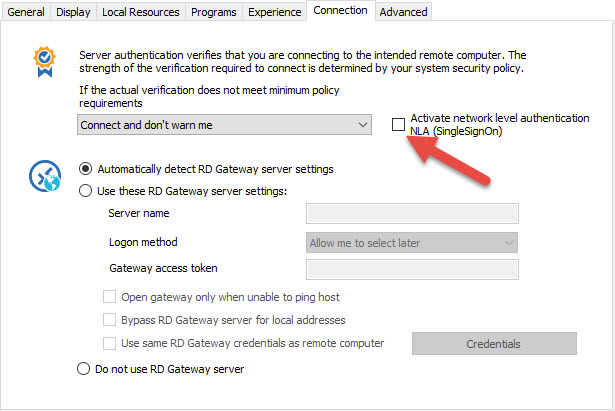
In your RDP session, could you try to uncheck the NLA option in the Connection tab
Best regards,
Jeff Dagenais
2016-06-17_11-44-17.jpg