scripting with remote powershell sessions

Hi,
I've set up remote powershell sessions for a group of servers and am now trying to run scripts against them all, but the various methods I've tried so far have failed due to authentication errors.
I have Windows Remoting setup in an untrusted environment, so all servers have their own certificates and authentication is handled by the local machine and not a domain. I can use the following command from PS to obtain a remote session
>Enter-PSSession -ComputerName my.computer.name -UseSSL -Authentication Negotiate -Credential (Get-Credential)
As of RDM 11.5.5 the "PowerShell Remote Console" session type works fine with this.
So, what I'd expect is I'd open or select one or more PowerShell Remote Console sessions, Right click on them, go to Macros/Scripts/Tools and choose one of the Macros or PowerShell Remote scripts I've setup.
If I choose a macro, a notification appears to tell me that it's executing my macro on the powershell session, but nothing appears in the powershell window, not that a macro would be particularly useful in my case here as I have a 15 line powershell script I need to run.
If I choose a Powershell Remote script a new powershell window appears with errors telling me that the user name or password is incorrect... So to see what's happened I type in the following in the new powershell window
>(h)[-1].CommandLine
and get the following returned
$Host.UI.RawUI.BufferSize = new-object System.Management.Automation.Host.Size 192,4000;
$Host.UI.RawUI.WindowSize = $Host.UI.RawUI.MaxWindowSize;
$Host.UI.RawUI.WindowSize = new-object System.Management.Automation.Host.Size 192,84;
cls;
$rdm_script = [scriptblock]::Create([IO.File]::ReadAllText("C:\Users\xxxxx\AppData\Local\Temp\RDM\some.guid.ps1"));
$rdm_pssession = New-PSSession -ComputerName "my.computer.name"
Invoke-Command -Session $rdm_pssession -ScriptBlock $rdm_script;
Enter-PSSession -Session $rdm_pssession;
No credential has been set, nor has the UseSSL flag been used as part of the connection.
Am I doing something wrong here, or is it not possible to use authentication here?
Thanks
All Comments (5)
Hello,
There are two ways to execute the PowerShell Remote script over a session. You can run RDM with elevated privileges or you can set the Run as Administrator option into the PowerShell Remote script session.
Best regards,
Érica Poirier
Hi,
We will try to improve the powershell with the UseSSL
David Hervieux
Hello,
This feature is now available in the latest beta version (11.5.8.0) which can be downloaded here http://remotedesktopmanager.com/Home/Download#beta
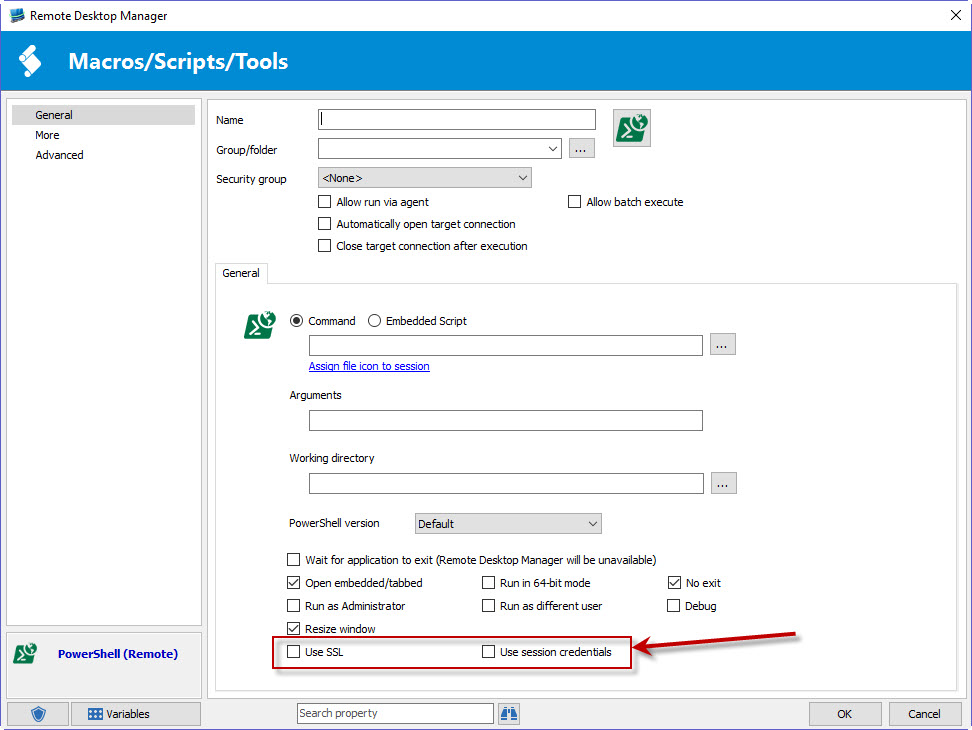
Look for the "Use SSL" as well as "Use session credentials" in the entry's settings:
"Use SSL" will add -UseSSL in the command and "Use session credentials" will add -Credential <Credential> where <Credential> is created by using the credentials of the session you executed the macro on. So if you execute the remote powershell on an RDP session, it will take the RDP's username and password for the credential.
I think this should fix your issue. Could you give us some feedback after testing it out? Thank you.
Regards,
Hubert Mireault
2016-06-20 13-11-10.jpg
Awesome, thank you!
It works fine with if the user name and password are set directly in the session, or when it's directly in user specific settings for the session, but if it uses a "private vault credential entry" the user name is set, but the password is blank.
Regards
Ian
I can't seem to reproduce that issue, I tried with both directly putting the credential in as well as using the private vault (either as a user specific setting in the "all entries" section or directly as a private vault credential in the private vault itself) but it works in all the cases I've tried.
Could you give us a description of your setup that fails so we can try to reproduce it? Is there any error in powershell? What datasource type are you using?
Thank you.
Hubert Mireault