Permission question

Hi there
I have question about security group / folder rights. I think one picture says more than thousand words:
How i can achieve this?
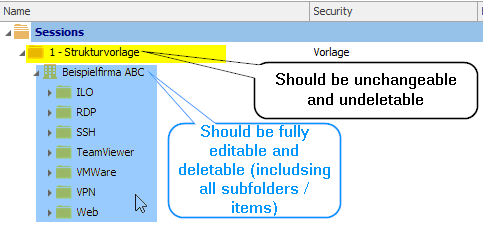
RemoteDesktopManager_2016-06-10_20-44-08.png
All Comments (7)
Hi,
This is something that we don't support for now. We already have a feature request for that.
Sorry about that
Regards
David Hervieux
That is really too bad, but thank you for the statement.
We have this kind of setup.
What we did is having two security groups one for the upper folder and one for the folder and items below.
Then create roles in which the security group for the upper folder only has view rights and the security group for the lower folder and its items has all rights (i.e. fully editable).
Assign these roles to the users requiring access (and remove all direct security group assignments to these users with overlapping rights).
and finally assing the security group for the upper folder to that folder and assign the security group for the lower folder and items to that folder and items.
Thank you very much for your idea. Is it really necessary to give every single item a security group? This would be an administration nightmare.
Actually if the folder has a security group assigned all user that have no rights at all for this security group (either directly or via roles) won't see the folder nor its items in it so you don't need to assign it to every item. When you move the item to another folder however (for example by accidentely drag and drop - Ive disabled that for all users :-)) this means everybody that have assigned rights for the other folder will be able to use it as it has no security group assigned. If you are aware of this then you can work like this.
RDM however also has a batch edit feature - you can select multiple items, select the correct batch edit option (in the right click menu) and you appply the change on all items in one go
I even made a video on this that is somewhere on the RDM site (sorry I don't have the direct at hand).
I don't know what im doing wrong, but it doesn't work... :(
Folder structure:
Location (First folder in root) (User has only view rights here), then:
-ClientServer (User has full edit rights here)
--Kunde (no rights set)
I followed your guide, but the user gets for every folder and item under the folder Location "You don't have Edit access rights Location". Even he has full privileges on this folder.
You are correct. I have tested it again and it does not work anymore (it has worked in one of the previous versions as far as I can remember - or I have tested it incorrectly at that time).