CTRL, SHIFT and arrow on 2nd monitor

Hi,
I have the version 11.5.2.0 64bit running on Win 7 with 2 monitors.
I run RDP Manager on my right monitor and If I am in a spreadsheet or any application on the left monitor and use CTRL + SHIFT + Arrow then while the cursor moves in my spreadsheet, it also moves the focus between the different tabs I have open in RDP Manager.
All Comments (21)
Hi,
You can disable those shortcuts in File->Options | UI->Keyboard
Regards
David Hervieux
Hi,
I think RDM should not react on keyboard input when it doesn't have the focus. Have the same issue here.
I can't even input an @ oder | in other applications any more, as the Alt Gr seems to be grabbed by RDM sometimes.
regards
Alex
Could you verify which mode is set in the keyboard options? Is it default or global?
Regards
David Hervieux
See attached
2016-05-30 14_31_49-.png
I don't see the Navigation section in the print screen but just the General section.
Regards
David Hervieux
Sorry David, I'm confused. Not sure what exactly you are looking for. Here is a full RDM screenshot.
2016-05-30 15_40_33-.png
Hello,
In File -> Options -> User Interface -> Keyboard, there's a Navigation button.
Could you click on that button and post a print screen of that section please.
Best regards,
Jeff Dagenais
There you go
2016-05-30 16_24_27-Remote Desktop Manager.png
Any idea?
Could you change the value for When not in session?
Regards
David Hervieux
Change to what?! Sorry for my stupidity.
Hello,
Please have a look at my print screen. You can select the when not in session value in the first column
Best regards,
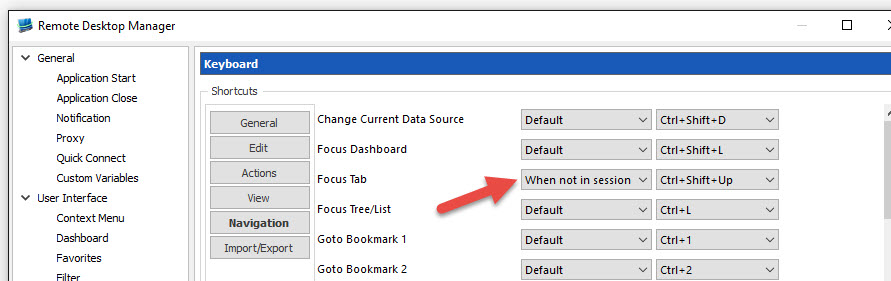
Jeff Dagenais
2016-06-08_08-07-03.jpg
That seems to do the trick, thanks!
Is this a change in a recent version because RDM keeps popping up on some key sequences when I'm pretty sure it's not in focus. Dual monitors as well.
@Rob Nicholson
Could you elaborate on your issue please.
Best regards,
Jeff Dagenais
Hi there,
Not 100% sure - all I know is that just now, my remote desktop connection to my home Windows server has just undocked from RDM (Free version BTW) and has switched into a normal RDP session. It's happening quite a bit so I'll eventually I'll twig what key sequence it is. It's definitely something new - have been using the free version at home for a month or so now.
Cheers, Rob.
Hello,
Yes, you would need to retrieve the sequence and then maybe do some changes in File -> Options -> User Interface -> Keyboard.
Best regards,
Jeff Dagenais
Hi,
I am having exact same when using RDM.
It seem to be picking up key strokes when it does not have focus
for example when I am using Outlook on my local computer and need to highlight a word in the editor using CTRL+SHIFT and Left arrow key
RDM suddenly switches tabs
Also opens up a selected connection in navigation bar when I use a shortcut in another application on my local computer
Kind of irritating Feature/Bug, not sure this is by design and I do not get why it would be
writing an email and suddenly another program(RDM) executes an action
Best regards,
Valdi Hafdal
Hi,
It seems to be a default shortcut in the third party we use. I have posted a question on their forum to learn how to remove it. I will let you know as soon as I get the information.
Regards
David Hervieux
Well at least it wasn't me going mad ;-)
Hi,
It's not an issue with the third party. We have already disabled the shortcut but I've found that we have a shortcut in the application. You can remove it:

David Hervieux
ControlNext.png