User cannot connect SQL datasource after AD rename

Hello,
I have a Problem with one of our RDM users. We're using RDM with MSSQL Express as data source and AD integrated logins.
We renamed the user's AD login name about two weeks ago without any issues. This week we rebooted the SQL Express Server, and after that the user receives the following errors when starting RDM.
I already checked the seurity settings in the SQL server and renamed the AD user there. But I cannot find a way to rename the AD user in RDM.
Do I need to delete and readd the user in RDM? If so, what happens with the user's personal settings and the private vault?
Regards
Marc

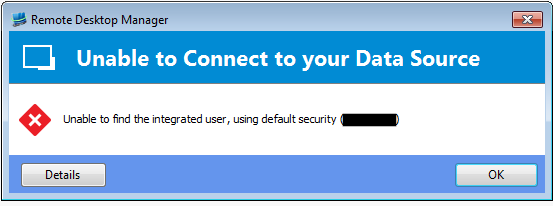
Screenshot_2.png
Screenshot_1.png
All Comments (3)
Correct, deleting the user in RDM will result in the loss of the personal settings and such.
FYI, we don't support since it's such a corner case but we should be able to do it manually. We have three components here (SQL login, SQL user & RDM user).
You've said:
I already checked the security settings in the SQL server and renamed the AD user there.
So I'm assuming you mean the SQL login, if not run the following:use master;GOALTER LOGIN [domain\oldname] WITH NAME = [domain\newname];GO
Rename the SQL useruse database_name;GOALTER USER [domain\oldname] WITH NAME = [domain\newname];GO-- make sure that the renamed user is mapped to the renamed login-- not sure if this is needed but just to be safe, it might have been-- done with the login rename (step #1)ALTER USER [domain\newname] WITH LOGIN = [domain\newname];GO
Rename the RDM useruse database_name;GOupdate [dbo].[UserSecurity]set Name = 'domain\newname'where Name = 'domain\oldname'GO
Does that resolve the issue?
Stéfane Lavergne
Thank you for your detailled explanation.
I've run all three scripts in SQL Manager.
The user can now open RDM without any errors, so the issue ist resolved.
Best regards
Marc
Marc,
Good to here, thank you for the response.
Best regards
Stéfane Lavergne