Ugly blue bar showing up on Putty Sessions

Since upgrading from 11.1 to 11.5 I am now seeing these ugly blue bars on every SSH session.
There is a single button, "copy all text", and I cannot find a way to remove this bar.. It never showed up before, I am not sure why something like this would get enabled on all my connections but I need a way to remove it.
All Comments (12)
Hello,
If you are talking about a "Putty (Telnet, SSH, RAW, rLogin) entry, set to use Putty, I cannot reproduce.
Please include a screenshot
Best regards,
Maurice
Screenshot
Capture.PNG
I believe this is not putty, its our native SSH Shell type, right?
I will assign this to a dev, I'm not aware of a way to hide that toolbar.
Maurice
Yes, its the internal PuTTY implementation.
Thanks for submitting this, this bar is a terrible waste of space for a single button. It't not like there weren't already options to save the session text..
Hi,
We will add an option to hide the bar but eventually we plan to add more features in it.
Regards
David Hervieux
Is there somewhere where the old version can be downloaded? I cannot work with this bar taking up space and sticking out with the ugly bright blue color.
EDIT: nm, I found a download on my system for v11.1 still
Hello,
Previous version of RDM can be downloaded here - http://remotedesktopmanager.com/Home/PreviousVersion
Best regards,
Jeff Dagenais
That was a fast turn around for this fix, I honestly wasn't expecting this so soon!
Thanks for getting this sorted out so quickly. Color me impressed..
Thank you for your feedback. We can fix it quickly we like get it done.
Regards
David Hervieux
Sorry to bump an old thread, but is there a way to set a connection to never show that bar in the first place?
Hi,
Yes you can disable it in File->Options
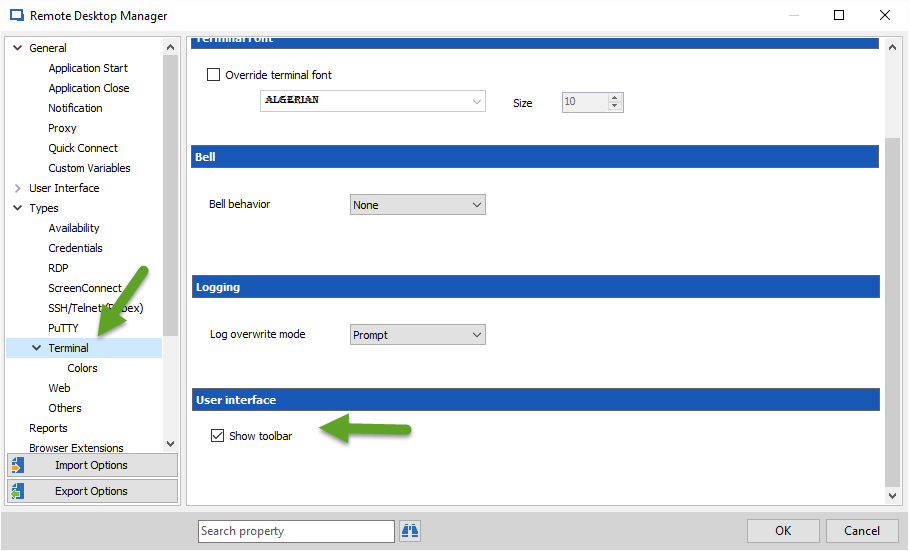
David Hervieux
Toolbar2016-07-22_7-42-06.png
Thank you, this is exactly what I was looking for.