Cannot Copy Paste Files between Mac and Remote Desktop Manager host connection to Windows Machine.
Cannot Copy Paste Files between Mac and Remote Desktop Manager host connection to Windows Machine.

I have created a Host Connection to one of the Windows VM using Remote Desktop Manager, But unable to Copy and Paste Files from Mac to this VM machine. Can you please help me in fixing this issue. Thanks
All Comments (1)
Unfortunately, the copy of files between a Mac and a Windows Remote computer is not supported. You can only copy and paste text.
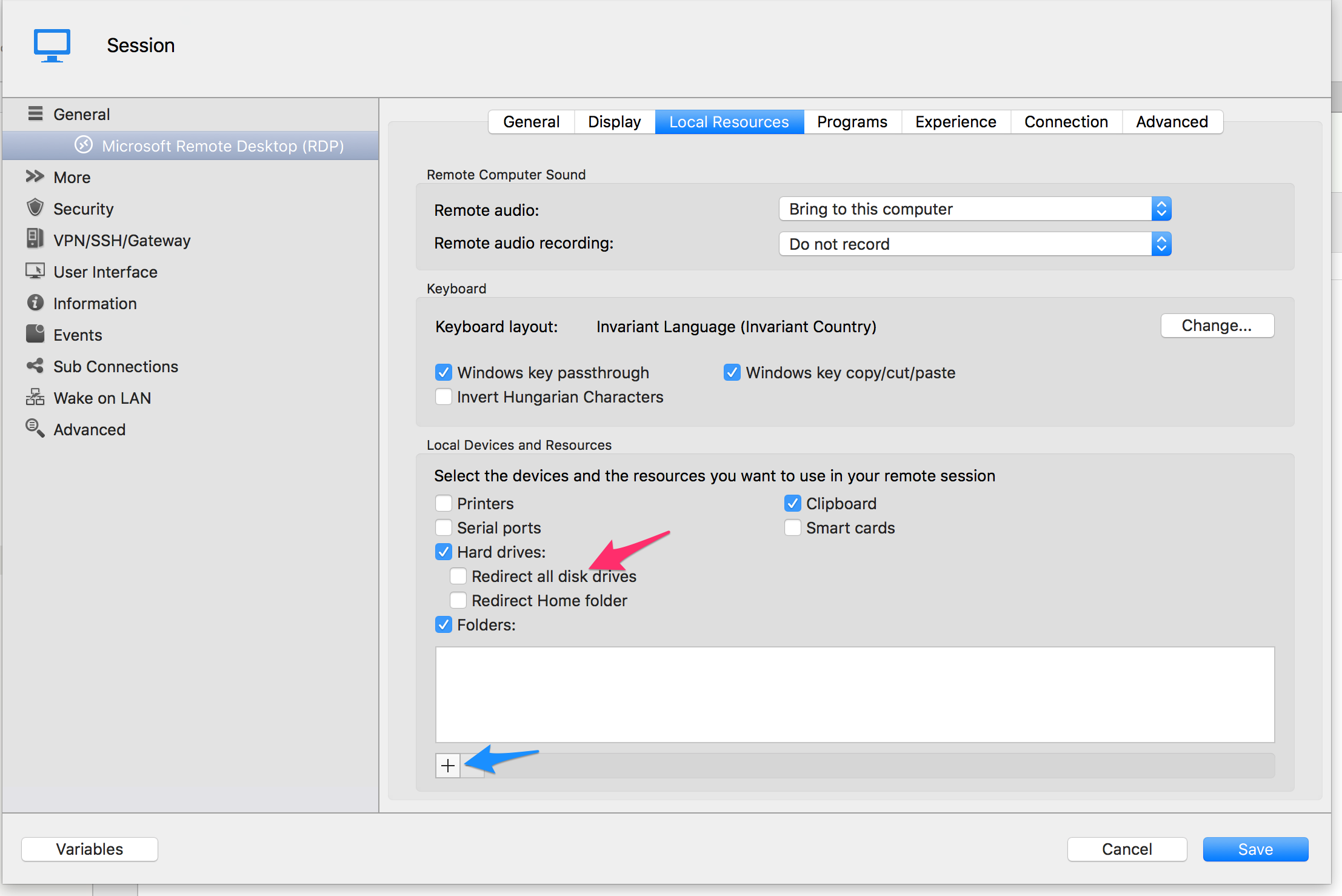
If you want to have access to files from your Mac on your remote computer I would suggest to redirect a folder.
You can do this by redirecting a hard drive or a folder. This is configured in the Local Resources tab. Simply check the hard drive (red arrow) check box and the one fitting your needs under it. If you only want a specific folder to be redirected click the + (blue arrow) under the folder list and select the folder you want to be able to access from your remote session.
Tell us if you need anymore help with that.
Benoît Sansregret
RedirectFolder 20160510.png