Password inheritence

Hi there
I don't understand fully the way of security/password handling/inheriting within RDM.
What I understand:
For private credentials you have to create them first before they can be used for connections, because when I right-click on a connection and add credentials this is automatically saved in the public vault. Correct?
So I created my private credential and I want to use them in different folders and/or connections under the "all entries" tab. Therefore I change the "credentials" in the properties from default to .... "Private fault search" on a folder - but then it shows me my credentials, but I want to use one specified credential and not everytime to choose one. How is this possible?
If I choose "My personal credentials" I don't see anything.
So this set on the folder level I inherited this to the connections inside via batch editing and choose "inherited" - but this isnt' working either for private vault credentials.
I'm confused. I have 3 private credentials and I want to specify a folder with connection inside to use privat1-credential and another folder with connections inside to use private2-credential, e.g. How do I do this?
Thanks
Udo
All Comments (11)
Hello Udo,
If all the sessions under the same folder are using the same credential, you will configure your sessions to be Inherited and you will configure your folder with the generic credential that everybody in your organization should use.
If you want to use your own credential to connect, you will use our User Specific Settings feature to override the credential that you have saved at the folder level.
Please consult this help topic for more information on the User Specific Settings feature
http://help.remotedesktopmanager.com/edit_userspecificsettings.htm
Best regards,
Jeff Dagenais
Thank you!
Using my own credential I cannot use the inherate feature? Meaning I configure User Specific Settings on a folder and all connections in that folder inherit my own credential. Is that possible?
Br
Udo
Hello,
Absolutely!
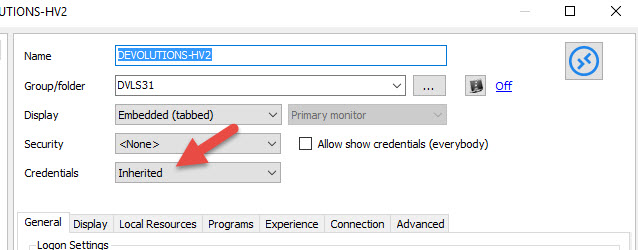
In your sessions, select Inherited in the Credentials section
After, you just need to enable the User Specific Settings at the folder level.
With this configuration, your sessions will use the credentials that you have configured in your User Specific Settings.
Best regards,
Jeff Dagenais
2016-04-28_09-18-31.jpg
Ok, but this settings is only valid for my user? Another user can use his own credentials for a folder?
Background:
We have connections to customers, there all of our admins use the same user.
In our own environment every admin uses his own credentials to conncet to differnt servers.
Hello,
Yes, the User Specific Settings feature is personal to you. So your other users would need to enable the User Specific Settings to use their own credential to connect.
Best regards,
Jeff Dagenais
Hello,
Is it possible to enable inherited credentials in Bulk?
I have enabled it on the folder level, but the folder contains hundreds of individual server connections...
Thanks,
Chris
Hello,
Yes this is possible with our Batch Edit Feature.
For more information, please consult http://help.remotedesktopmanager.com/edit_batch.htm
Best regards,
Jeff Dagenais
Thanks Jean-Francios,
Can you confirm something else for me? I have set user specific credentials at the folder level. and I have batch edited the session objects to inherit credentials, which has solved my problem. Will other users accessing the database experience the same inherit credentials settings on the connections? And if another user changes that setting from their client, will it their change be reflected on my client?
Hello,
Yes, other users will benefit of this settings on their connections because you are all sharing the same data.
If someone change this settings, after a refresh, yes, you will also see this change on your computer.
If you don't want that to happen, maybe you would need to restrict the edit permissions to some specific users only :)
Best regards,
Jeff Dagenais
Hello Jean-Francois
So to restrict the edit permissions you mean within the RDM-app itself right? So is there an overview-table for the rights management?
Thanks
Udo
Hello,
Yes, you restrict the access through the application itself via the Administration tab.
There's no overview table to see if all users as the edit permissions checked in the Rights section as example. You would need to edit the user to verify this information.
Best regards,
Jeff Dagenais