Offline mode question on startup - show available data sources
Offline mode question on startup - show available data sources
0 vote

Currently you have to guess what the last data connection was when you start up and have "ask for offline mode" enabled.
I think it would be better if we can choose to what data source we want to connect offline or online.
This way we don't have to wait to have it timeout on the wrong data source.
All Comments (5)
Hello,
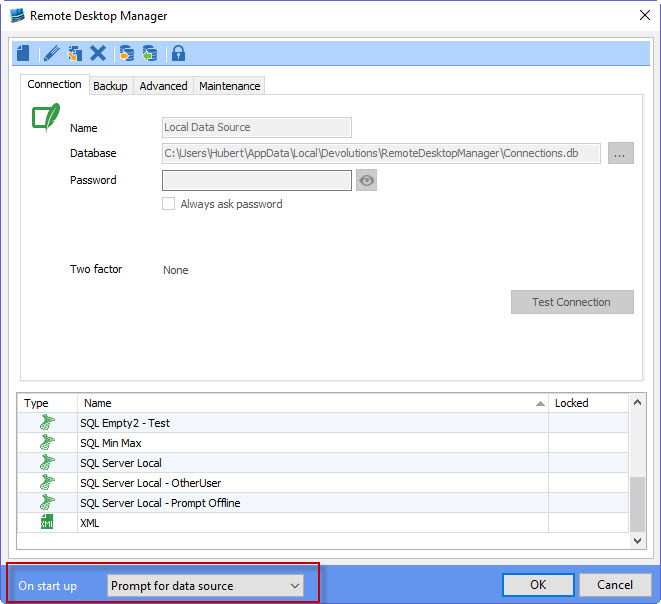
Right now in the datasource list, there is a start up option for "prompt for datasource" which should allow you to connect to the datasource you want on startup of the application.
Can you see if this works for you?
Regards,
Hubert Mireault
2016-04-26 13-34-07.jpg
This works but it adds yet another dialog.
I was thinking more of a single dialog where you can perhaps choose online / offline per data source
Per data source (or all sources but grouped) check if there were open sessions if you want to open them again.
Now:
- choose your data source
- no connection -> offline password (no retry online button?)
- last sessions
- update rdm dialog if you have it enabled
And one dialog blocks the other and hangs while connecting so you can't click them away.
Thanks for the feedback Wesley. We'll keep this idea in mind since it is definitely very interesting.
For now, we're going to add an "online" and "offline" button to replace the "ok" button in the datasource selection menu, which would allow you to connect directly offline without having to try first, fail, and then click to go offline. This should help in certain use cases, but we'll definitely try and implement what you're asking further down the line.
Regards,
Hubert Mireault
Do you mind adding a retry online button on the offline password dialog please?
I also have the following problem:I have password enabled for offline mode and correctly filled it in but when I want to go online and for some reason it does not work and RDM wants to go offline again I have to reenter the password.
So it would be nice to not have to reenter the offline password to stay offline.
It might be a little tricky, we'll have to check.
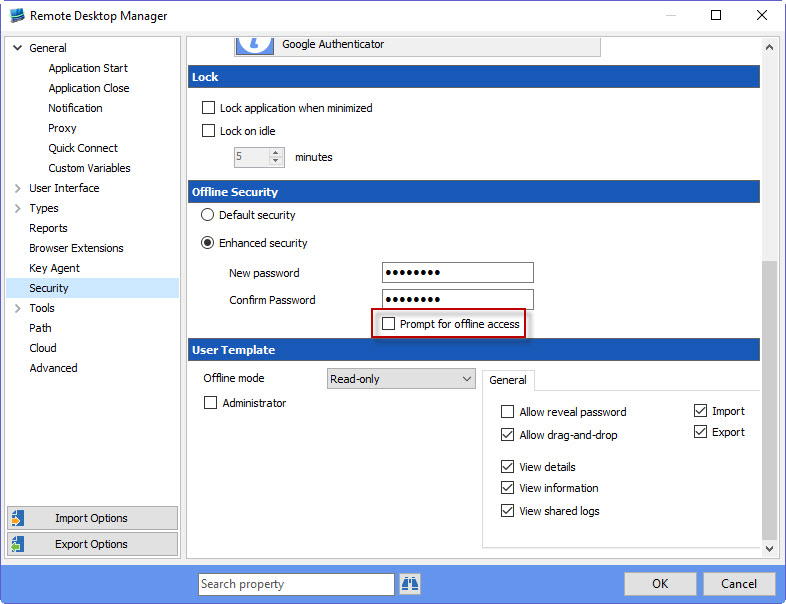
As for it prompting again, I believe the only way right now to not have the prompt would be to disable the following option:
With the option removed, it will still encrypt the offline data, but RDM won't prompt for the password. It might be a possible workaround.
Regards,
Hubert Mireault
2016-05-03 11-01-59.jpg