Office 365

Hi,
We have multiple office 365 logins for different customers, now the auto login feature works for one customer - when it comes to the next customer it stays logged in as the previous customer.
Has anyone got this working or are you just logging out?
All Comments (6)
Hello,
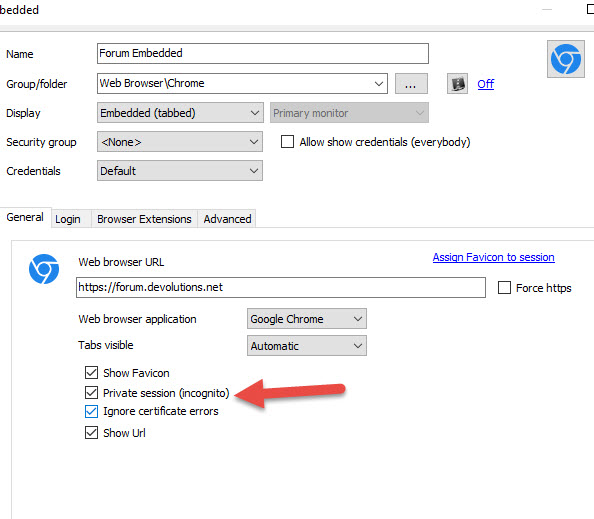
What browser type are you using? If you're fine with using the embedded Chrome browser, starting from RDM beta 11.1.1.0 we added an "incognito mode" option, which will isolate that entry and not reuse the cache, effectively allowing you to log in to multiple Office365 accounts at once.
Regards,
Hubert Mireault
ah right, i'm using Google Chrome at the moment.
If you'd rather stay with a stable version and not try out the beta, we're planning to have our next major release soon, which will include this change. Look forward to it! :)
Regards,
Hubert Mireault
That's perfect, for the moment we are just remembering to log out after we done our bits and bobs! but can't wait for next version!
Hi, i still can't find the option in the latest update or is this a work in progress?
Hello Alex,
The option is present on the latest release of RDM
Please post a print screen of the properties of your session.
Best regards,
Jeff Dagenais
2016-05-18_09-15-40.jpg