Close VPN button not working?

Hi,
Instead of automatically connecting or being prompted to connect VPN (AnyConnect in this case), we want to manually click Open VPN to connect and click Close VPN when when we are finished instead of automatically disconnecting or being prompted when closing the sessions. Clicking Open VPN button works fine, but the Close VPN button only briefly shows an RDM progress bar saying "Closing VPN Connection..." for about a second and does not disconnect the VPN session.
Are there any good workarounds for this? Can we somehow add a custom button for "C:\Program Files (x86)\Cisco\Cisco AnyConnect Secure Mobility Client\vpncli.exe disconnect"?

closingvpn.png
All Comments (8)
Hello,
What version of RDM are you running?
Best regards,
Jeff Dagenais
Hi Dan,
I will ask Hubert to check this next week (Monday) to verify what we send to AnyConnect
David Hervieux
As additional information to help, can you tell us what version of the add-on you have installed? You can check in RDM in the Tools tab in the add-on manager.
Regards,
Hubert Mireault
Ah I understand the setup a little better I think. You have an RDP session or something similar with a CiscoAnyconnect set in the VPN/SSH/Gateway section of the entry, is that right? Did you make sure to put the "close" option to "On session close"?
I'll check more in depth Monday, thank you for the information.
Regards,
Hubert Mireault
Hello,
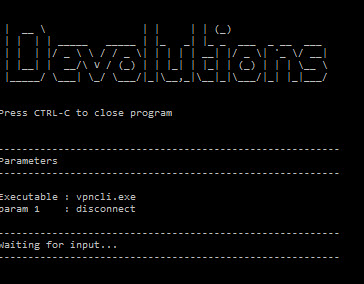
I tested using our test application and it should send the "disconnect" parameter properly using the "close VPN" button.
I linked the test app to this post, could you try it out? Back up your vpncli.exe, and put the test app where vpncli.exe was and rename it to that so RDM will use it. Does it give the same result as in the screenshot?
Regards,
Hubert Mireault
AnyConnectSimulator.zip
2016-04-11 08-15-47.jpg
I don't think the custom path has something to do with it, as I've been using a custom path for the executable too. I even created the exact same path you're using but the program still opens for me. What puzzles me is that it works on opening the VPN but not closing through there. Both buttons to close the VPN are calling the same code, too.
We'll try to reproduce it on our end, do you think you could send us a short video showing the issue? We're probably missing something in our configuration. You can send it to me at hmireault (at) devolutions.net
Regards,
Hubert Mireault
Thank you, I can confirm I received it, I transferred it to our support department to see if they can reproduce the issue. I noticed you're using the open/close buttons in the bar at the very top. Does using the close button in the dashboard work?
Regards,
Hubert Mireault
Hello,
Could you try to launch RDM with elevated privileges to see if it's making a difference.
Best regards,
Jeff Dagenais