rdp gateway certificate expired

Hello,
firstly, thanks for the awesome product.
I am having an issue connecting to servers through an rdp gateway. It was working perfectly fine until the rdp gateway certificate expired back in December. I can now no longer connect to the servers behind that gateway. I have uninstalled the old certs from my certifcate manager console, and installed the new certificates. I can connect to the servers find using the rdp gateway if I use the normal mstsc application.
Is the SSL Certificate stored somewhere in Remote Desktop Gateway manager cache or something?
How can I renew my certificate so that I can use remote desktop manager again?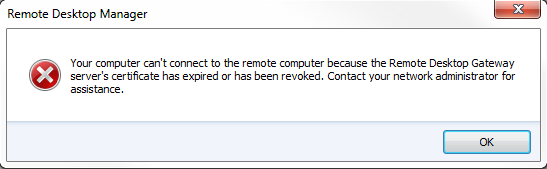
All Comments (10)
Hi
Are you trying with an embedded or an external session? In one case we use the ActiveX and for the other we use mstsc.
Maurice
This is for embedded connections. If I set the connection to use external then it opens in mstsc and the connection succeeds.
the Certificate is installed in which store? By default its imported in personal but we typically import in "trusted root..."
Maurice
I've taken a screenshot, and blanked out some details.
but the certificate exists in the trusted root, it is valid until 2013 and it works for normal mstsc sessions. It does not work for embedded RDM sessions and it seems to reference an old certificate. But that certificate I can't find anywhere. It is definitely not in cert manager.
I've been looking for the cause of this for weeks, but so far, nothing.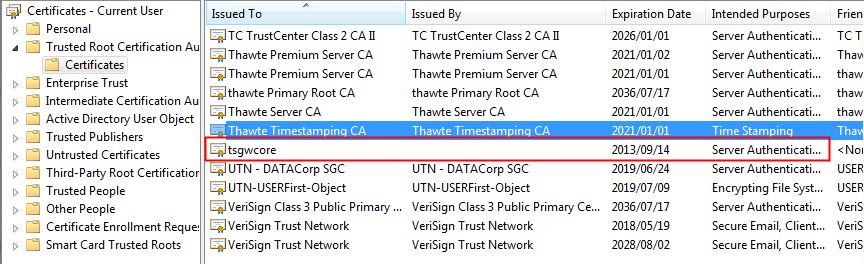
Could you please try going in Internet Explorer, Tools -> Internet Options -> Content -> Clear SSL State.
Maurice
I have tried that before, and just now again, but it does not help unfortunately. Still get the same error message.
Is there a debug option or something that I can enable?
Hi
We do not cache any certificate in the application. I'm digging deeper in our handling of the activeX to see if there's a property we should set.
Increasing the debug level wont help in this case.
Maurice
The major difference between the ActiveX and mstsc is that the former is tied in with the internet options. The only other tidbit of information I found points us towards looking in your internet zones if the RD Gateway server is in a particular zone.
If you open a rdp file you'll see that there isn't mention of a certificate, its all taken care of by the transport layer. I'll have to consult David on the best way forward.
Maurice
Hi, is there any feedback on this?
Hi
Sadly the problem is in a cache that is not controlled by RDM. There's little we can do. When I googled the problem most times clearing the IE SSL cache fixed the issue.
Sorry about that.
Maurice