CTRL+F shortcut

Hi
This is not so much a bug but ...
I just upgraded from 7.5 to 8.x and the CTRL+F shortcut is in my way.
I use all my rdp sessions in embedded/tabbed mode and autohide the tree view when connecting.
If i try to search in a logfile or just search in explorer, the filter screen pops up.
Is there any way i can disable the CTRL+F shortcut ?
All Comments (10)
yes this is very annoying!
+ is there a way to view the filter
If I want to clear the filter on my sessions, I need to ctrl+F and then backspace to clear the filter, but I can't see the filter(dialog)
If the rdp session is running, ctrl + F should not be captured outside of this session.
edited by kabee on 1/23/2013
found the filter dialog at the bottom in another forum post! not a very intuitive place to put it
@tabbed:
easyiest way would be to redirect all shortcuts into the rdp connection, see http://forum.devolutions.net/topic2532-remote-desktop-issue.aspx
@kabee: +1 from me. even more uncomfortable is you have the navigation tab on the second screen.
@Max thanks! that seems to have solved it
also sometimes remote desktop manager seems to steal focus when ctrl+f'ing
the filter screen pops up even though i'm in my webbrowser
but i cannot reproduce it al the time
This is such an annoying bug that I have recommended that my collegues do not upgrade.
When Ctrl-F'ing in other applications on local computer, remote desktop can sometimes steal focus.
Redirecting all shortcuts is unfortunately not a good solution if you want Alt-Tab to work on local machine.
Ctrl-F should behave like Ctrl-C, V, X etc.
found this in my options:
v8.0.15
did you try this?
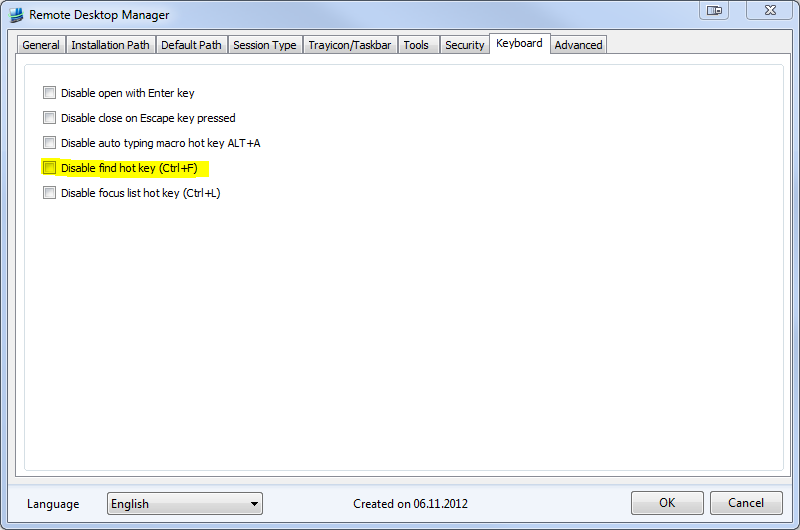
disable.PNG
arghh! how did i miss that option
problem solved!
Yes. Problem solved. Thanks very much.
Aaah great, works for me!
took me a moment to find the options dialog though
oops, i found a way to do what i complained about:
now my filter is in the navigation pane and i got rid the buttom bar. more space for more remote desktop :)
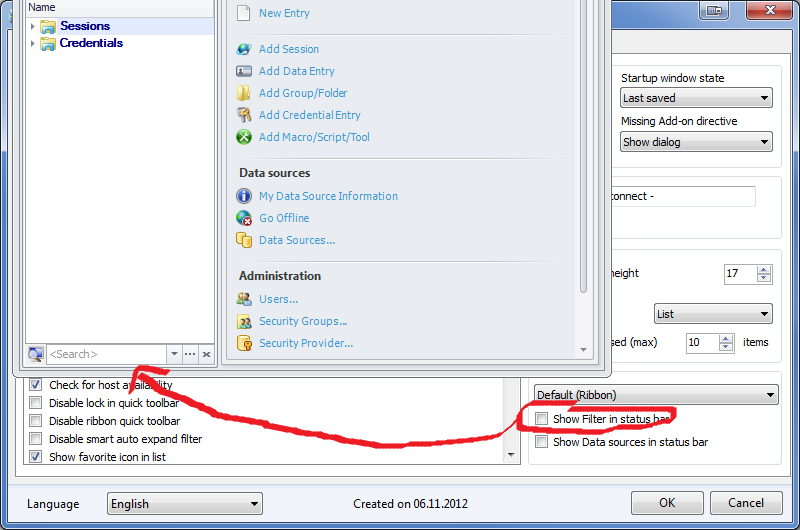
filterStatusBar.png