auto login to vmware web console

Hi,
I'm trying to configure the auto-login to my vmware web console but with no success.
Is it possible ?
Snir
All Comments (26)
Hello,
Have you created an web browser session to connect on your vmware web console?
Maybe you can try to send the credential using a typing macro
http://help.remotedesktopmanager.com/howto_typingmacro.htm
Best regards,
Jeff Dagenais
this is not working, in version 6 vmware web client is very important, please find a solution...
Have you tried the embedded Chrome?
David Hervieux
yes, the macro is not working...
it is not a standard HTML form.
Hello,
Is there a public URL that you can provide us so that we can test it?
Best regards,
Jeff Dagenais
you do not use vmware ? if yes, ask your IT guy to give you the internal URL.
You understand that I cannot open the internal main management console to the internet...
Snir
Hi,
If we asked that it's because we don't have access to one. We do our best to help but it's not always easy. We understand that it's not always easy to open the access but sometime it's possible to get an access to a test machine.
Regards
David Hervieux
Tried but no success to get approval...
Thank you for trying. I will check if we can setup a web console internally.
Regards
David Hervieux
It would be great to have this work, I have spent way too much time over the years to get various VMware console versions work with RDM.
I might be able to give you access to my vSphere 6 lab. Just pm me with what kind af access and info you need.
Hello,
We have a partner that will grant us access to a lab. It may take a week of so. If you feel that providing us access on your end is the best option just PM me.
Best regards,
Maurice
PM sent
Hello,
First, thank you @Oletho for granting me access to your environment.
Second, sorry about the delay in providing my findings, new stuff was put on top of my pile.
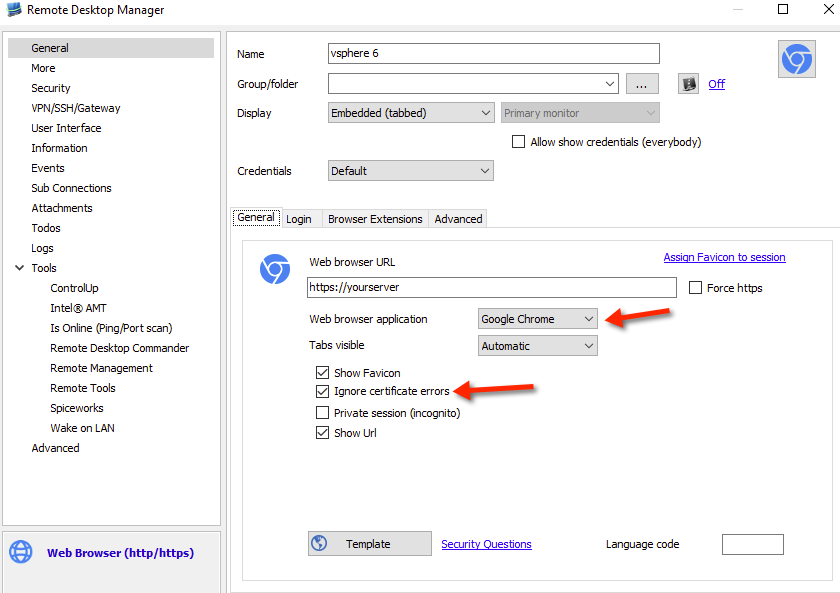
So the page is protected by a self-signed certificate, if you want to use the "embedded" display mode, only our Chrome library will tolerate certificate errors, that is if you check the corresponding option in its settings.
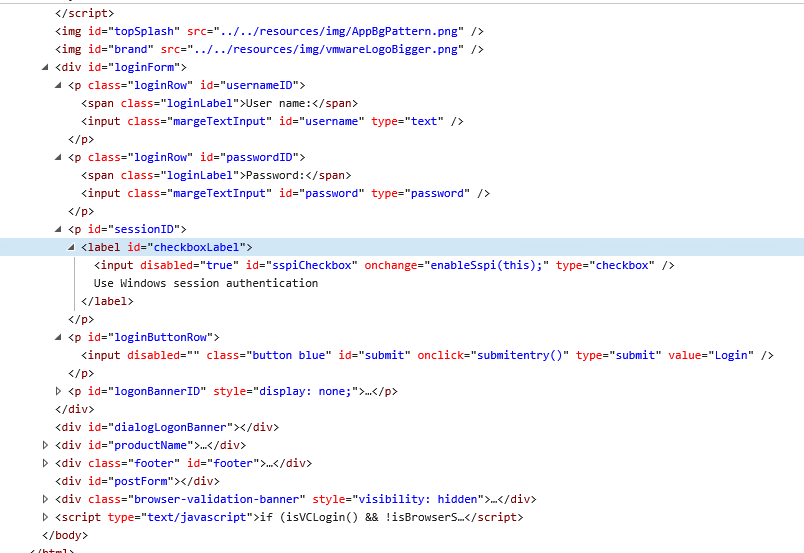
As you can see in the HMTL structure of the login page below...
The form tag isnt present, this is not a major issue, mostly a Best practice. Our code should work around that.
We then see two input controls, with respective id's of username and password. That is perfect.
Then another input, with the id of submit, which calls a javascript.
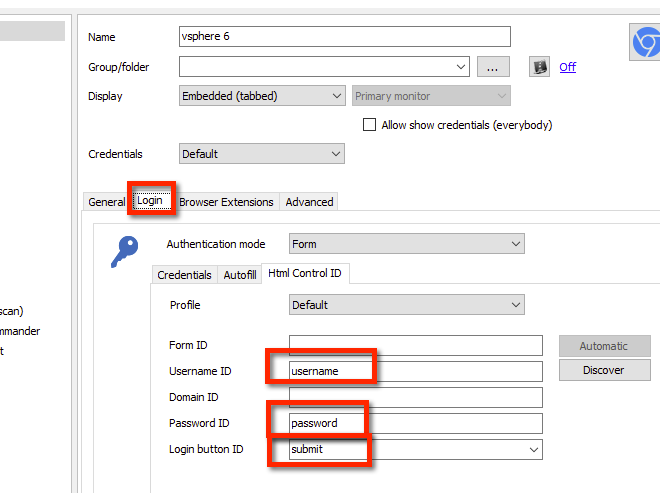
Depending on the extent of javascript "interference", the following Web browser (http/https) entry should work
Set your credentials in Login - Credentials, then on to the Html Control ID tab
If it doesnt work we can use a keyboard macro. I will wait on news from you before I describe the required macro.
Best regards,
Maurice
vs2.png
vs1.png
vmware.png
since I had all the windows opened....
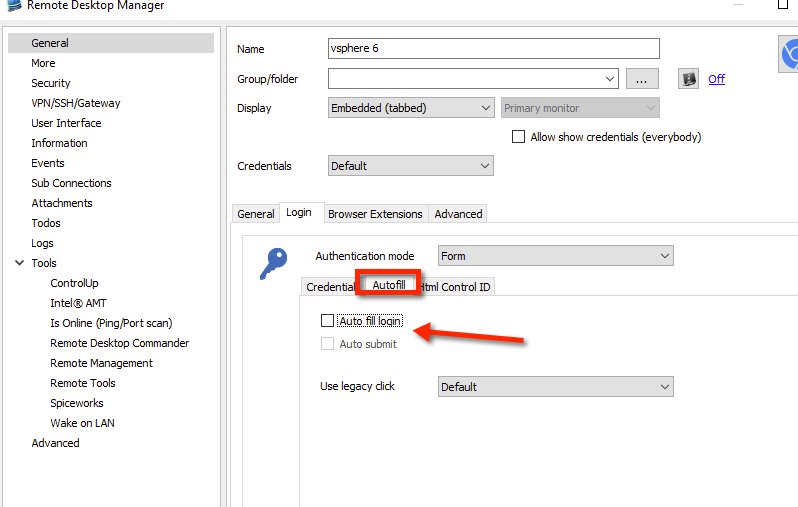
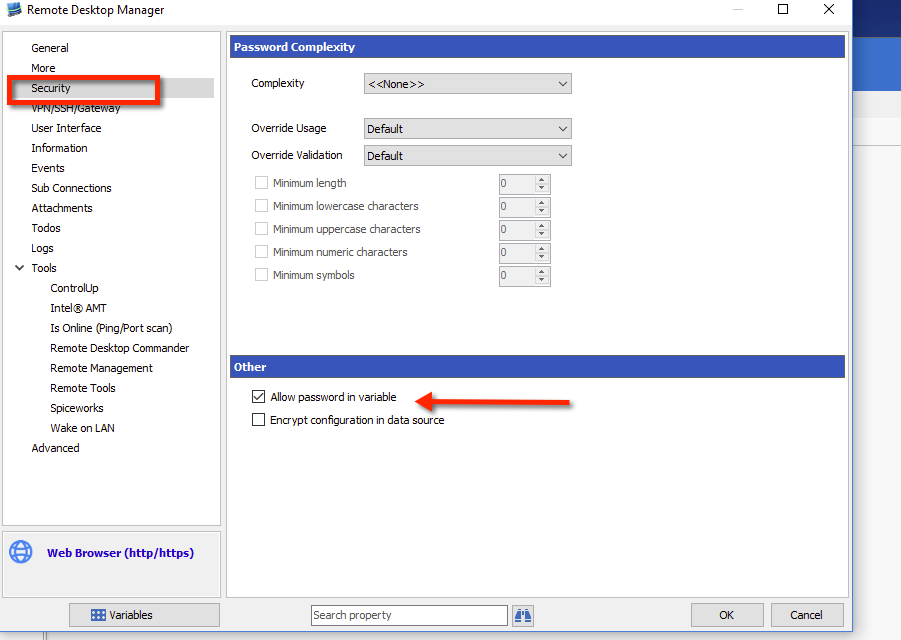
The macro that I think would work is$USERNAME${TAB}$PASSWORD${TAB}{TAB}{ENTER}Step 1, disable auto-login and auto fill-in
Step 2, allow for the password to be used in a macro, thats a security measure.
Last, define the macro, ensure you adapt the initial wait to your environment.
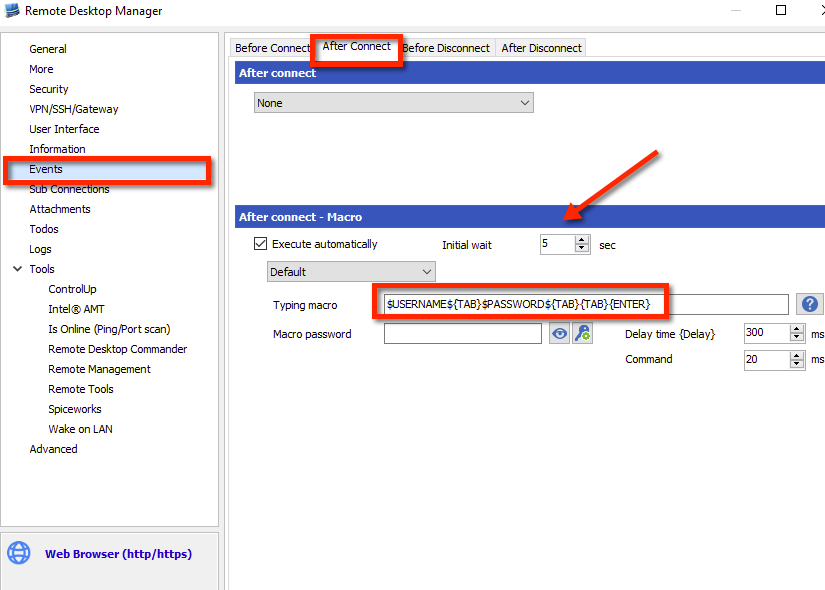
Maurice
vm3.png
vm2.png
vm1.png
Sorry, both methods did not work (I actually tried it before)...
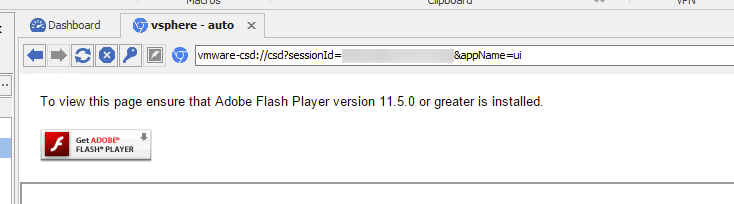
Embedded chrome doesn't seem to support Adobe flash.
Maybe you could install RDM on that test machine and give me access again
Maurice
Certainly, I will just have to recreate the user and its access. I will let you know.
Hello,
External...
Embedded...
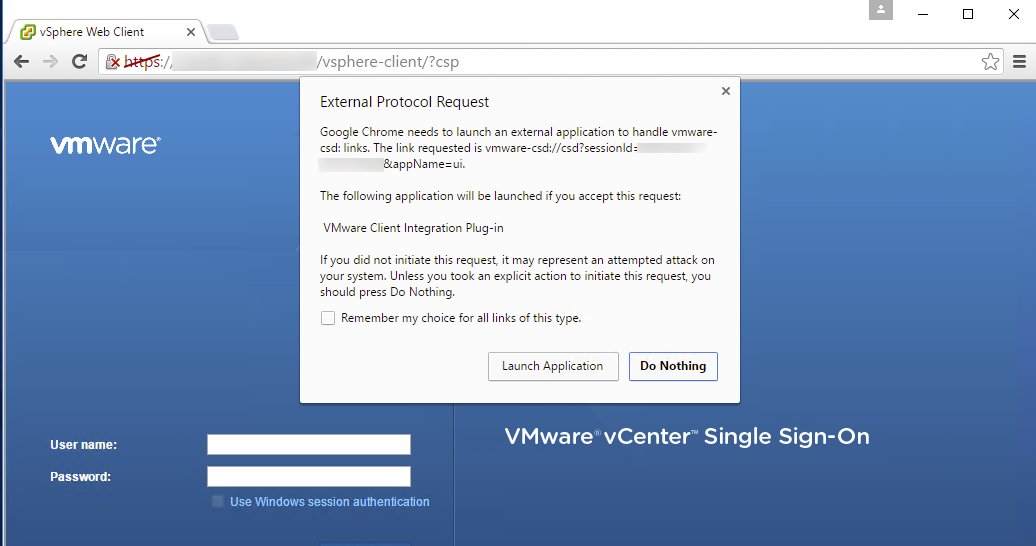
it uses a custom protocol handler, this in turn loads another program with interacts with the browser.
This will never work in the embedded mode, we would need to test with one of our extension to see if the flash / javascript is interfering with it.
Maurice
vmissue2.png
vmissue1.png
Hi Maurice,
I've tried your macro solution with the VMware vSphere WebClient and basically works for me with the following sequence:
{TAB}$USERNAME$@$DOMAIN${TAB}$PASSWORD${ENTER}
Problem is, $PASSWORD$ does not get resolved even though I've set "Security > Allow password in variable"
I'm currently on RDM 11.6.6.0 Beta, using embedded Chrome with "File > Options > Types > Web Chrome > Enable plugins" enabled to support Flash.
Best regards
Holger
-------------------
Remote Desktop Manager Enterprise Edition 12.6.6.0 64 Bit - Data Source: SQL Server
Running on Windows Server 2012R2 VMs with Remote Desktop Services feature, serving as common work environment for 30 Windows Server administrators
Hello,
Since that time, we introduced a new security option in Administration - data source settings, this was a community request.
It's in Password Policy, allow password in macro.
Best regards
Maurice
Thank you Maurice, that did the trick.
But I have to admit it's a rather fragile construct... VMware vSphere WebClient tends to have long loading time, especially when starting the session after a long time. There's a loading indicate, displaying "VMware", slowly filling up and after that showing the login fields.
So it's difficult to predict how long to wait before executing the autotype macro automatically. Can be 2 seconds, can be 20. And manually executing the macro fails, because the username field never gets the focus. somehow.
Damn on VMware...
I guess there's no way for you to monitor if the VMware login page is actually displayed before automatically executing the macro?
And probably no better approach to make automatically logging in to the vSphere WebClient work?
-------------------
Remote Desktop Manager Enterprise Edition 12.6.6.0 64 Bit - Data Source: SQL Server
Running on Windows Server 2012R2 VMs with Remote Desktop Services feature, serving as common work environment for 30 Windows Server administrators
Hello,
The mechanism we have to detect web pages is triggered by the web control itself. Some pages run javascript after a delay or after other events. It's not as clear cut as one would think.
Automating credentials submission is rarely a concern of those that decide to expose services only through web applications. Wmware has gone back and forth on their clients for many versions now (Standalone, browser plugins, web apps). We want to improve every aspect of our integration with Vmware, but it's a huge undertaking. We are really trying to shoot a moving target.
Sadly for now, you must tweak the delay.
Best regards,
Maurice
Thanks again Maurice, I figured there's no easy way to handle this. VMware is really a pain in the ass with its Flash based web interface. Nevertheless I try to offer it within RDM in the most convenient way possible to all the other RDM users and I think I've found a setting of 3 seconds to be working for autologin via macro. Even though the Flash interface is still in loading progress, it still accepts the entered credentials once it has loaded completely.
-------------------
Remote Desktop Manager Enterprise Edition 12.6.6.0 64 Bit - Data Source: SQL Server
Running on Windows Server 2012R2 VMs with Remote Desktop Services feature, serving as common work environment for 30 Windows Server administrators
This is really awesome, I have tried for a long time to make this work and Vmware's flash has never liked it. However following what Maurice has shown worked really well for me and now I don't have to login anymore. :) I use embedded chrome with creds from lastpass.
I agree it's hard to know how long to wait for Vmware to load, I can confirm typing marco does not work via the button however does work if I set it at 10 seconds. Only issues are sometimes it does not load that quickly, but I can just close and start again.
One last point was to you Maurice. You may note that the Vmware page has a tick box for "Use windows authentication", when I manually login I use this box but because there is no space bar keystroke in the macro setting I can't send it, any update on if this would be possible in the future? Maybe I can just send the ASCII char?
Hello,
Are you using the latest stable version of RDM (11.6.2.0)? You will need to have this version or a more recent one to make this work.
You will need to enclose your space character between a {SENDKEYS} and {ENDSENDKEYS} command. Your command would look similar to this:{USERNAME}{TAB}{PASSWORD}{TAB}{SENDKEYS} {ENDSENDKEYS}
It must be done like this because our macros, while they use the SendKeys commands (https://msdn.microsoft.com/en-us/library/system.windows.forms.sendkeys(v=vs.110).aspx) among other things, are different because we implement more commands like sending usernames and passwords. Using the {SENDKEYS} and {ENDSENDKEYS} command allows you to revert to using the Windows SendKeys method directly, in which sending a space character can tick checkboxes.
I hope this method works for you.
Regards,
Hubert Mireault