Lack of polish character

System: Windows 10 x64 EN
RDM: 11.1.0.0 64-bit
We noticed problem with polish charackters when Remote Desktop Manager is open. When RDM is open and works in background sometimes we loose polish characters in other apps. When it happens, we click to RDM window once and we back to app where is problem and polish characters back to works. It happens on systems with Windows 10. On Windows 7 we didn't notice the problem. We don't use any extra shortcuts in RDM.
All Comments (5)
Hello,
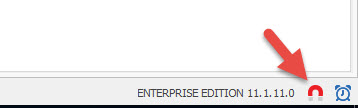
Could you try to enable/disable the red magnet at the bottom right of your screen to see if that help
Best regards,
Jeff Dagenais
2016-04-07_08-24-34.jpg
We tested pointed option, but it doesn't help. Any other suggestions?
Hi,
It looks similar to this issue?
https://forum.devolutions.net/topic9714-altgr-key-disabled-by-rdm.aspx
David Hervieux
Hello,
Propably yes, but as I metioned problem exists on Windows 10 Enterprise. Work around is click to RDM window and back to app you use. Maybe you need additional logs from our workstations?
Just to be sure have you tried to disable all the RDM shortcut in File->Options
David Hervieux